
पता अपने-आप भरने की सुविधा
आप अपनी वेबसाइट पर Google Places API का इस्तेमाल कर सकते हैं ताकि यह सुनिश्चित हो सके कि आपके उपयोगकर्ताओं के डिलीवरी पते मौजूद हैं और कैरियर द्वारा समझे जाते हैं। Google Places API डेवलपर्स को HTTP अनुरोधों का उपयोग करके जगहों के बारे में विस्तृत जानकारी ऐक्सेस करने की अनुमति देता है। जब उपयोगकर्ता पता टाइप करना शुरू करता है तो ऑटोकम्प्लीशन जगहों की एक सूची की भविष्यवाणी करता है।
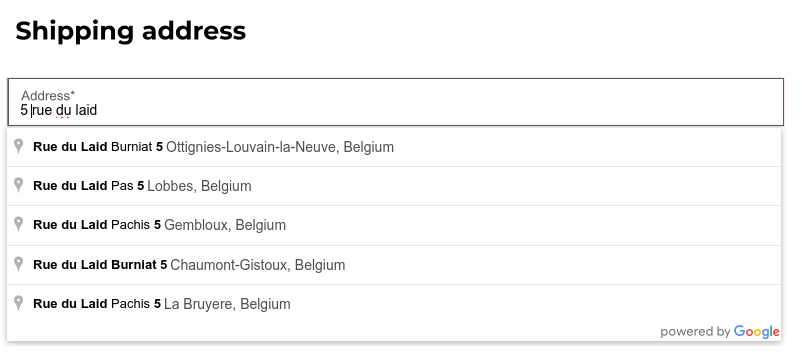
ऐसा करने के लिए, पर जाएं और एसईओ सेक्शन में पता ऑटोकम्प्लीट को सक्षम करें।
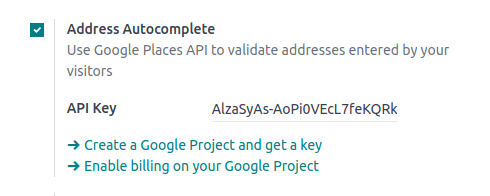
API Key फ़ील्ड में अपनी Google Places API key डालें। अगर आपके पास एक नहीं है, तो Google Cloud Console पर अपना बनाएं और इन चरणों का पालन करें।
चरण 1: Google Places API को सक्षम करें
नया प्रोजेक्ट बनाएं: Google Places API को सक्षम करने के लिए, आपको पहले एक प्रोजेक्ट बनाना होगा। ऐसा करने के लिए, ऊपरी बाएं कोने में प्रोजेक्ट चुनें पर क्लिक करें, नया प्रोजेक्ट, और अपना प्रोजेक्ट सेट अप करने के लिए प्रॉम्प्ट का पालन करें।
Enable the Google Places API: Go to the Enabled APIs & Services and click + ENABLE APIS AND SERVICES. Search for "Places API" and select it. Click on the "Enable" button.
टिप्पणी
Google's pricing depends on the number of requests and their complexity.
Step 2: Create API Credentials
Go to APIs & Services --> Credentials.
Create credentials: To create your credentials, go to Credentials, click Create Credentials, and select API key.
Restrict the API Key (Optional)
For security purposes, you can restrict the usage of your API key. You can go to the API restrictions section to specify which APIs your key can access. For the Google Places API, you can restrict it to only allow requests from specific websites or apps.
महत्त्वपूर्ण
Save Your API Key: copy your API key and securely store it.
Do not share it publicly or expose it in client-side code.