
Ingenico
पेमेंट टर्मिनल कनेक्ट करने से आप अपने कस्टमर्स को सुगम पेमेंट फ़्लो ऑफ़र कर सकते हैं और अपने कैशियर्स के वर्क को आसान बना सकते हैं।
महत्त्वपूर्ण
Ingenico पेमेंट टर्मिनल को IoT सिस्टम की आवश्यकता होती है।
Ingenico फ़िलहाल सिर्फ़ बेल्जियम, नीदरलैंड और लक्ज़मबर्ग में उपलब्ध है।
Odoo works with Ingenico's Lane/5000, Desk/5000, Move/5000 payment terminals, as they support the TLV communication protocol through TCP/IP.
Ingenico terminal configuration
To configure the Lane/5000, Desk/5000, or Move/5000, follow these steps:
Press the function button (F on the Lane/5000 terminal, ⦿ on the Desk/5000 and Move/5000 terminals).
Go to , enter the settings password (default:
2009), and press OK.Select Protocol and press OK.
Select CTEP and press OK.
Select Change Connection and press OK.
Select TCP/IP and press OK. Then, select IP-address and press OK.
Enter the IoT system's IP address and press OK.
Enter port number
9001if using an IoT box or9050if using the Windows virtual IoT.Select No SSL and press OK.
The terminal restarts and should be displayed on the IoT system's form in Odoo.
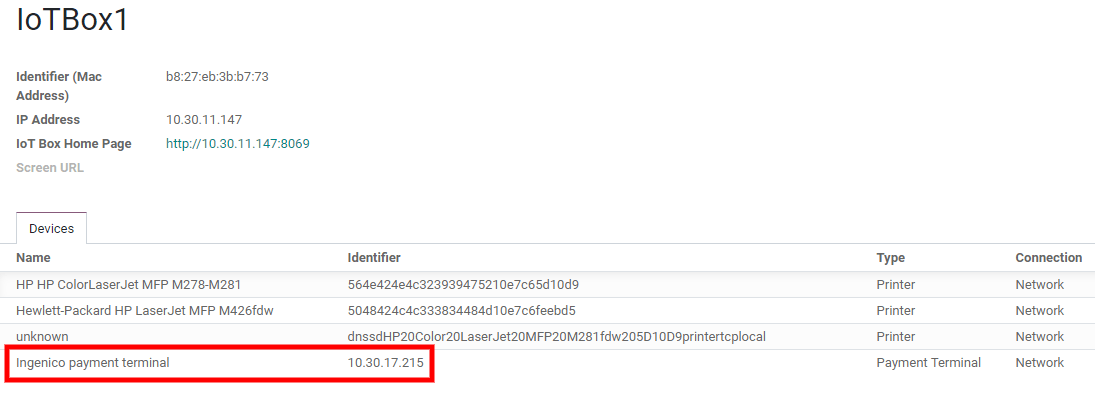
Odoo कॉन्फ़िगरेशन
The configuration of an Ingenico terminal with Odoo requires to first connect the IoT system to Odoo, then to enable the Worldline terminal in the POS settings under the Payment Terminals section.
To connect the Ingenico terminal with Odoo Point of Sale, follow these steps:
पर जाएं और पेमेंट मेथड बनाएं।
Journal फ़ील्ड को Bank पर सेट करें।
Set the Point of Sale field to the desired point of sale.
Integration फ़ील्ड को Terminal पर सेट करें।
Select the Worldline terminal number in the Payment Terminal Device field, then save.