
スケジュール済施策
*スケジュール済施策*とは、指定されたスケジュールまたは発生回数に基づいて、データベース内の特定のタスクを自動化できる事前設定されたプロセスです。これらのタスクには、メールの送信、請求書の生成、データのクリーンアップなどが含まれます。
Odooでは、特定の機能が自動的にトリガーされるよう、デフォルトでいくつかのスケジュール済アクションが稼働中になっていますが、データベースに表示されるスケジュール済アクションのオプションの中には、デフォルトでは稼働**していない**ものも*多数*あります。
Odooサブスクリプションでは、稼働中の定期サブスクリプションの請求プロセスを開始するスケジュール済アクションと、サブスクリプションの有効期限により請求を停止する必要がある時期に関するスケジュール済アクションの2つがあります。
これらはデフォルトでオンになっており、サブスクリプションを手動で管理するためにいつでも無効化できます。
スケジュール済施策へのアクセス
重要
スケジュール済施策にアクセスするには、開発者モードを有効にする**必要があります**。
開発者モードを有効にした状態で、に移動します。
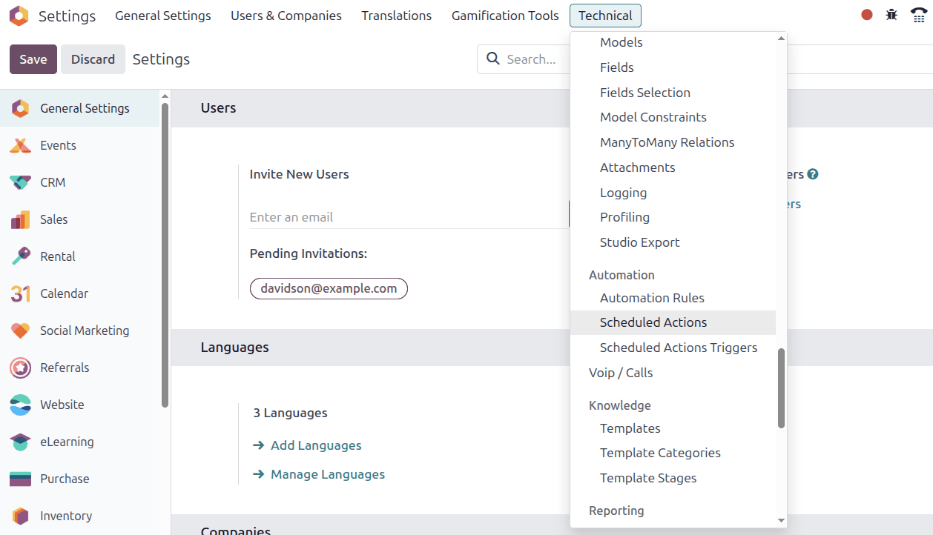
これにより、専用のScheduled Actionsダッシュボードが表示されます。このページには、データベース全体のスケジュール済施策の完全なリストがあります。
ここで、検索バーに「Subscription」と入力します。これにより、サブスクリプション固有の結果が4つ表示されます。以下のドキュメントでは、リストの最後の3つの結果に焦点を当てています:
Sale Subscription: generate recurring invoices and payments
Sale Subscription: subscriptions expiration
サブスクリプション販売: トークンなしサブスクリプションのリマインダーを送信

スケジュール済アクションが稼働中かどうかを判断するには、スケジュール済アクションダッシュボードの対応する行の稼働中列を見て、チェックボックスが選択されているかを確認します。チェックボックスが緑色でチェックマークが付いている場合、そのスケジュール済アクションは稼働中です。
スケジュール済アクションを稼働させる必要がある場合は、リストから目的のスケジュール済アクションをクリックします。次に、スケジュール済アクションフォームで、稼働中フィールドのスイッチを右に切り替えます。これによりスイッチが緑色になり、スケジュール済アクションが稼働中になったことを示します。
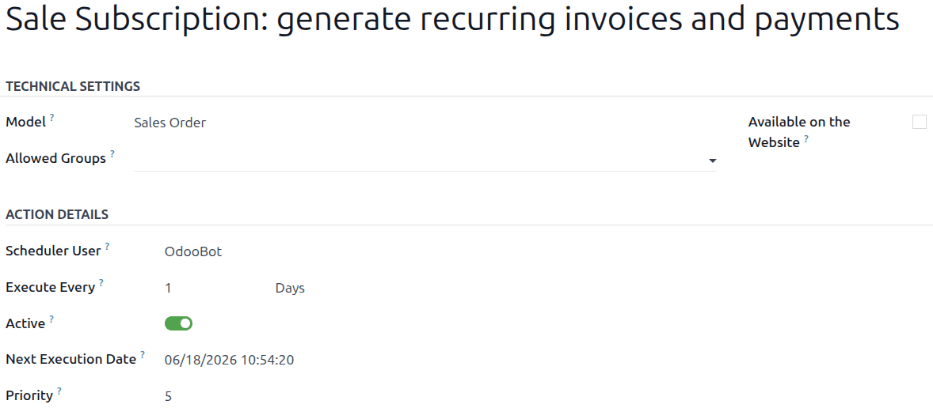
スケジュール済アクションの実行頻度を設定する機能は、スケジュール済アクションフォームの実行間隔フィールドでも利用できます。
重要
実行時間が5分未満の場合、スケジュール済施策は正しく機能**しません**。これはすべてのスケジュール済施策に共通するルールです。
詳細については、よくある技術的な質問のドキュメントをお読みください。
定期的な請求書と支払いの生成
In order for the Sale Subscription: generate recurring invoices and payments scheduled action to properly generate recurring invoices and payments on subscriptions, the Deferred Expense and Deferred Revenue accounts must be set up, in order for Odoo to process various invoices and payments related to subscriptions.
To set up Deferred Expense and Deferred Revenue accounts, navigate to . Both accounts can be configured in the Default Accounts section.
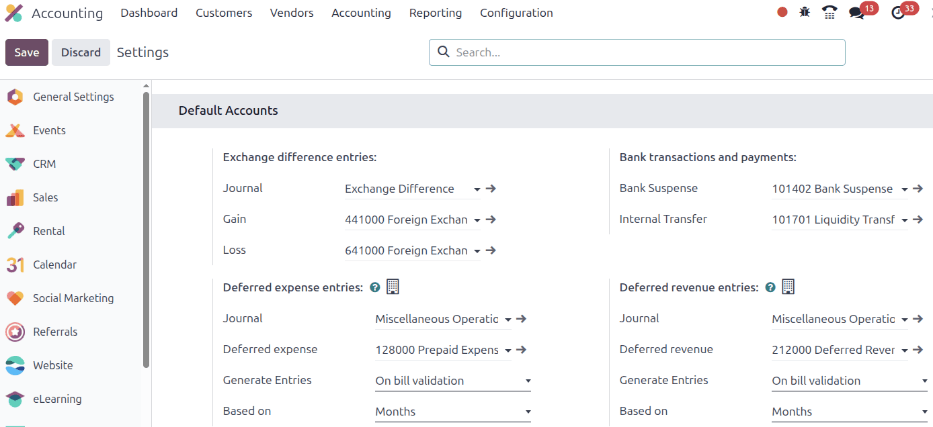
Once the correct accounts are entered in the Deferred Expense and Deferred Revenue drop-down menu fields, click Save in the upper-left corner.
請求書作成
Elements related to the Sale Subscription: generate recurring invoices and payments scheduled action can be found on confirmed subscription sales orders.
To examine these elements, open any confirmed sales order in the Subscriptions application to reveal the subscription sales order form.
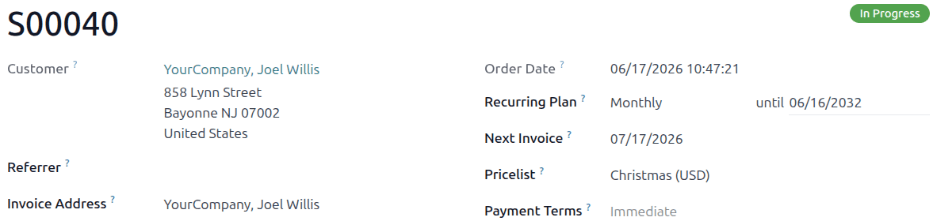
確定されたサブスクリプション販売オーダフォームで、定期プランと次回請求日フィールドに注目します。
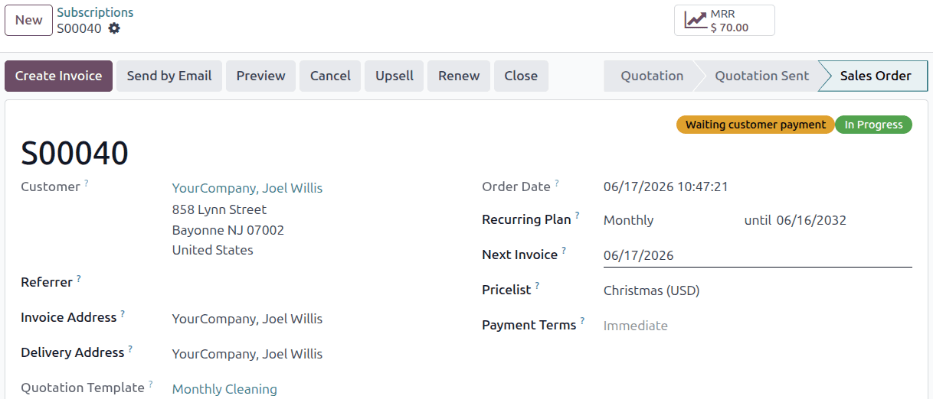
スケジュール済アクションは、今日の日付が次回請求日と同じ日付の場合に請求書を作成します。
Odoo uses the information in the Recurring Plan field to update the next invoice date accordingly.
警告
If the product invoicing policy is set to Based on Delivered Quantities (Manual), and the
delivered quantity is 0, Odoo does not create an invoice, and the customer is not charged.
Instead, the subscription is processed as a free recurring product, and is reflected as such in the chatter of the subscription sales order.
When this occurs, the following message appears: Automatic renewal succeeded. Free subscription.
Next invoice:[date]. No email sent.
Once the invoice for the subscription sales order is created, the invoice can be viewed by clicking the Invoices smart button that appears at the top of the subscription sales order.
An email is sent to the customer notifying them of the recurring subscription charge, if there is a Payment Token on the account.
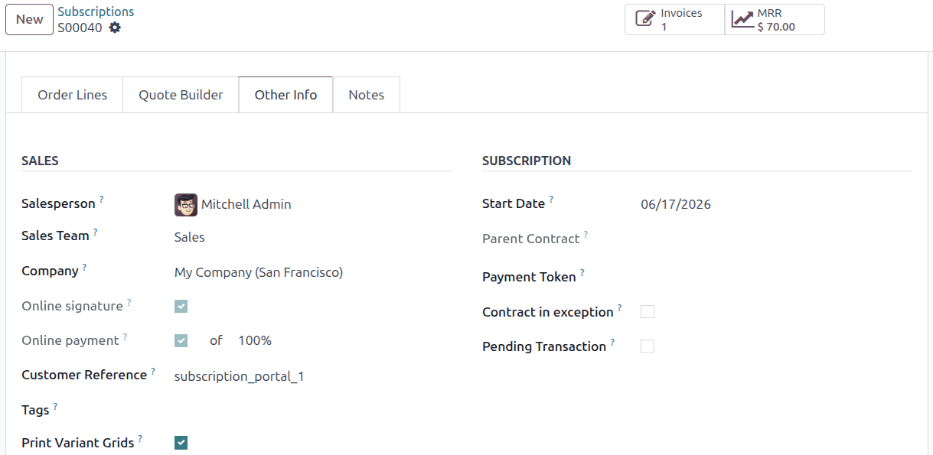
決済トークンがあるかどうかを確認するには、サブスクリプションフォームのその他の情報タブを開き、サブスクリプションセクションの決済トークンフィールドを確認します。
決済トークンがない場合、システムはサブスクリプション販売: トークンなしサブスクリプションのリマインダーを送信スケジュール済アクションを使用して、引受者に支払リマインダーメールを送信します。引受者が手動で支払を行った後、サブスクリプションの請求書が生成されます。
警告
その他の情報タブでオンライン決済チェックボックスが選択されている場合、次回請求日にスケジュール済アクションによって請求書が自動的に生成される**ことはありません**。代わりに、クライアントがサブスクリプションの手動支払を完了したときに請求書が生成されます。
自動支払を使用し、請求書を自動生成するには、このチェックボックスは空のままにする必要があります。
Closing invoices
The Sale Subscription: generate recurring invoices and payments scheduled action also has the ability to close a subscription, if the following conditions are met:
If the subscription has no Payment Token, create and post the invoice.
If the subscription has a Payment Token, try to charge.
If the charge is successful, create and post the invoice.
If the charge fails, send reminders periodically.
14日以上失敗が続く場合は、サブスクリプションを閉じます。
サブスクリプションの有効期限
Sale Subscription: subscriptions expirationスケジュール済アクションは、サブスクリプションが自動的に閉じられる原因となる可能性のある他のすべての条件をチェックします。特定の条件が満たされた場合、スケジュール済アクションはそのサブスクリプションを閉じます。
まず、Sale Subscription: subscriptions expirationスケジュール済アクションは、サブスクリプション販売オーダに設定されている終了日が過ぎているかどうかをチェックします。
次に、Sale Subscription: subscriptions expirationスケジュール済アクションは、請求書が支払条件の期限内に支払われていないかどうかをチェックします。
複数回請求されたサブスクリプションに添付されている請求書にアクセスするには、サブスクリプションの販売オーダに移動し、請求書スマートボタンをクリックします。次に、請求日列を確認します。請求日が定期プランの自動クロージングフィールドで決定された日数を過ぎている未収金サブスクリプションは、サブスクリプション販売: サブスクリプションの有効期限スケジュール済アクションによって自動的にクローズされます。
Example
次回請求日が7月1日で、自動クロージングが「30日」に設定されている場合、スケジュール済アクションは8月1日にサブスクリプションをクローズします。