
マルチカンパニー
参照
Odoでは、1つのデータベース内に複数の会社を設定できます。これにより、エンティティ間で一定の分離を維持しながら、一部のデータを会社間で共有できます。
一元管理環境により、権限を持つユーザは複数の会社を同時に選択し、特定の倉庫、顧客、設備、連絡先を設定できます。また、インターフェイスを切り替えることなく集計数値のレポートを生成し、日常業務を円滑化し、全体的な管理プロセスを強化します。
警告
Odooデータベースでマルチカンパニー機能を有効にすると、プランが スタンダードプランの場合は自動的にカスタムプランへのアップセルが発生します。ただし、これはシングルアプリ無料プランのデータベースには適用されません。
年間契約または複数年契約の場合 :アップセル注文が作成され、その有効期限は30日間です。
月額契約の場合:サブスクリプションは自動的にカスタムプランへ切り替わり、次回の請求時に新しい料金が適用されます。
詳しくは Odooの料金ページ をご覧いただくか、アカウントマネジャーあてにお問い合わせください。
設定
Open the Settings app, navigate to the Companies section, and click Manage Companies. Then, click New and fill in the form with the company's information or select an existing company to edit it.
注釈
または、:menuselection:`設定 --> ユーザ & 会社 --> 会社`に移動して会社を作成することもできます。
マルチカンパニー環境
マルチカンパニー環境では、ユーザは:ref:`1つまたは複数のカンパニーへのアクセス <general/multi-company/user-access>`を付与され、:ref:`データ <general/multi-company/shared-and-unshared-records>`はその構造内での使用目的に基づいて作成または変更されます。
ユーザアクセス
マルチカンパニー環境では、:ref:`ユーザアクセス <users/multi-companies>`と:doc:`アクセス権 <../users/access_rights>`を柔軟に制御でき、必要に応じて付与または制限できます。
カンパニーセレクタ
複数のカンパニーを切り替える(または選択する)には、次の手順に従います:
ヘッダーメニューの右上隅にあるカンパニーセレクタをクリックします。
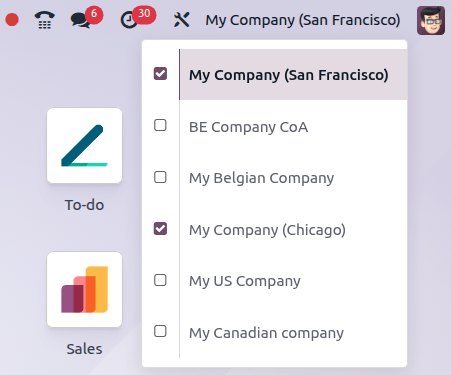
ドロップダウンリストで、目的のカンパニーの横にあるチェックボックスを選択します。
ハイライトされているカンパニーは、現在稼働中の環境を示しています。
別のカンパニーに切り替えるには、選択したカンパニーのリストでその名前をクリックします。
Example
以下の例では、ユーザは6つのカンパニーにアクセスでき、そのうち2つが選択されています。現在稼働中のカンパニーは*My Company (San Francisco)*です。
会社間取引
The Inter-Company Transactions feature allows one company in the database to sell or purchase goods and services from another company within the same database. Depending on the configuration settings, counterpart documents for orders and invoices can be automatically generated and synchronized.
警告
会社間打刻データを正しく処理するには、:doc:`一般 <../../finance/accounting/get_started>`および特定の設定を適切に行う必要があります。これには:doc:`会計ポジション <../../finance/accounting/taxes/fiscal_positions>`と:doc:`ローカライゼーション <../../finance/fiscal_localizations>`が含まれます。
To activate inter-company transactions, select the relevant company in the company selector, open the Settings app, navigate to the Companies section, enable Inter-Company Transactions, and Save. Then, select the option(s) to create a counterpart for the selected company:
Generate Bills and Refunds: Generate a bill/refund when a company confirms an invoice/credit note for the selected company. To generate a validated bill/refund, select Create and validate.
Generate Sales Orders: Generate a quotation (drafted sales order) when a sales order is confirmed for the selected company. To generate a validated sales order instead of a quotation, select Create and validate.
Generate Purchase Orders: Generate a request for quotation (drafted purchase order) using the selected company warehouse in the Use Warehouse field when a purchase order is confirmed for the selected company. To generate a validated purchase order instead of a request for quotation, select Create and validate.
注釈
For inter-company transactions, the products must be shared among the involved companies.
Example
Generate Bills and Refunds: when an invoice for Customer JS Store US is
posted on JS Store Belgium, a vendor bill is automatically created in JS Store US.
Generate Sales Orders: when a sales order for Customer JS
Store US is confirmed on JS Store Belgium, a purchase order on JS Store US is automatically
created (and confirmed if the Create and validate option is selected).
使用ケース
多国籍企業
米国とカナダで事業を展開する多国籍小売チェーンは、USDとCADで打刻データを管理する必要があります。
Since each country has its own tax laws and regulations, using Odoo’s multi-company feature is highly beneficial.
このセットアップにより、会社間打刻データが可能になり、国境を越えた在庫移動の管理に不可欠です。また、顧客が現地通貨で打刻データを実行できるようにすることで、販売プロセスを簡素化します。
プロセスを分ける
小規模な家具会社は、別々の調達、在庫、製造ワークフローを必要とする新しいプロダクトラインを立ち上げています。これらの新しいプロダクトは、既存のカタログとは大きく異なります。これを効率的に管理するために、同社はマルチカンパニー機能を使用して、新しいラインを別の事業体として管理することを検討しています。
ただし、まったく新しいカンパニーを作成すると、データベースに不要な複雑さが追加される可能性があります。代わりに、同社は:doc:`分析会計 <../../finance/accounting/reporting/analytic_accounting>`や複数の倉庫などの既存の機能を活用して、全体的な運用を複雑にすることなく新しいプロダクトラインを管理できます。