
ePOSプリンター
ePOSプリンタはPOSシステムとシームレスに連携するように設計されています。接続すると、これらのデバイスは自動的に情報を共有し、POSシステムからePOSプリンタへの伝票の直接印刷が可能になります。
設定
POSでePosプリンタを使用するには:
:ref:`POSの管理設定にアクセス <configuration/settings>`します。
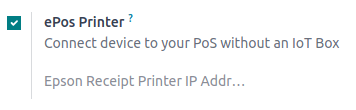
ePos プリンタ機能を有効にします。
フィールドにePosのIPアドレスを入力します。
注釈
プリンタがネットワークに接続すると、そのIPアドレスが記載された伝票が自動的に印刷されます。
直接サポートされているePOSプリンタ
次のePOSプリンタはIoTシステムを必要とせず、Odooと直接互換性があります。
Epson TM-m30 i/ii/iii(Wi-Fi/Ethernetモデルのみ、推奨)
Epson TM-H6000IV-DT(レシートプリンタのみ)
Epson TM-T70II-DT
Epson TM-T88V-DT
Epson TM-L90-i
Epson TM-T70-i
Epson TM-T82II-i
Epson TM-T83II-i
Epson TM-U220-i
Epson TM-m10
Epson TM-P20(Wi-Fi®モデル)
Epson TM-P60II(レシート: Wi-Fi®モデル)
Epson TM-P60II (Peeler: Wi-Fi® model)
Epson TM-P80 (Wi-Fi® model)
ePOS printers with IoT system integration
次のプリンタはOdooとの互換性を確保するためにIoTシステムが必要です:
Epson TM-T20ファミリー(ePOSソフトウェアと互換性なし)
Epson TM-T88ファミリー(ePOSソフトウェアと互換性なし)
Epson TM-U220 family (incompatible ePOS software)
重要
Epson printers using Wi-Fi/Ethernet connections and following the EPOS SDK Javascript protocol are compatible with Odoo without needing an IoT system.
Thermal printers using ESC/POS are compatible with an IoT system.
Epson printers using only USB connections are compatible with an IoT system.
Epson printers that connect via Bluetooth are not compatible.