レポーティング
**休暇**アプリのレポーティング機能により、マネージャーは従業員、タイプ、または残高別にチームの休暇を表示できます。これにより、マネージャーは:ref:誰が休暇を取得しているか、どれだけ使用したか <time_off/by-employee>、どのタイプがより一般的に使用されているか、および:ref:`各従業員がまだどれだけ対応可能か <time_off/balance>`を確認できます。
重要
The reporting feature of the Time Off app is only available to users with the correct access rights, typically managers.
従業員別
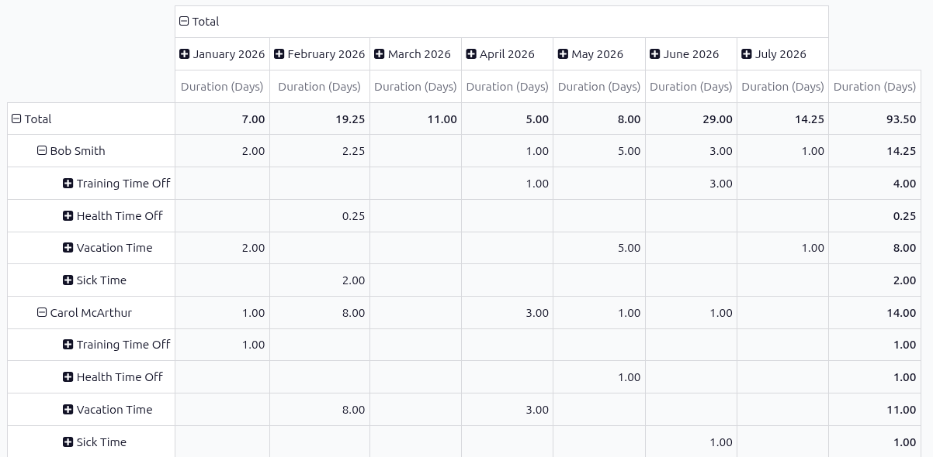
従業員別に休暇を表示することで、マネージャーは使用パターンの追跡、残高の監視、ポリシーコンプライアンスの確保、および今後の欠勤に対するカバレッジの計画を行うことができます。従業員の休暇申請のリストを表示するには、:menuselection:`休暇アプリ --> レポーティング --> 従業員別`に移動します。
The default report presents the current year's data in a pivot table, with the months populating the columns, and the employees populating the rows. The report displays the various time off taken by each employee, with a status of either Approved or To Approve, the amount of time off used for each month (the Duration (Days)), and the various totals.
注釈
All time off is calculated in days, including time off types configured to be taken in hours.
Odoo automatically converts all time off hours into their day equivalent. For example, two hours
of time off is presented as 0.25 days.
タイプごと
タイプ別に会社全体の休暇を表示することで、マネジャーは従業員が休暇を使用しているかどうか、どのタイプが他のタイプよりも多く使用されているか、および傾向を発見することができます。病気休暇などの特定の休暇タイプで合計が高い場合、健康や士気の問題を示している可能性があります。
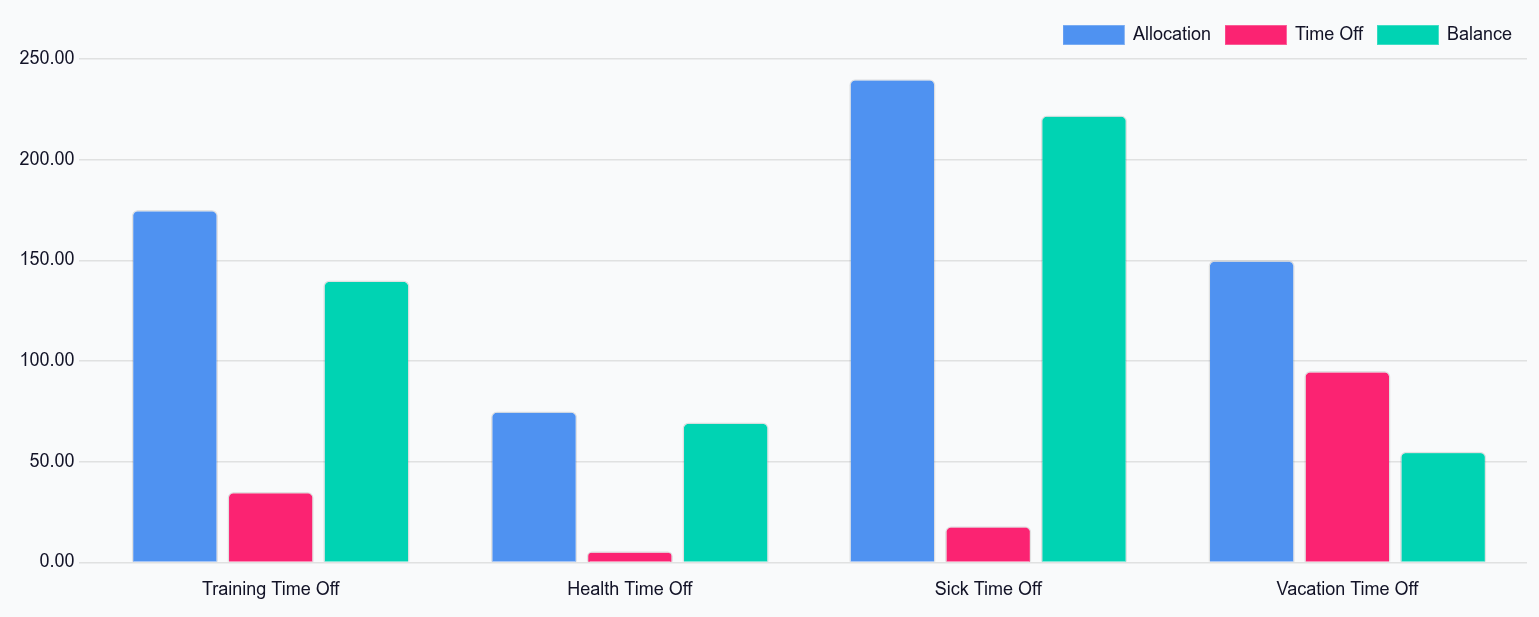
To view a graph of all time off, organized by time off type, navigate to . This shows all time off requests with a status of Approved or To Approve in a default bar chart.
Each time off type displays three columns of information:
Allocation: This blue-colored bar indicates the total amount of time off allocated to employees.
Time Off: This red-colored bar indicates the amount of time off requested, including both past and scheduled future time off, for both approved and pending requests.
Balance: This green-colored bar indicates the total balance of unused time off.
注釈
If the time off type is configured to not require an allocation, the Allocation column does not appear.
Hover over a column to view the total Duration (Days) and click on a bar to view a detailed list of all the individual records for that bar.
各申請がリストされ、次の情報が表示されます:従業員、日数、申請タイプ、開始日、終了日、ステータス、および:guilabel:説明。
レポートは他の方法でも表示できます。ページの右上隅にある対応するボタンオプションをクリックすると、その方法でデータを表示できます。さまざまなオプションは、グラフ`(デフォルトビュー)、:icon:`oi-view-listリスト、または:icon:oi-view-pivotピボットテーブルです。
選択が行われると、その特定の選択に対する追加オプションが表示されます。レポートとそのさまざまなオプションに関する詳細情報については、レポーティングのドキュメントを参照してください。
残高
When some time off types have restrictions, such as rollover rules and balance limits, viewing time off balances can help managers and time off approvers see a high-level overview of time off. If certain employees have time off that will expire soon, they can be infomred and adjust their schedules accordingly.
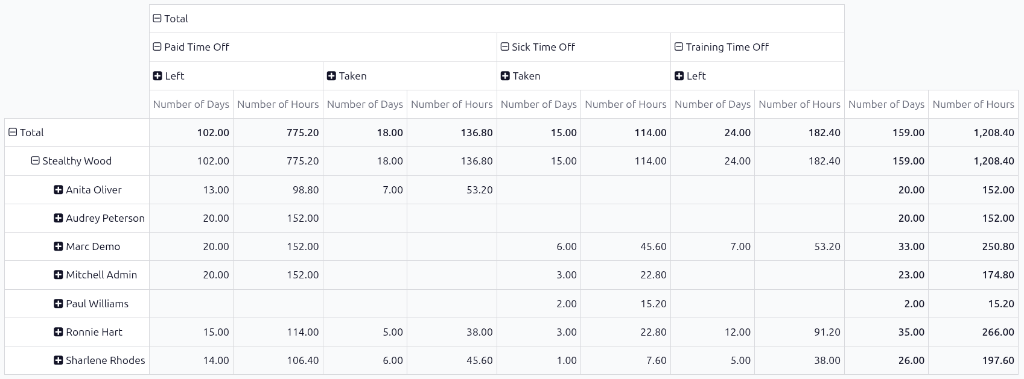
To view all time off balances for the current year, navigate to . The Balance report shows all time off balances in a default pivot table. The employees populate the rows, while the various time off types populate the columns.
Each time off type displays the Number of Days and Number of Hours remaining for the following:
Left: The remaining amount of time off for the year.
Planned: The amount of time off scheduled for the remainder of the year.
Taken: The amount of time off already taken for the year.