
TikTok Shop order management
This guide explains how to manage TikTok Shop orders, inventory, deliveries, and sales reporting within Odoo using the TikTok Shop Connector. It covers product catalog mapping, order synchronization, delivery processes, platform fee handling, and sales analysis to streamline social commerce operations across supported regions.
产品目录映射
To ensure accurate synchronization, it is crucial to properly map the SKUs between the platforms. The TikTok Shop Seller SKU must correspond exactly to the Internal Reference of the product or its variant.
没有现有产品的新 Odoo 客户
If you are starting a new Odoo database and your products exist only on TikTok Shop, you can import your TikTok Shop product catalog into Odoo. In TikTok Shop Partner Center, use the feature to export your product catalog, including TikTok Shop Item IDs.
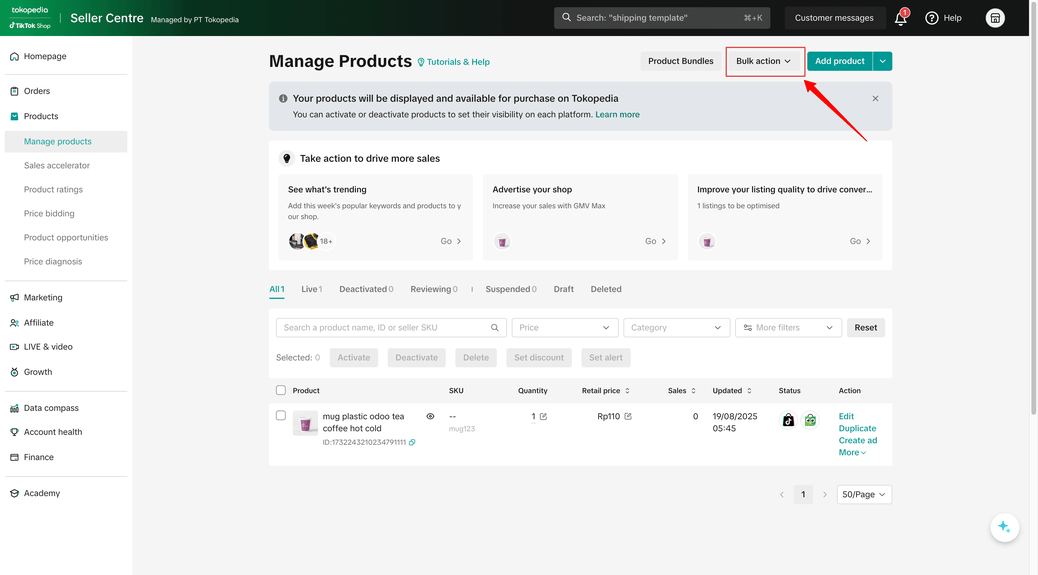
Then import the exported catalog into Odoo via . Map the TikTok Shop Item ID to the Product external ID field in Odoo to link your TikTok Shop and Odoo products.
已有产品的现有 Odoo 客户
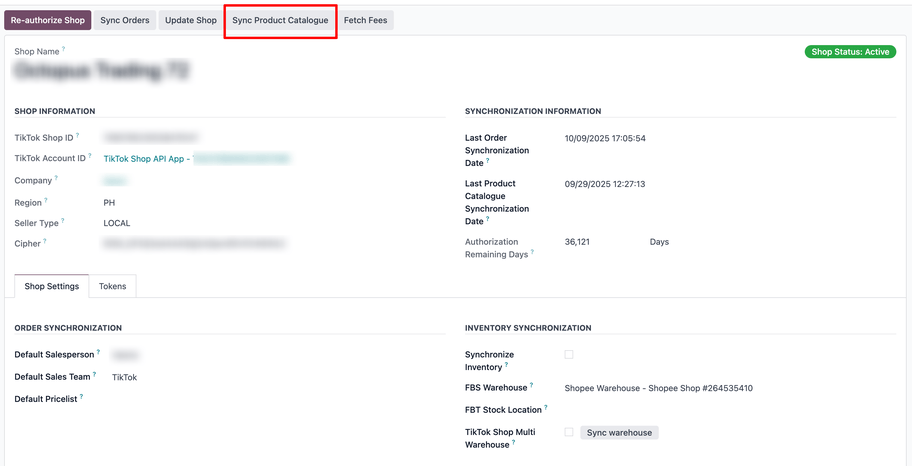
If you have an existing product catalog in Odoo, map your TikTok Shop listings to these products. Use the Sync Catalog button in Odoo to automatically match active products.
Alternatively, the Upload in bulk button in the seller center can be used if products from Odoo need to be synchronized to TikTok.
重要
Product catalog synchronization is an automated process. Ensure accurate SKU mapping to avoid duplication errors.
订单同步
Orders are automatically fetched from TikTok Shop and synchronized in Odoo at regular intervals.
Synchronization Scope: Only orders with status AWAITING_SHIPMENT or AWAITING_COLLECTION are fetched, as these require shipping action.
Processing Intervals: Sync orders and Webhooks of order status changes are processed every 5 minutes. Shipping labels are processed every 15 minutes. Inventory is processed every 30 minutes.
Status Updates: When an order is canceled on TikTok Shop, its status updates in Odoo. However, canceling an order in Odoo does not reflect on TikTok Shop.
Customer Creation: For each synchronized order, Odoo uses the buying identifier to search for existing contacts. If none exist, Odoo creates a sales order and a contact.
Default Products: If a product or delivery carrier isn’t found, Odoo uses a default product or carrier found by Internal Reference or name, respectively.
注解
仅同步需要发货的订单。同步期间会排除状态为SHIPPED、CANCEL、UNPAID或COMPLETED的订单。
强制同步
To synchronize an order whose status hasn’t changed since the last synchronization, navigate to and click the target TikTok Shop. Modify the Last Order Synchronization date to a date prior to the order’s last status change. Finally, click the Sync Orders button to trigger immediate synchronization.
在FBM中管理发货
For FBM orders, the TikTok Shop Connector creates a picking in the app, a sales order, and a customer record, upon synchronization.
Arrange Shipment: Confirm the picking in Odoo, then navigate to TikTok Shop Partner Center and arrange shipment to generate the shipping label and tracking number.
Fetch Shipping Label: Odoo retrieves the shipping label and tracking number automatically on orders with TikTok status of ‘Awaiting Collection’, attaching them to the corresponding delivery order. If PDF generation fails, a link to the label is provided.
Validate Stock Out: Validate the stock movement in Odoo to update inventory levels and confirm the order has left the warehouse.
TikTok Shop delivery statuses
Awaiting Shipment: The order is ready for shipment arrangement.
Awaiting Collection: The seller has arranged shipment and received a tracking number from the logistics provider.
Shipped: The parcel has been dropped off or picked up by the logistics provider.
Cancelled: The order has been canceled.
Pickup Failed: The logistics provider failed to pick up the parcel and the seller must rearrange shipment.
重要
TikTok Shop requires a tracking reference for each delivery. If the carrier doesn’t provide one automatically, set it manually in TikTok Shop Partner Center. Check supported logistics providers for the region.
订单履行流程
TikTok Shop orders are automatically created in Odoo as sales orders in the Sales app. Shipment can be arranged in TikTok Shop Partner Center, including choosing a logistics provider and generating a shipping label. Odoo imports any shipping labels and tracking numbers and associates them with the sales order. Stock movements are confirmed in Odoo to reduce inventory levels. Enabling synchronizing inventory in shop settings pushes stock levels to TikTok shop in order to prevent overselling.
发票和登记付款
Due to TikTok Shop’s policy of not sharing customer email addresses, invoices cannot be sent directly from Odoo. Instead, invoices can be generated in Odoo and manually uploaded to TikTok Shop Partner Center. Register a bank journal (e.g., “TikTok Payments”) with a suspense account. Since TikTok shop processes batch payments, all invoices linked to a payment in Odoo can be processed by creating a batch payment.
Analyzing TikTok Shop sales with Odoo’s reporting
Odoo’s dashboard consolidates sales data from all channels. To analyze TikTok Shop sales specifically, set up sales teams. Go to and assign a dedicated sales team to each TikTok Shop for isolated reporting. Use the dashboard filters to view sales data for the assigned TikTok sales team.