直发至分包商
在直送至分包商工作流程中,公司从供应商处购买产品的组件,供应商将组件直接交付给分包商进行制造。然后分包商将成品运回公司。
以下文档介绍如何配置分包产品并演练直送至分包商工作流程。
注解
本文档使用术语公司指需要分包货物的内部公司,使用术语分包商指处理分包货物外包生产的外部供应商。
配置
In order to use the Dropship to Subcontractor workflow, users must first follow the configuration process below:
Specify the subcontractor as a vendor on the subcontracted product.
Create a subcontracting-type bill of materials (BoM) for the product and add the necessary components.
For each dropshipped component, open its product form, then set its dropship vendor and the Dropship route.
Specifying the subcontractor as a vendor on the product form allows the contracting company to properly purchase the product from the subcontractor through a purchase order (PO). The BoM allows the product to be manufactured externally by the subcontractor. The Dropship route is applied to each component in order to be properly sent from the dropshipping vendor to the subcontractor.
重要
In order to configure product components for dropshipping, make sure that the Dropshipping feature is enabled in the Odoo settings.
To do so, navigate to either the Inventory or Purchase app, then click . Finally, in the Logistics section, enable the Dropshipping setting.
Specify product vendor
要为产品的代发货分包配置供应商,请前往 ,然后选择一个产品,或者:doc:创建一个新产品 <../../inventory/product_management/configure/type>。
在产品表单上,点击采购标签页,通过点击添加行将产品的分包商添加为供应商。在供应商下拉菜单中选择分包商。
然后,在单价字段中输入产品的价格。
Finally, set a Lead Time for the product in the corresponding field to specify the number of days for the subcontractor to receive components, produce the product, and deliver the finished good.
注解
Companies do not need to configure manufacturing lead times on a BoM. Instead, provide only a single Lead Time on the vendor pricelist, factoring in the duration for the subcontractor to receive the components from the dropship vendor, manufacture the product, and deliver the finished good back to the company.
Configure BoM
指定供应商后,为产品配置分包类型BoM。首先,点击产品页面上的物料清单智能按钮。然后,选择所需的BoM或创建新的。
小技巧
或者,导航至 ,然后选择分包产品的 BoM 。
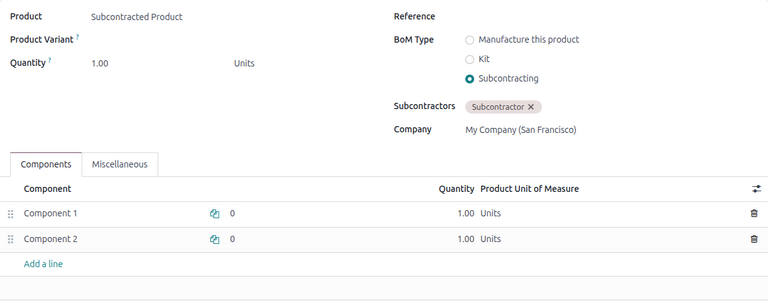
在物料清单类型字段中,选择分包选项。然后,在分包商字段中添加一个或多个分包商。
最后,确保在组件选项卡上指定了所有必要的组件。要添加新组件,请点击添加行,在组件下拉菜单中选择组件,并在数量字段中指定所需数量。
配置组件
When dropshipping to subcontractors, each component of a product must have a specified vendor and have the Dropship route enabled. This allows the components to be properly dropshipped from the vendor to the subcontractor.
要指定组件的供应商,请在组件标签页中选择组件名称,然后点击(内部链接)箭头。
小技巧
或者,导航至并选择组件。
在组件产品表单上,点击采购标签页。通过点击添加行添加供应商。然后,在供应商字段中选择供应商。
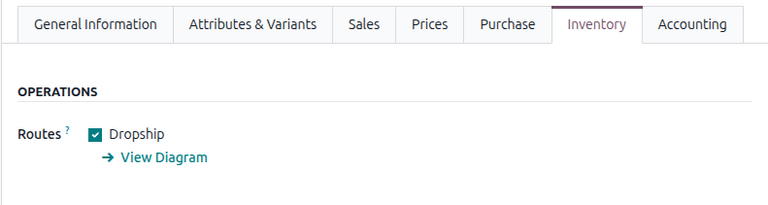
Next, to configure the route, click on the Inventory tab and select the Dropship route in the Routes section.
对转运配送至分包商的每个组件重复此过程。
工作流
The Dropship to Subcontractor workflow can be summarized in the following steps:
Open and confirm the dropship vendor request for quotation (RfQ).
Validate the dropship order to send the components.
Validate the receipt to receive the final product.
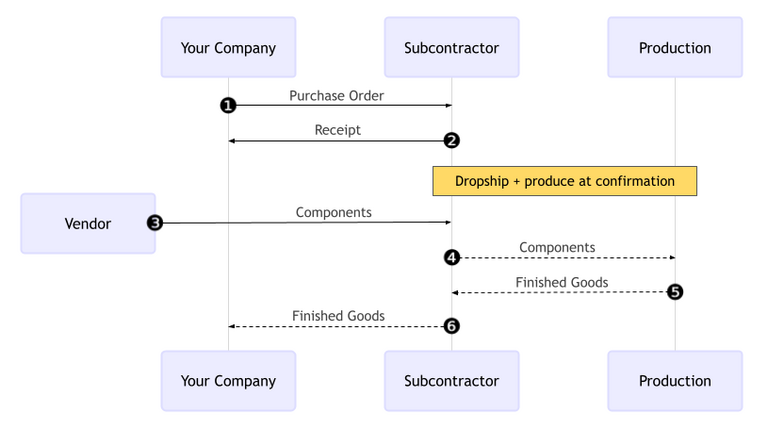
The workflow begins by creating a PO to purchase the product from the subcontractor (1).
然后,承包商(您的公司)确认分包商|PO|(2)。这将创建一个\ |RfQ|以从供应商采购组件,以及一个转移最终产品的收货单。
Next, the contractor confirms the RfQ, turning it into a vendor PO and creating a dropship order to send the components from the vendor to the subcontractor (3). Once the contractor validates the dropship order, the subcontractor begins to manufacture the final product with the components and ships it to the contractor when done.
Once the product has been produced and received, the contractor validates the receipt (6) to trigger inventory moves from the subcontractor to the company’s stock (4, 5).
Create and confirm subcontractor PO
要为外包产品创建PO,请导航至,然后点击新建。
开始填写PO,从供应商下拉菜单中选择一个外包商。在产品选项卡中,点击添加产品创建新的产品行。在产品字段中选择外包产品,并在数量字段中输入数量。
添加产品后,预计到达字段将更新为成品的预计交付日期,如之前使用供应商的提前期配置的那样。
最后,点击确认订单以确认PO。系统将自动创建一个收货单,并在表单顶部显示一个收货智能按钮。此外,系统还会自动创建一个单独的RfQ,用于从直接运输供应商处采购组件。
注解
This RfQ is not automatically linked to the PO. It must be accessed separately on the Requests for Quotation page.
确认供应商 RfQ
要确认供应商RfQ,请前往。选择新创建的相应供应商的RfQ。
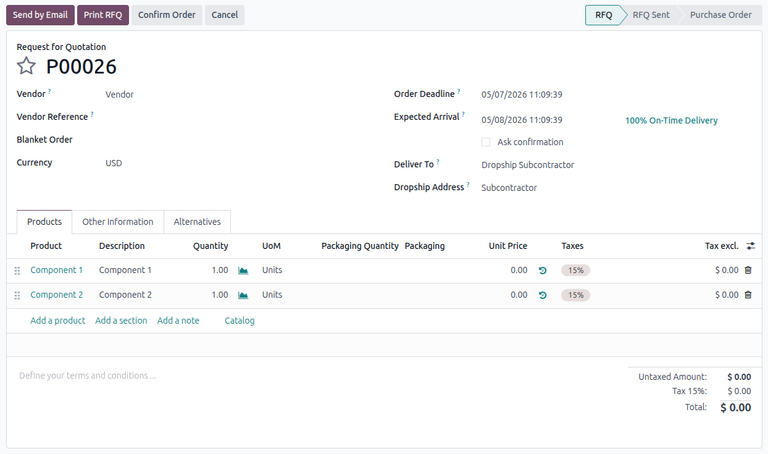
在RfQ上,交付至字段显示为直发分包商,直发地址字段显示组件直发至的分包商名称。
点击确认订单以确认从供应商处采购组件。此操作会将RfQ转换为*供应商*PO。供应商PO顶部将显示一个直接运输智能按钮。
注解
同时,之前创建的*分包商*PO顶部将显示一个补货智能按钮。在直接运输分包中,此智能按钮链接到直接运输订单。
验证直接运输订单
当直接运输供应商将组件交付给分包商后,点击供应商PO上的直接运输智能按钮以打开直接运输订单。
注解
也可以从*分包商*PO打开直接运输订单。前往,选择该PO,然后点击补货智能按钮。
最后,点击顶部的验证按钮,以确认分包商已收到组件。随后分包商开始制造最终产品。
处理收据
After the subcontractor completes production, the finished product is shipped to the company.
要将产品收入库存,请前往,并选择*分包商*PO。
在PO顶部,点击接收产品按钮,或点击收货智能按钮。然后,点击验证以将进货入库。
注解
如果启用了多步库存流程,则必须验证其他转移才能将入库产品录入库存。
追踪库存移动
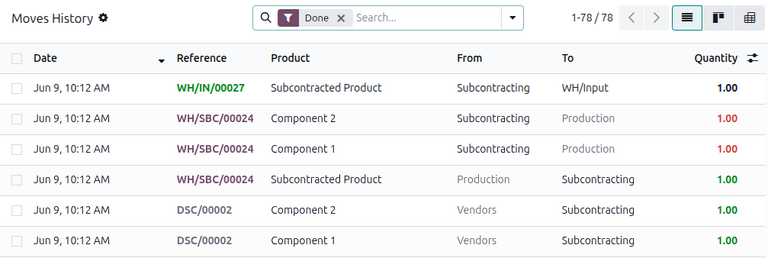
验证收货单后,Odoo会自动生成库存移动以跟踪分包产品在库位之间的移动。要查看这些库存移动,请导航至。
In the Dropship to Subcontractor workflow, product components are first sent from the vendors to a dedicated location called Subcontracting. Another location called Production then consumes the components and produces the finished good. Once produced, the good then moves back to the Subcontracting location before finally entering the contractor’s stock when the receipt is validated.