补货分包
In resupply subcontracting, a company supplies the components of its product to a subcontractor, who manufactures the product, then delivers the finished product to the company’s warehouse.
This document covers how to configure a subcontracted product and walk through the resupply subcontracting process.
注解
本文档使用术语公司指需要分包货物的内部公司,使用术语分包商指处理分包货物外包生产的外部供应商。
配置
In order to use the resupply subcontractor workflow, users must follow the configuration process below:
Specify the subcontractor as a vendor on the subcontracted product.
Create a subcontracting-type BoM for the product and add the necessary components.
Specifying the subcontractor as a vendor on the product form allows the contracting company to properly purchase the product from the subcontractor through a purchase order (PO). The bill of materials (BoM) allows the product to be manufactured externally by the subcontractor. By default, components specified on a subcontracting-type BoM are automatically configured to be sent from the contractor to the subcontractor.
Specify product vendor
要为补货转包配置产品的供应商,请转到,并选择一个产品,或创建一个新产品。
在产品表单上,点击采购标签,然后点击添加行将产品的分包商添加为供应商。使用供应商下拉菜单选择分包商。
然后,在单价字段中输入产品的价格。
Finally, set a Lead Time for the product in the corresponding field to specify the number of days for the subcontractor to receive components, produce the product, and deliver the finished good.
注解
由于外包商不负责成品生产,无需在物料清单(BoM)中设置生产提前期。仅需在供应商价格表中填写一项:guilabel:提前期,该时长需包含外包商从我方接收零部件、完成产品加工,再将成品送回公司的全部周期。
Configure BoM
指定供应商后,为产品配置转包类型BoM。首先,点击产品页面上的物料清单智能按钮。然后,选择所需的BoM或创建一个新的。
小技巧
或者,导航至 ,然后选择分包产品的 BoM 。
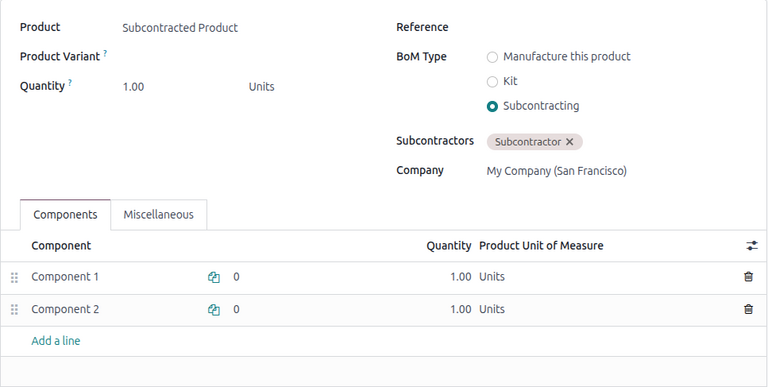
在物料清单类型字段中,选择转包选项。然后,在下面的转包商字段中添加一个或多个转包商。
Finally, add all necessary components in the Components tab. To add a new component, click Add a line. Then, select the Component using the drop-down menu , and specify the required Quantity in the corresponding field.
工作流
The resupply subcontracting workflow can be summarized in the following steps:
Validate the resupply order to send the components.
Validate the receipt to receive the final product.
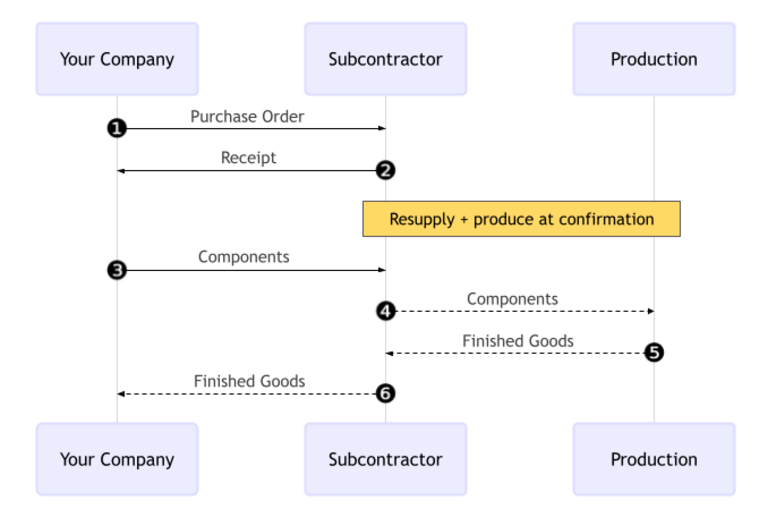
The workflow begins by creating a PO to purchase the product from the subcontractor (1).
公司随后确认PO,这会创建一个补货订单以转移组件,以及一个收货单以接收来自分包商的最终产品(2)。
Next, the contractor validates the transfer of components to the subcontractor (3). The subcontractor begins producing the product.
Once the product has been produced and received, the contractor validates the receipt (6) to trigger inventory moves from the subcontractor to the company’s stock (4, 5).
Create and confirm subcontractor PO
要为转包产品创建PO,请转到并点击新建。
从 供应商 下拉菜单中选择分包商,开始填写 PO。
在产品选项卡中,点击添加产品并选择分包产品。然后在相应字段中输入数量。
添加产品后,预计到达字段将更新为成品的预计交货日期,即之前在供应商交付周期中配置的日期。
最后,点击确认订单以确认PO。系统会自动创建一个收货单和一个补货订单,可通过表单顶部的收货单和补货智能按钮访问。
验证补货订单
点击PO顶部的补货智能按钮以打开补货订单,然后点击验证以确认组件已发送给分包商。
或者,打开库存应用程序,在分包商补货卡片上,点击(#)待处理按钮。选择相关补货订单,然后点击验证以确认组件已发送给分包商。
处理收据
补货订单确认后,分包商制造产品并将成品交付给公司。
要从分包商接收成品,请在PO上点击接收产品按钮,或点击页面顶部的收货单智能按钮。然后点击验证将入库货物录入库存。
注解
如果启用了多步库存流程,则必须验证其他转移才能将入库产品录入库存。
追踪库存移动
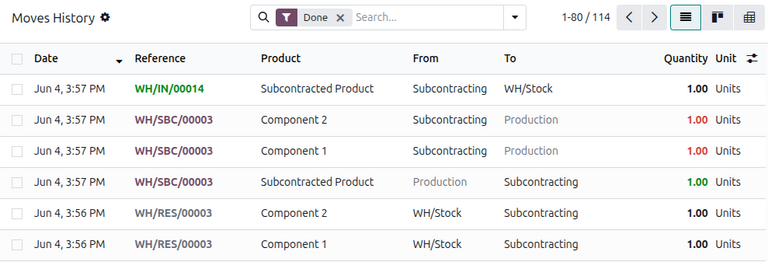
验证收货单后,Odoo会自动生成库存移动以跟踪分包产品在库位之间的移动。要查看这些库存移动,请导航至。
在补货分包中,Odoo首先将任何产品组件转移到一个名为分包的专用库位。然后另一个名为生产的库位消耗这些组件并生产成品。生产完成后,货物随后移回分包库位,最后在验证收货单时进入公司库存。