报表
**休假**应用的报表功能允许管理者按员工、类型或剩余额度查看团队休假情况。这使管理者能够了解 哪些员工正在休假、 已使用多少额度, 哪些类型使用更频繁,以及 每位员工剩余额度。
重要
The reporting feature of the Time Off app is only available to users with the correct access rights, typically managers.
按员工
查看员工休假情况有助于管理者追踪休假模式、监控剩余额度、确保政策合规,并为即将发生的缺勤安排人员覆盖。要查看员工休假申请列表,请前往 。
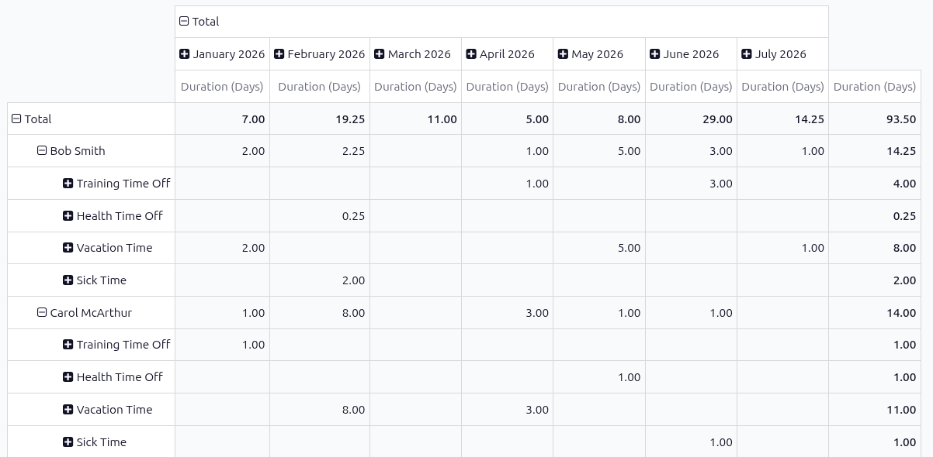
The default report presents the current year’s data in a pivot table, with the months populating the columns, and the employees populating the rows. The report displays the various time off taken by each employee, with a status of either Approved or To Approve, the amount of time off used for each month (the Duration (Days)), and the various totals.
注解
All time off is calculated in days, including time off types configured to be taken in hours.
Odoo automatically converts all time off hours into their day equivalent. For example, two hours
of time off is presented as 0.25 days.
其他资料
按类型
按休假类型查看全公司的休假情况,可帮助管理者判断员工是否在正常使用休假额度、哪些类型的休假使用频率更高,并识别相关趋势。某些休假类型(如病假)的总时长偏高,可能反映出健康或员工士气问题。
To view a graph of all time off, organized by time off type, navigate to . This shows all time off requests with a status of Approved or To Approve in a default bar chart.
Each time off type displays three columns of information:
Allocation: This blue-colored bar indicates the total amount of time off allocated to employees.
Time Off: This red-colored bar indicates the amount of time off requested, including both past and scheduled future time off, for both approved and pending requests.
Balance: This green-colored bar indicates the total balance of unused time off.
注解
If the time off type is configured to not require an allocation, the Allocation column does not appear.
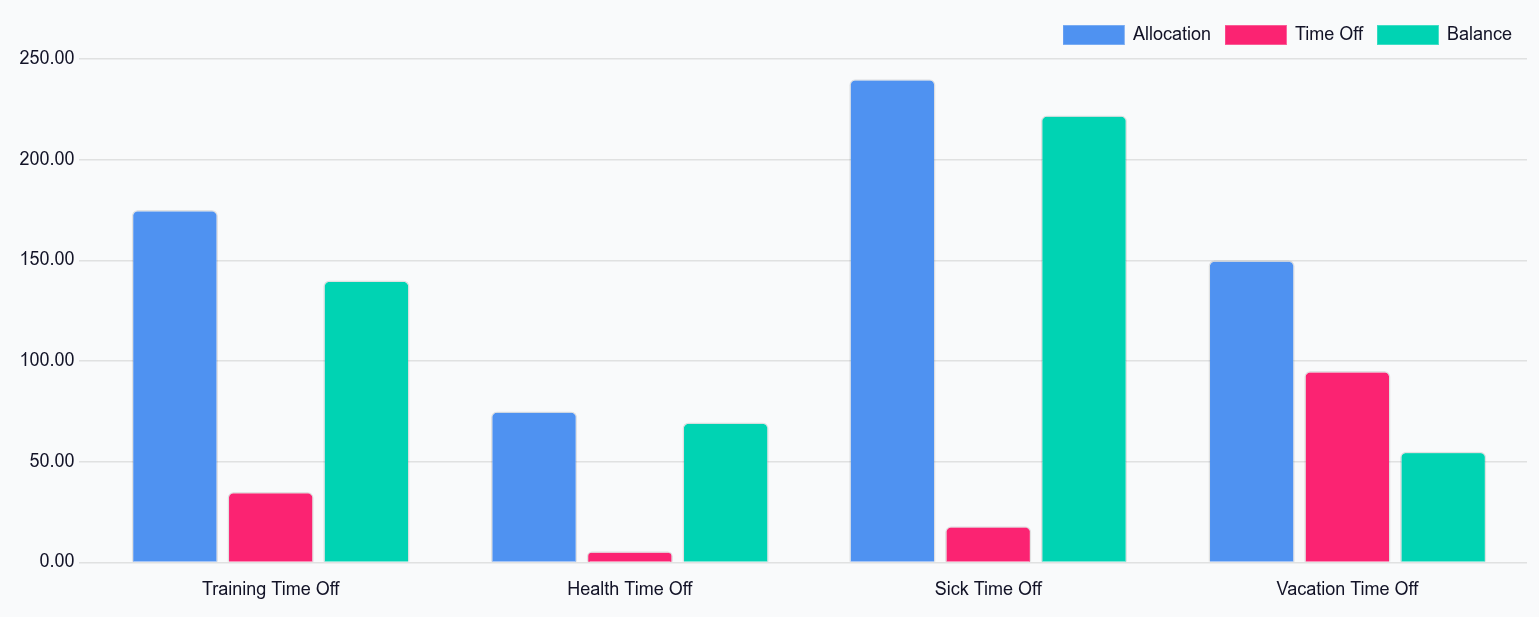
Hover over a column to view the total Duration (Days) and click on a bar to view a detailed list of all the individual records for that bar.
每个请求都会列出,并显示以下信息:员工、天数、请求类型、开始日期、结束日期、状态`和:guilabel:`描述。
报告还可以以其他方式显示。点击页面右上角相应的按钮选项,就能以这种方式查看数据。各种选项包括:icon:fa-area-chart (图表)`(默认视图)、:icon:`oi-view-list (列表) 或 (透视图) 表格。
做出选择后,系统会显示针对该选项的额外设置。如需了解报表及其各类选项的更详细说明,请参考 :doc:`报告 <../../essentials/reporting>`说明文档。
余额
When some time off types have restrictions, such as rollover rules and balance limits, viewing time off balances can help managers and time off approvers see a high-level overview of time off. If certain employees have time off that will expire soon, they can be infomred and adjust their schedules accordingly.
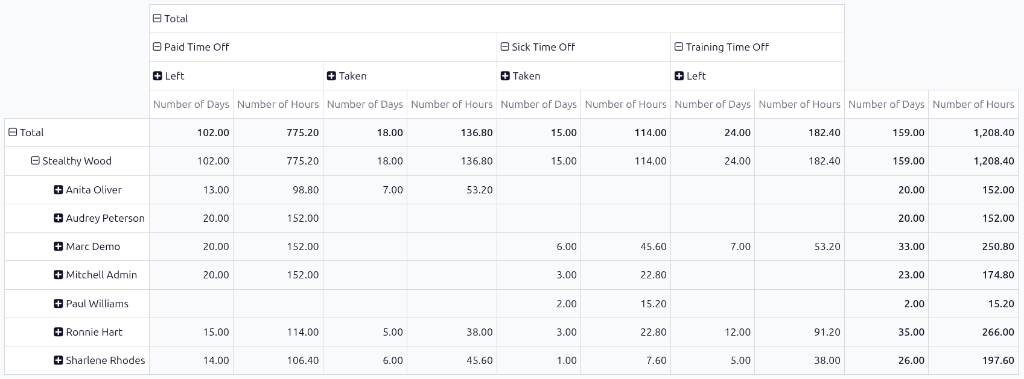
To view all time off balances for the current year, navigate to . The Balance report shows all time off balances in a default pivot table. The employees populate the rows, while the various time off types populate the columns.
Each time off type displays the Number of Days and Number of Hours remaining for the following:
Left: The remaining amount of time off for the year.
Planned: The amount of time off scheduled for the remainder of the year.
Taken: The amount of time off already taken for the year.