
技能进化
In Odoo’s Appraisals app, it is possible to view employees’ skills as they progress over time in the Skills Evolution report, also known as the Appraisal Skills Report.
经理可以通过它了解谁实现了考核中设定的各种技能目标,谁在技能截止日期前完成了任务,谁在技能发展方面表现最好等等。
技能发展 报告还提供 搜索具有特定技能 员工的功能,这对需要特定技能的情况很有帮助。
技能发展报告
要访问此*技能发展*报告,请导航至 。
Doing so reveals the Appraisal Skills Report page. All skills are grouped first by the month the skill was initially achieved, then by employee, and lastly by skill type.
重要
The Appraisal Skills Report only displays skills for employees with at least one completed appraisal. Skills for employees whose appraisals have a status of Draft or Ongoing are not included.
When an employee completes their first appraisal, all their skills appear on the report. Once subsequent appraisals are marked as Done, any skill changes from the previous appraisal appear on the report.
任何来自**尚未**最终确定的进行中绩效的技能水平变化**不会**包含在此报告中。
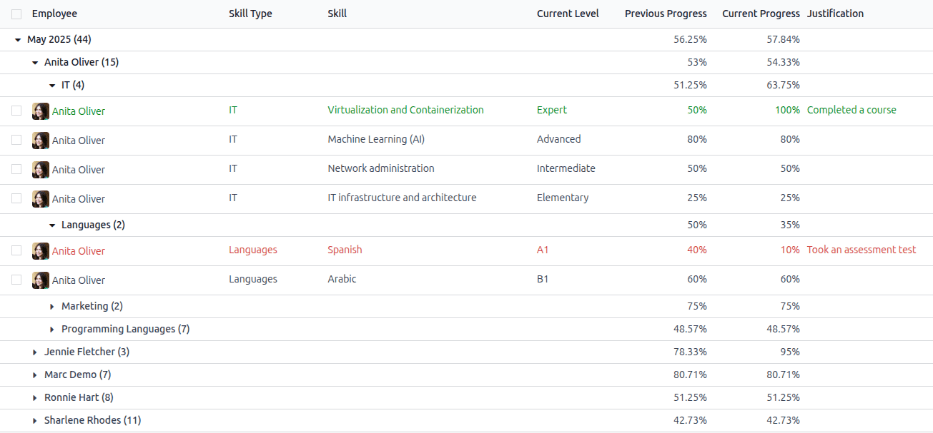
To view the specific details for an employee’s skill, expand the Employee, then the Skill Type. This displays a list of all the employee’s skills within that skill type. Each skill displays the following information:
员工:员工姓名。
Skill Type: The category the skill falls under.
Skill: The specific, individual skill.
Current Level: The current level the employee has achieved for the skill.
Previous Progress: The previous percentage of competency achieved for the skill.
Current Progress: The current percentage of competency achieved for the skill.
Justification: Any notes entered on the skill, explaining the progress.
The color of the skill text indicates any changes from the previous appraisal. Skill levels that have increased since the last appraisal appear in green, skill levels that have not changed appear in black, and skills that have regressed appear in red.
可通过调整顶部搜索栏中设置的 筛选器 和 分组 来修改此报告,以查找特定信息。
使用案例:识别具备特定技能的员工
Since the Appraisal Skills Report organizes all skills by month, then employee, it can be difficult to find employees with a specific skill at a certain level. To find these employees, a custom filter must be used.
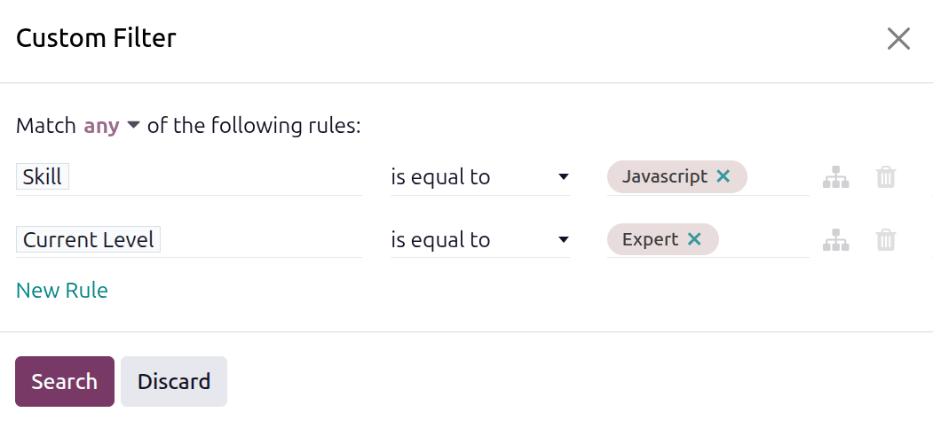
在本示例中,对报告进行了修改,以显示具有专家级 Javascript 知识的员工。要只查看这些员工,首先要移除搜索栏中的所有活动筛选器。
Next, click the (Toggle Search Panel) icon in the search bar, then click Custom Filter… beneath the Filters column to load a Custom Filter pop-up window.
At the top of the pop-up window, first modify the Match any of the following rules sentence. Click the word any to change it to all.
Next, using the drop-down menu in the first field, select Skill. Then, keep the second field as-is (is equal to), and select Javascript for the third field.
Next, click New Rule, and another line appears. In this second line, select Current Level for the first drop-down field, leave the second field as-is (is equal to), then select Expert for the third drop-down field.
Finally, click the Search button.
现在,只有技能 Javascript 达到 专家 级别的员工才会出现。在本例中,只有 Marc Demo 符合这些条件。

使用案例:评估最大改进
Another way to modify the Appraisal Skills Report is to identify the employee who has the highest amount of improved skills over a specific period of time.
要查看此信息,首先移除搜索栏中的默认筛选器。然后,点击搜索栏中的 (切换搜索面板) 图标,再点击 筛选器 栏下的 改进。启用此筛选器只会显示已改进的技能。
It is possible to view the skills that have improved over a period of time, such as a specific quarter, or month. With the search bar drop-down menu still expanded, click Custom Filter… at the bottom of the Filters column, and a Custom Filter pop-up window appears.
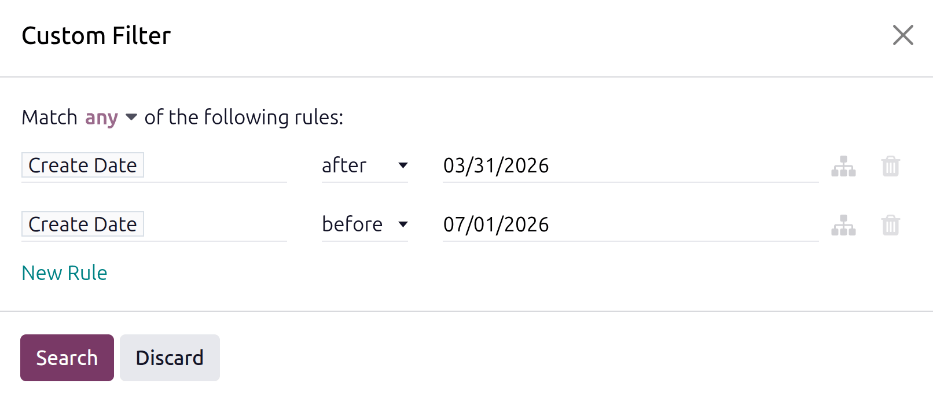
Select Create Date for the first drop-down field, then select after for the second drop-down field. Once after is selected, the current date populates the last field. Modify the date so it is one day before the desired date range.
Next, click New Rule, and a second line appears with identical information. In this second rule, click on the middle drop-down menu, and select before. Modify the last field so the date is one day after the desired time period.
Once all the fields are properly formatted, click Search.
自定义筛选项会在默认列表视图中按员工分类显示所有已改进的技能。
Example
To determine the employee with the most amount of improved skills for the second quarter, remove the default filter in the search bar of the Appraisal Skills Report. Next, activate the Improvement filter, then click Custom Filter… at the bottom of the Filters column.
In the resulting Custom Filter pop-up window, select Create Date for the first drop-down field, then select after for the second drop-down field. Using the calendar selector, set the date to 03/31/2026. Click New Rule, and select before in the middle field. Using the calendar selector, set the last field to 07/01/2026, then click Search.
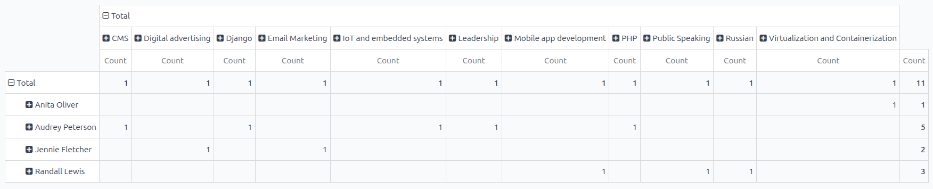
To view the number of employees and skills in further detail, click the (Pivot) icon in the top-right corner. This presents a pivot table with the employees populating the rows, and the only visible column represents the total number of improved skills.
To expand the columns to view which skill types had the most overall improvement, click Total above the Count column, then click Custom Group , then click Skill from the resulting drop-down menu. This expands all the improved skills, organized by individual skill.
Example
在此例中,Audrey Peterson 在第三季度取得了最显著的进步,共有五项技能得到了提升。
其他资料