
预订操作
预订操作 是预先配置的流程,允许用户根据指定的时间表或发生次数,自动执行数据库中的某些任务。这些任务包括发送电子邮件、生成发票、数据清理等。
In Odoo, some scheduled actions are active, by default, to ensure that certain functions are triggered automatically, however there are also many scheduled action options that appear in the In Odoo, some scheduled actions are active by default to ensure that certain functions are triggered automatically. However, there are also many scheduled action options that appear in the database that are not activated by default.
In Odoo Subscriptions, there are two scheduled actions that initiate the billing process for active recurring subscriptions, as well as when billing should stop due to subscription expiration.
They are turned on by default and can be deactivated at any time in order to manage subscriptions manually.
访问预订操作
重要
要访问预订操作,必须 激活 开发者模式。
激活开发者模式后,导航至 。
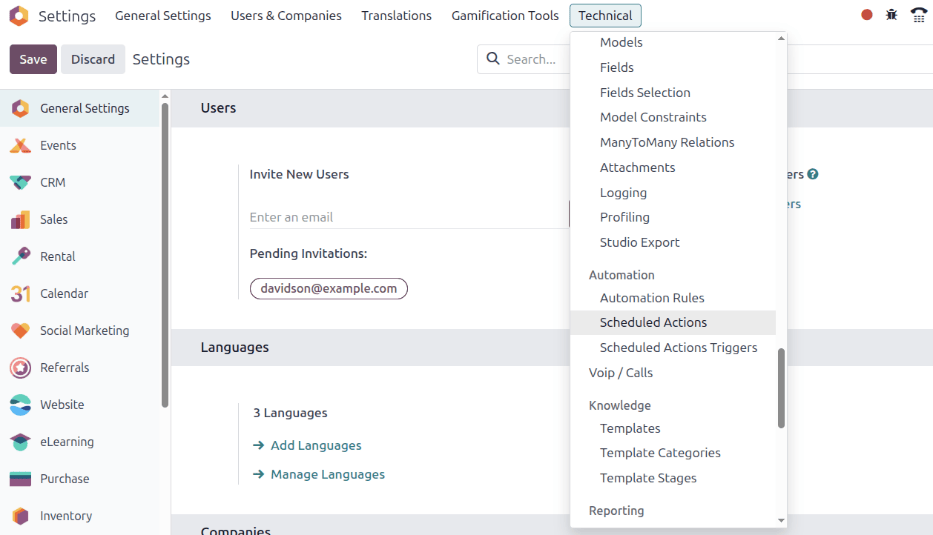
执行此操作后,系统会显示一个专门的 预订操作 仪表板。在该页面上,有整个数据库的预定操作的完整列表。
From here, enter Subscription in the search bar. Doing so provides four subscription-specific
results. The following documentation focuses on the last three results in the list:
销售订阅:生成定期发票和付款
销售订阅:订阅过期
Sale Subscription: send reminder for subscriptions with no token

Determine if a scheduled action is active by looking under the Active column, in the corresponding row on the Scheduled Actions dashboard, for a selected checkbox; if the checkbox is green with a check mark, the scheduled action is active.
If a scheduled action needs to be activated, click into the desired scheduled action from the list.
Then, from the scheduled action form, toggle the switch in the Active field to the
right. Doing so turns the switch green, indicating that the scheduled action is now Active.
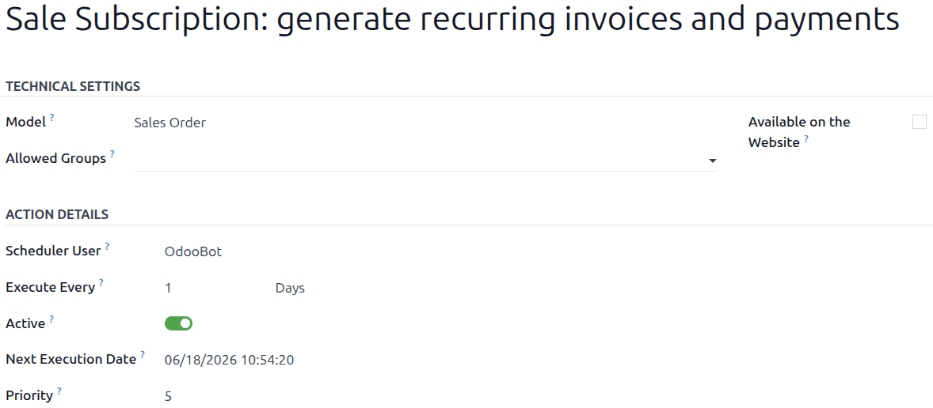
The ability to set up how often the scheduled action runs is also available on the scheduled action form in the Execute Every field.
重要
如果执行时间少于五分钟,预订操作将 无法 正常运行。这是所有预订操作的一般规则。
有关更多信息,请阅读:doc:常见技术问题</administration/odoo_sh/advanced/frequent_technical_questions> 文档。
生成周期性发票和付款
为了使 销售订阅:生成周期性发票和付款 预订操作正确生成订阅的周期性发票和付款,必须 设置*递延开支* 和*递延收入* 账户,以便 Odoo 处理与订阅相关的发票和付款。
要设置 递延开支 和 递延收入 账户,请导航至 。这两个账户可在 默认账户 部分进行配置。
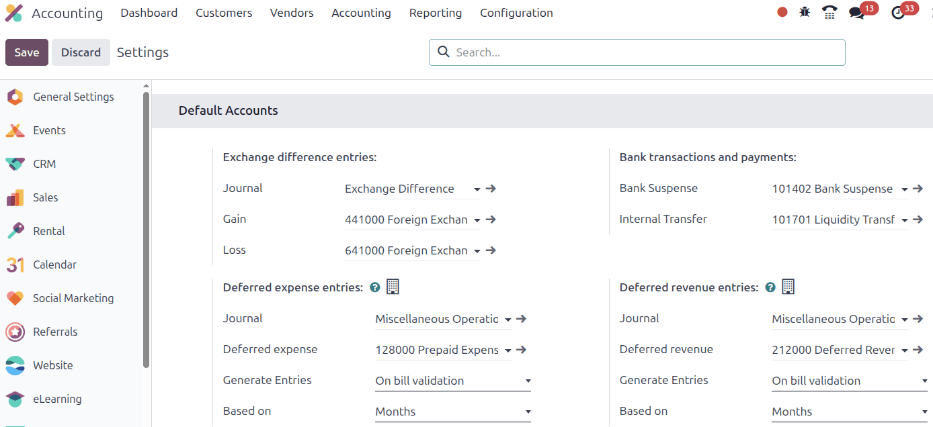
在 递延支出 和:guilabel:递延收入 下拉菜单字段中输入正确的账户后,点击左上角的:guilabel:保存。
创建结算单
与 销售订购:生成周期性发票和付款 计划操作相关的元素可在已确认的订阅销售订单中找到。
要检查这些要素,请在 订阅 应用程序中打开任何已确认的销售订单,以显示订阅销售订单表。
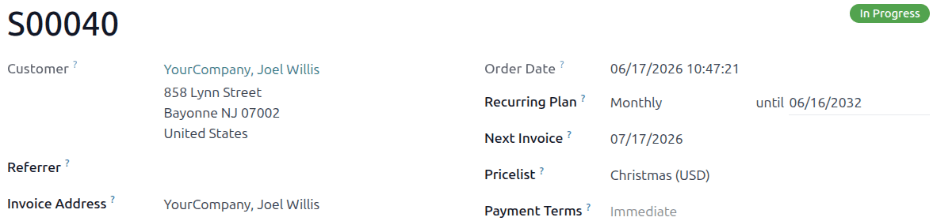
On a confirmed subscription sales order form, focus on the Recurring Plan and Next Invoice fields.
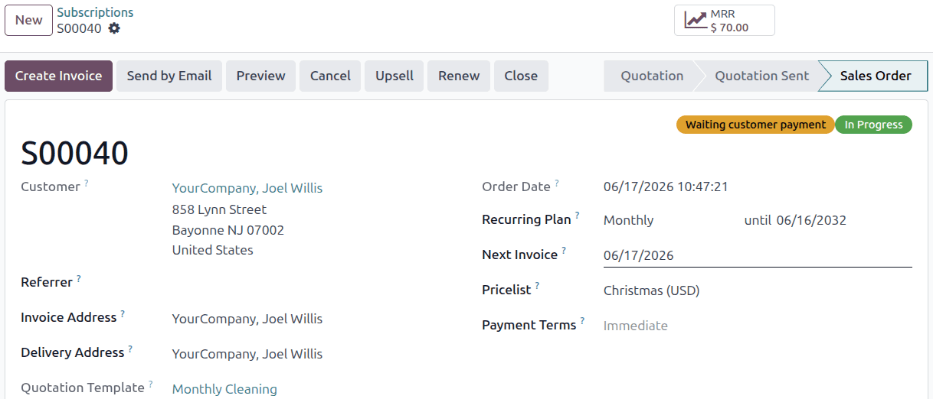
The scheduled action creates an invoice when today’s date is the same date as the Next Invoice.
Odoo 会使用 经常性计划 字段中的信息,相应地更新下一张发票日期。
警告
如果产品开票策略设置为*基于交付数量(手动)*,且交付数量为 0,则 Odoo **不会**创建发票,也不会向客户收取费用。
相反,订阅会作为免费的定期产品处理,并反映在订阅销售订单的*沟通栏*中。
出现这种情况时,会出现以下信息:自动续订成功。免费订阅。下一张发票:[日期]。未发送电子邮件。
为订购销售订单创建发票后,可点击订购销售订单顶部的 发票 智能按钮查看发票。
*如果*账户中有 支付令牌,则会向客户发送一封电子邮件,通知他们周期性订购费用。
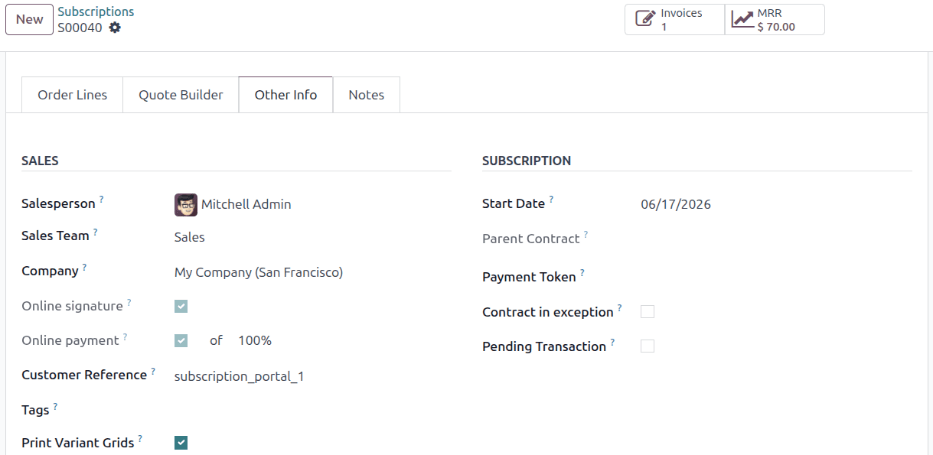
To check if there is a Payment Token, open the Other Info tab of the subscription form, and check the Payment Token field, under the Subscription section.
If there is no Payment Token, the system uses the Sale Subscription: send reminder for subscriptions with no token scheduled action to send a payment reminder email to the subscriber. After the subscriber has manually made a payment, an invoice is generated for the subscription.
警告
If the Online payment checkbox is selected on the Other Info tab, invoices are not automatically generated by the scheduled action on the date of the next invoice. Instead, invoices are generated when the client completes the manual payments for the subscription.
To use automatic payment and automatically generate invoices, this checkbox must remain empty.
关闭发票
The Sale Subscription: generate recurring invoices and payments scheduled action also has the ability to close a subscription, if the following conditions are met:
If the subscription has no Payment Token, create and post the invoice.
If the subscription has a Payment Token, try to charge.
If the charge is successful, create and post the invoice.
If the charge fails, send reminders periodically.
Close the subscription if it continues to fail for more than fourteen days.
订阅到期
销售订阅:订阅到期 计划的操作会检查所有可能导致订阅自动关闭的其他条件。如果满足特定条件,计划的操作将关闭该订阅。
首先,销售订阅:订阅到期 计划操作会检查订阅销售订单上配置的结束日期是否已过。
然后, 销售订阅:订阅到期 计划操作会检查发票是否在付款条件截止日期内未支付。
To access the invoices attached to a subscription that’s been invoiced multiple times, go to the sales order for the subscription and click the Invoices smart button. Then, look at the Invoice Date column. Unpaid subscriptions with an Invoice Date that are past the determined number of days in the Automatic Closing field of a Recurring Plan are automatically closed by the Sale Subscription: subscriptions expiration scheduled action.
Example
If the next invoice date is July 1st, and the Automatic Closing is set to ‘30 Days’, the scheduled action would close the subscription on August 1st.