意大利
模块
以下模組會隨義大利本地化自動安裝:
名称 |
技术名称 |
描述 |
|---|---|---|
意大利 - 会计 |
|
默认:ref: |
意大利 - 电子发票 |
|
电子发票的实施 |
意大利 - 意向声明 |
|
支持意向声明(Dichiarazione di Intento) |
Italy - E-invoicing - Additional module to support the debit notes (nota di debito - NDD) |
|
Adds payment methods and document types for debit notes |
Italy E-invoicing - Bridge module between Italy NDD and Account Debit Note |
|
Adds debit note fields |
意大利 - 销售电子发票 |
|
电子发票的销售修改 |
Italy eCommerce eInvoicing |
|
Italian eCommerce eInvoicing features |
意大利 - 电子发票(代扣代缴) |
|
E-invoice withholding |
意大利 - 销售点 |
|
将 Odoo PoS 与意大利财政打印机集成 |
Italy - Accounting Reports |
|
意大利报表 |
意大利 - 银行收款 |
|
Generation of Ri.Ba. files from batch payments in Odoo |
意大利 - 库存滴滴涕 |
|
运输单据 - Documento di Trasporto(DDT) |
Italy - Tax Report XML Export |
|
Export of the Italian monthly tax report to XML format |
注解
在某些情况下,例如升级到包含额外模块的版本时,模块可能不会自动安装。任何缺失的模块都可以手动安装。
公司
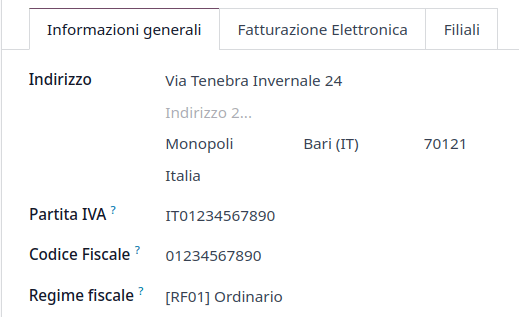
Configuring the company’s information ensures your Accounting database is properly set up. To add information, open the Settings app, navigate to the Companies section, and click Update info. Then, fill out the fields:
地址:公司地址;
增值税:公司增值税;
Codice Fiscale: the fiscal code of the company;
Tax System: the tax system under which the company falls;
税项配置
许多电子发票功能都是使用 Odoo 的税务系统实现的。因此,必须对税务进行适当配置,以便正确生成发票和处理其他账单用例。
意大利语**本地化包含预定义的税种**示例,可用于各种目的。
免税
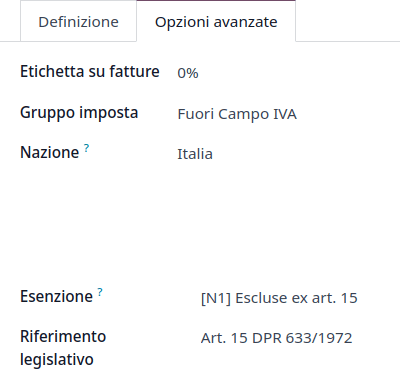
意大利当局要求使用金额为零百分比(0%)的销售税,以跟踪发票行中进行免税操作所依据的确切免税类型(Natura)和法律依据。
Example
欧盟出口税可作为参考(0% EU,发票标签`00eu`)。可在下找到。出口免征增值税,因此需要填写免税类型和法律依据。
其他资料
有许多免税类型(Natura)和法律参考代码。请确保查看最新版本以获取以下最新信息:
注解
如果您需要使用不同类型的免税,请转到,选择类似的税,然后点击齿轮图标并选择复制。在高级选项选项卡中,添加免税和法律参考。点击保存确认。
小技巧
根据其免税在名称字段中**重命名**您的税项,以便轻松区分它们。
逆向收费
The reverse charge mechanism is a VAT rule that shifts the liability to pay VAT from the supplier to the customer. The customers pay the VAT themselves to the AdE instead. There are different types:
发票
Reverse-charged customer invoices show no VAT amount, but the AdE requires the seller to specify the Tax Exemption reason and the Law Reference that enable the reverse-charge mechanism. Odoo provides a set of special 0% taxes that can be assigned to each reverse-charged invoice lines, representing the most commonly used configurations.
供应商账单
Italian companies subjected to Reverse Charge must send the information in the bill received to the AdE.
注解
Self-reported VAT XML files must be issued and sent to the AdE for reverse charged bills.
创建供应商账单时,可以在税项字段中添加**逆向收费**税项。您可以通过转到来查看哪些税项可用,您可以看到10%商品和22%服务税等已激活。由于意大利财务规则的自动配置,这些税项会自动在税项列表中激活。
税目明细
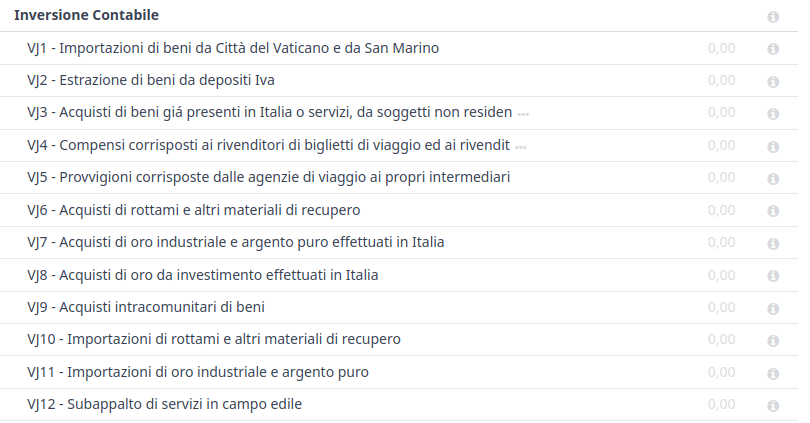
The Italian localization has a specific tax grid section for reverse charge taxes. These tax grids are identifiable by the VJ tag, and can be found by going to .
电子发票
注解
Make sure all the Italian-specific e-invoicing modules are installed.
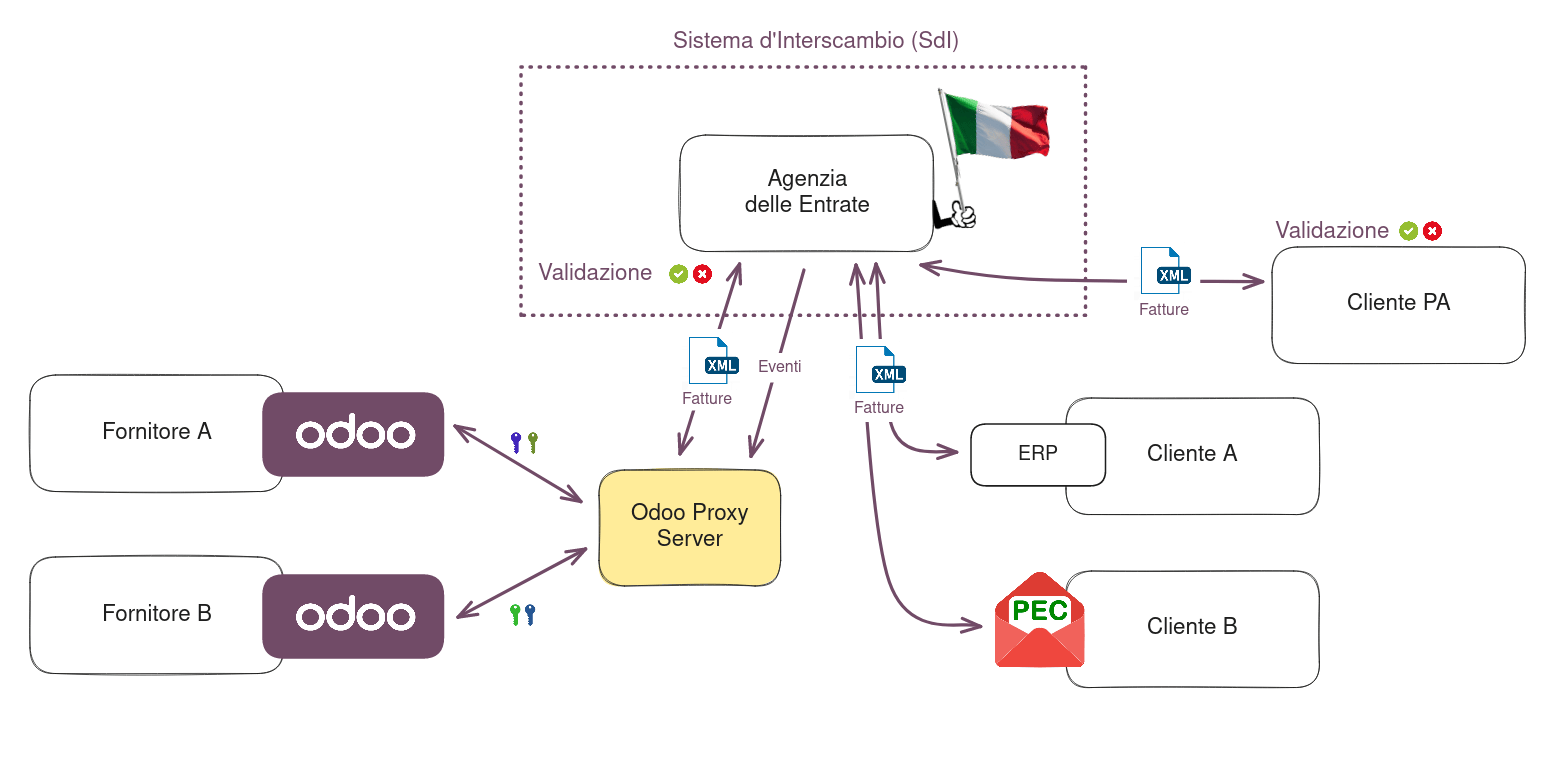
The SdI is the electronic invoicing system used in Italy. It enables the sending and receiving of electronic invoices to and from customers. The documents must be in an XML EDI format called FatturaPA and formally validated by the system before being delivered.
To be able to receive invoices and notifications, the SdI service must be notified that the user’s files need to be sent to Odoo and processed on their behalf. To do so, you must set up Odoo’s Destination Code on the AdE portal.
Go to Italian authorities portal and authenticate;
Go to section Fatture e Corrispettivi;
Set the user as Legal Party for the VAT number you wish to configure the electronic address;
在中,插入Odoo的目标代码
K95IV18,然后确认。
EDI Mode and authorization
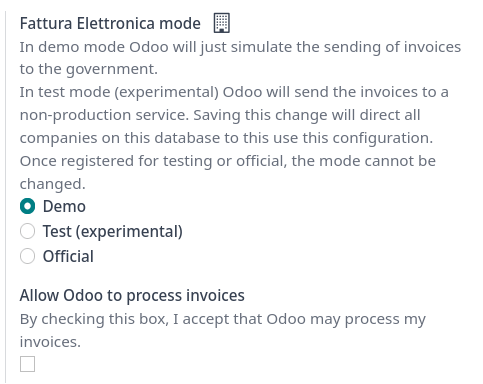
Since the files are transmitted through Odoo’s server before being sent to the SdI or received by your database, you need to authorize Odoo to process your files from your database. To do so, go to and scroll to the Italian Electronic Invoicing section.
There are three modes available:
- 演示This mode simulates an environment in which invoices are sent to the government. In this mode, invoices need to be manually downloaded as XML files and uploaded to the AdE’s website.
- Test (experimental)This mode sends invoices to a non-production (i.e., test) service made available by the AdE. Saving this change directs all companies on the database to use this configuration.
- OfficialThis is a production mode that sends your invoices directly to the AdE.
选择模式后,您需要通过勾选 允许 Odoo 处理发票 接受**条款和条件**,然后 保存。现在您可以在 Odoo 会计中记录交易。
警告
Selecting either Test (experimental) or Official is irreversible. For example, once in Official mode, it is not possible to select Test (experimental) or Demo. We recommend creating a separate database for testing purposes only.
注解
When in Test (Experimental) mode, all invoices sent must have a partner using one
of the following fake Destination Code given by the AdE: 0803HR0 - N8MIMM9 - X9XX79Z. Any real production Codice Destinario
of your customers will not be recognized as valid by the test service.
处理
The submission of invoices to the SdI for Italy is an electronic process used for the mandatory transmission of tax documents in XML format between companies and the AdE to reduce errors and verify the correctness of operations.
注解
您可以通过SdI状态字段查看发票的当前状态。XML文件附在发票上。
XML Documents creation
Odoo 以AdE(税务局)要求的 FatturaPA 格式生成所需的 XML 文件作为发票的附件。选择所需的发票后,点击发送按钮。
当弹出窗口打开时,可以选择执行的操作。生成XML文件会生成附件。
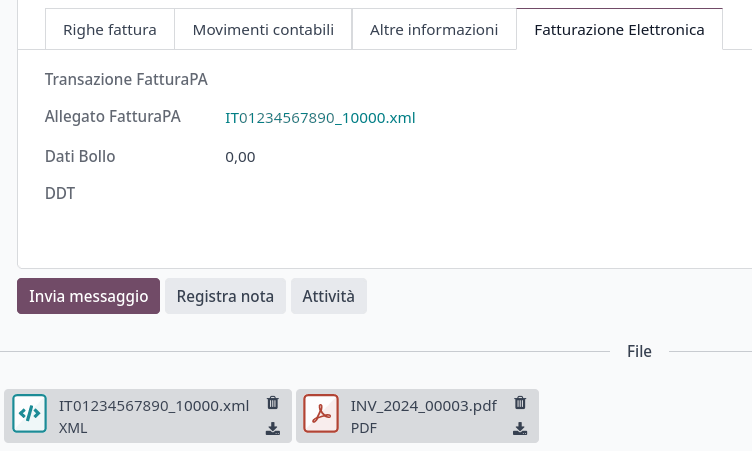
XML文件以及PDF文件可以在发票的附件中找到。
After choosing the desired actions, click send.
提交至SDI
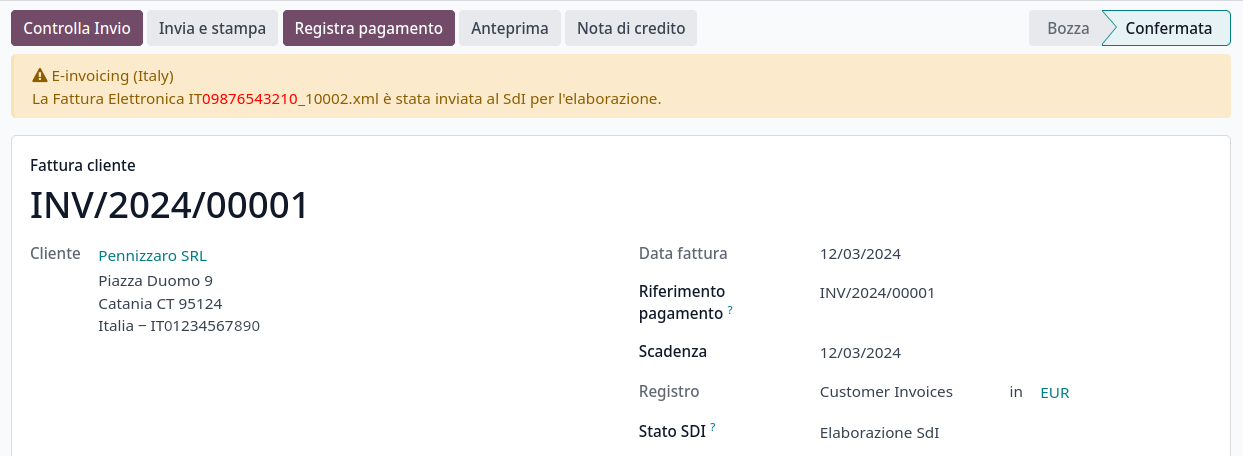
The Send to Tax Agency sends the attachment to the Proxy Server, which gathers all requests and then forwards them via a WebServices channel to the SdI. Check the sending status of the invoice through the Check Sending button at the top of the invoice’s view.
SDI处理
The SdI receives the document and verifies for any errors. At this stage, the invoice is in the SdI Processing state, as shown on the invoice. The invoice also gets assigned a FatturaPA Transaction number that is shown in the Electronic Invoicing tab. The checks may take variable time, ranging from a few seconds up to a day, depending on the queue of invoices sent throughout Italy.
接受
If the document is valid, it is recorded and considered fiscally valid by the AdE, which will proceed with archiving in Substitute Storage (Conservazione Sostitutiva) if explicitly requested on the Agency’s portal.
警告
Odoo does not offer the Conservazione Sostitutiva requirements. Other providers and AdE supply free and certified storage to meet the specifications requested by law.
The SdI Destination Code attempts to forward the
invoice to the customer at the provided address, whether it is a PEC email address or a
SdI Destination Code for their ERP’s WebServices
channels. A maximum of 6 attempts are made every 12 hours, so even if unsuccessful, this process can
take up to three days. The invoice status is Accepted by SDI, Forwarding to Partner.
Possible Rejection
The SdI may find inaccuracies in the compilation, possibly even formal ones. In this case, the invoice is in the SDI Rejected state. The SdI’s observations are inserted at the top of the Invoice tab. To resolve the issue, it is sufficient to delete the attachments of the invoice, return the invoice to Draft, and fix the errors. Once the invoice is ready, it can be resent.
注解
要重新生成 XML,必須刪除 XML 附件和 PDF 報告,以便它們隨後一起重新生成。這確保兩者始終包含相同的資料。

Forwarding Completed
發票已交付給客戶;但是,您仍然可以透過電子郵件或郵寄將副本以 PDF 形式發送給客戶。其狀態為已被 SDI 接受,已交付給合作夥伴。
If the SdI cannot contact your customer, they may not be registered on the AdE portal. In this case, just make sure to send the invoice in PDF via email or by mail. The invoice is then in the Accepted by SDI, Partner Delivery Failed state.
Tax Integration
When you receive a vendor bill, either from SdI, from paper or from an imported XML file, the Tax Agency might request that you send some tax information integration back to the SdI. It happens when a transaction that was tax exempt becomes taxable for any reason.
Example
以下是一個非詳盡列表:
- 作為買方,您必須為購買的商品繳納稅款並整合稅務資訊。反向收費稅。
- As a PA business buyer, you have to pay taxes and integrate tax information. Be sure that you replace the 0% Sale Taxes on the vendor bill you received with the correct Split Payment taxes.
- 自用作為企業主,當您將原本為企業購買的資產用於個人用途時,您必須繳納最初作為企業成本扣除的稅款。
Odoo 可能会检测到您的供应商账单可以被解释为需要税务整合的文档类型,具体详见Document Types部分。
重要
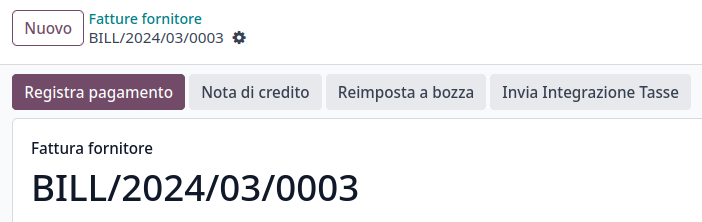
Be sure that you replace the 0% Sale Taxes on the vendor bill you received with the ones you’re supposed to pay to the AdE. A button then appears on the top of the single vendor bill form to send them.
點擊發送稅務整合按鈕時,會生成適當文件類型的 XML 檔案,附加到帳單上,並像發票一樣發送。
Document Types
The SdI requires businesses to send customer invoices and other documents through the EDI.
以下文件類型代碼在技術上都標識不同的業務用例。
TD01 - Invoices
This represents the standard domestic scenario for all invoices exchanged through the SdI. Any invoice that doesn’t fall into one of the specific special cases
is categorized as a regular invoice, identified by the Document Type TD01.
TD02 - Down payments
**預付款**發票以不同的文件類型代碼 TDO2 導入/導出,而不是常規發票。導入發票後,將建立常規供應商帳單。
如果滿足以下條件,Odoo 將交易導出為 TD02:
It is an invoice;
所有發票行都與預付款銷售訂單行相關。
TD04 - Credit notes
It is the standard scenario for all credit notes issued to domestic clients, when we need to
formally acknowledge that the seller is reducing or cancelling a previously issued invoice, for
example, in case of overbilling, incorrect items, or overpayment. Just like invoices, they must be
sent to the SdI, their Document Type TD04
TD07, TD08, TD09 - Simplified Invoicing
簡化發票(TD07)、貸項通知單(TD08)和借項通知單(TD09)可用於證明 400 歐元以下(含增值稅)的國內交易。其狀態與常規發票相同,但資訊要求較少。
要建立簡化發票,必須包括:
Customer Invoice reference: unique numbering sequence with no gaps;
Invoice Date: issue date of the invoice;
Company Info: the seller’s full credentials (VAT/TIN number, name, full address);
VAT: the buyer’s VAT/TIN number (on the partner form);
總計:發票的總**金額**(含增值稅)。
在EDI(電子資料交換)中,如果滿足以下條件,Odoo 將發票導出為簡化發票:
It is a domestic transaction (i.e., the partner is from Italy);
Your company’s required fields (VAT Number or Codice Fiscale, Fiscal Regime, and full address) are provided;
The partner’s address is not fully specified (i.e., it misses the City or the ZipCode);
含增值稅的總金額**少於** 400 歐元。
注解
400 欧元的门槛在`2019 年 5 月 10 日 Gazzetta Ufficiale <https://www.gazzettaufficiale.it/eli/id/2019/05/24/19A03271/sg>的法令`_中定义。我们建议您核实当前官方数值。
TD16 - Internal Reverse Charge
Internal reverse charge transactions (see 免税 and
逆向收费) are exported as TD16 if the following conditions are
met:
It is a vendor bill;
在发票行上至少有一项税指向以下税格 <localizations/italy/grids>`之一:`VJ6、
VJ7、VJ8、VJ12、VJ13、VJ14、VJ15、VJ16、VJ17
TD17 - Buying services from abroad
从欧盟和非欧盟国家购买服务时,外国卖家开具的服务发票为不含增值税的价格,因为在意大利不征税。增值税由意大利的买家缴纳。
Within the EU: the buyer integrates the invoice received with the VAT information due in Italy (i.e., vendor bill tax integration);
非欧盟:买家向自己开具发票(即自开票)。
如果满足以下条件,Odoo 将交易导出为TD17:
It is a vendor bill;
It has at least one tax on the invoice lines that targets the tax grid VJ3;
所有发票行要么将服务作为产品,要么使用以服务作为税务范围的税。
TD18 - Buying goods from EU
在欧盟内开具的发票遵循标准格式,因此只需对现有发票进行集成。
如果满足以下条件,Odoo 将交易导出为TD18:
It is a vendor bill;
The partner is from an EU country;
It has at least one tax on the invoice lines that targets the tax grid VJ9;
所有发票行要么将消耗品作为产品,要么使用以货物作为税务范围的税。
TD19 - Buying goods from VAT deposit
从外国供应商购买货物,但货物已在意大利的增值税仓库中。
From the EU: the buyer integrates the invoice received with the VAT information due in Italy (i.e., vendor bill tax integration);
非欧盟:买家向自己开具发票(即自开票)。
如果满足以下条件,Odoo 将交易导出为TD19:
It is a vendor bill;
It has at least one tax on the invoice lines that targets the tax grid VJ3;
所有发票行要么将消耗品作为产品,要么使用以货物作为税务范围的税。
TD24 - Deferred invoices
**递延发票**是在销售货物或提供服务**之后**开具的发票。**递延发票**最迟必须在单据所涉交货后的下一个月**15 天**内开具。
它通常是一份汇总发票,包含当月进行的多项货物或服务销售清单。企业可以将销售汇总到一张发票中,通常在月末开具以用于会计目的。延期发票是拥有经常性客户的批发商的默认选择。
如果货物由**承运人**运输,则每次交货都有相关的**运输文件(DDT)**或**运输单据**。延期发票**必须**注明所有**DDT**详细信息,以便更好地追踪。
注解
延期发票的电子开票需要l10n_it_stock_ddt模块。在这种情况下,电子发票中使用专用的文档类型TD24。
如果满足以下条件,Odoo 将交易导出为TD24:
It is an invoice;
它与DDT日期与发票开具日期不同的交付相关联。
TD28 - 圣马力诺
发票
圣马力诺和意大利在电子发票操作方面有特殊协议。因此,发票遵循常规逆向征税规则。您可以根据发票类型使用适当的文档类型:TD01、TD04、TD05、TD24、TD25。Odoo 不强制执行其他要求。但是,国家要求用户:
Select a tax with the Tax Exemption Kind set to
N3.3;Use the generic SdI Destination Code
2R4GTO8.
然后,发票由圣马力诺的专门办公室路由到正确的企业。
供应商账单
When a paper bill is received from San Marino, any Italian company must submit that invoice
to the AdE by indicating the e-invoice’s Document Type
field with the special value TD28.
如果满足以下条件,Odoo 将交易导出为TD28:
It is a vendor bill;
It has at least one tax on the invoice lines that targets the tax grids VJ;
合作伙伴的**国家**为**圣马力诺**。
Public Administration Businesses (B2G)
PA businesses are subjected to more control than private businesses as they handle public money coming from taxpayers. The EDI process adds some steps to the regular one, as PA businesses can accept or refuse invoices.
注解
PA businesses have a 6-digit long Destination Code, also called CUU, that is mandatory, PEC address cannot be used in this case.
CIG, CUP, DatiOrdineAcquisto
为确保公共行政机构付款的有效可追溯性,向公共行政机构开具的电子发票必须包含:
The CIG, except in cases of exclusion from traceability obligations provided by law n. 136 of August 13, 2010;
如果发票与公共工程相关,则需要CUP(Codice Unico di Progetto,项目唯一代码)。
If the XML file requires it, the AdE can only proceed payments of electronic invoices when the XML file contains a CIG and CUP.
注解
CUP(Codice Unico di Progetto,项目唯一代码)和CIG(Codice Identificativo Gara,招标识别代码)必须包含在 DatiOrdineAcquisto、DatiContratto、DatiConvenzione、DateRicezione 或 DatiFattureCollegate XML 标签之一中。
这些对应于电子发票 XML 文件中名为CodiceCUP和CodiceCIG的元素,其表格可在政府网站上找到。
Split Payment
分割付款机制的行为与逆向收费非常相似。
Example
When an Italian company bills a PA business - for example, cleaning services for a public building - the PA business self-reports the VAT to the Tax Agency themselves, and the vendor just has to select the appropriate tax with the right Tax Exemption for their invoice lines.
The specific Scissione dei Pagamenti fiscal position is available to deal with partners belonging to the PA.
处理
合格的电子签名
Invoices and bills intended for the PA must include a qualified electronic signature when submitted through the SdI. This signature is automatically applied in the XAdES format when the invoice’s partner has a 6-digit long Destination Code (which indicates a PA business).
注解
当此类发票传输到税务局时,生成的 .xml 文件会在 Odoo 服务器上签名,返回到资料库,并自动附加到发票。
Acceptance or Refusal
After receiving the invoice through the SdI, the PA business has 15 days to accept the invoice. If it does, then the process ends here. If the PA business refuses the invoice, it is still considered valid once it is accepted by the SdI. You then have to issue a credit note to compensate and send it to the SdI.
Expired Terms
If the PA business doesn’t reply within 15 days, you need to contact the PA business directly, sending them both the invoice and the received deadline notification by email. You can make an arrangement with them and manually set the correct SdI State on your invoice.
Point of Sale fiscal printers
警告
Fiscal printers are distinct from ePOS printers. The IP address for a fiscal printer should not be entered in the ePOS IP address settings.
财政法规要求使用经认证的 RT 设备(如 RT 打印机或 RT 服务器)以确保符合规定的销售收据和与税务机关的安全通信。这些设备每天自动传输财务数据。RT 打印机专为单个 POS 终端设计,处理交易、打印收据并向相关部门报告,确保数据完整性和合规性。
模拟模式
警告
由于模拟模式会向相关部门发送数据,因此仅应在打印机配置过程的最开始启用。一旦打印机切换到生产模式,就无法恢复到模拟模式。
要使用 Odoo 测试财务打印机设置,请按如下方式在模拟模式下配置财务打印机:
确保财务打印机处于默认状态:打印机已开启、启动周期已完成且没有正在进行的交易。
键入
3333。按Chiave。屏幕显示Scelta Funzione。
键入
14。屏幕显示Apprendimento。键入
62。屏幕显示Simulazione。要将no改为si,请按X。
要确认,请按Contante。
按Chiave。
要为生产配置打印机,请重复上述步骤。
注解
要测试打印机配置,必须首先获取物理设备并向相关部门注册。
设置打印机以配合 Odoo 使用
财务打印机只能在本地网络中工作。这意味着打印机和运行 Odoo POS 的设备必须连接到同一个网络。
财务打印机通常默认配置为使用 HTTP。为确保与 Odoo 兼容,必须更新设置,使打印机支持 HTTPS。可使用 EpsonFPWizard 配置软件或连接到打印机的键盘进行更新。
要使用键盘设置财务打印机,请按照以下步骤操作:
确保财务打印机处于默认状态:打印机已开启、启动周期已完成且没有正在进行的交易。
键入
3333。按Chiave。屏幕显示Scelta Funzione。
输入
34。屏幕显示 网页服务器。按 3 次 Contante 直到屏幕显示 网页服务器:SSL。
要将数值
0变成1,请按 X。要确认,请按 Contante 3 次。
按Chiave。
然后,使用运行 Odoo POS 的设备登录打印机,以便它识别打印机的证书。
要批准并安装打印机的证书,请执行以下步骤:
打开网络浏览器,在地址栏中输入
https://<ip-of-your-printer>,即可访问打印机。出现 警告:潜在安全风险 安全消息。点击 高级 显示证书批准选项。
点击 继续 验证证书。
然后,为确保 Odoo POS 配置了财务打印机,进入 。在 已连接设备 部分,在 意大利财务打印机 IP 地址 中添加 IP 地址,并启用 使用 HTTPS。
Ri.Ba.(Ricevuta Bancaria)
Ri.Ba. is a payment method widely used in Italy where vendors request payments through their bank, which forwards the request to the customer’s own bank and takes responsibility for the collection. This enables payment automation and reduces risks for the vendor.
供应商通常会将包含付款列表的固定格式文本文件上传到银行的网络门户。
注解
Ri.Ba. are exclusively for domestic payments in Italy. For recurring international payments, please use SEPA Direct Debt (SDD)
配置
检查
l10n_it_riba模块是否已安装。Go to and select the company that will use Ri.Ba..
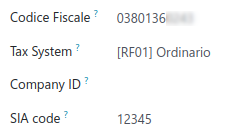
填写必填的SIA 代码。
注解
SIA 代码 用于识别意大利银行网络内的企业,并通过特定的支付方式接收资金。它由一个字母和四位数字组成(如 T1234),通常可在银行门户网站上找到或通过联系银行获得。
确保公司的银行账户拥有意大利 IBAN 号码。
其他资料
如何配置 银行账户
接受发票的 Ri.Ba.
Payments of type Ri.Ba. can be registered from the Invoices ().
重要
确保您的发票涉及的业务伙伴拥有带有意大利 IBAN 的银行账户。
然后,所有付款必须分组到**批量付款**中。
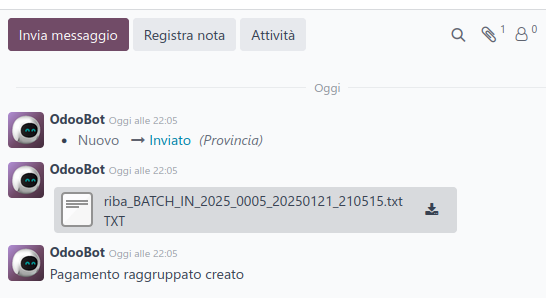
Once you press the Validate button for the Batch Payment, the Ri.Ba. file is generated and attached to the Batch Payment, so you can download it and upload it through your bank’s web portal.