
多员工管理
Odoo Point of Sale (POS) offers a Log in with Employees feature, allowing multiple users to log into a POS session. Activating this feature enables the following actions:
选择可以 登录 POS 的特定用户。
Assign basic or advanced permissions to these users.
配置
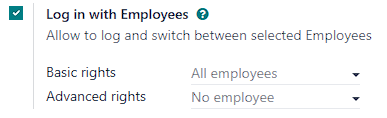
Access the multi-employee setting from the PoS Interface section of the POS settings. Then,
激活 以员工身份登录 功能。
在 基本权利 字段中添加具有**基本 POS 功能**访问权限的员工。
在 高级权利 字段中添加具有**扩展 POS 功能**的员工。
注解
Leaving the Basic rights field empty allows all employees to log in.
若将 高级权限 字段留空,则仅 Odoo 用户可获得扩展权限。
小技巧
点击销售点(POS)卡片右上角的 :icon:`fa-ellipsis-v`( :guilabel:`垂直省略号`)按钮,然后点击 编辑,即可从销售点(POS)主控制面板访问该设置。
其他资料
Employees with basic rights can perform the following actions within the POS:
Session management:
Lock the current POS session.
销售交易:
Access past and current order history.
定价与折扣:
Manually select another pricelist.
Enter promotional codes.
Manually change a product’s price.
Switch between fiscal positions.
In addition to the basic rights, employees with advanced rights can also:
访问 Odoo 后台界面。
Create products.
注解
An employee with advanced POS rights who is not a database user cannot access the backend.
使用指南
正在登录
启用**员工登录**功能后,员工必须登录才能 开启POS会话、点击:icon:fa-users`图标(:guilabel:`用户)从授权用户列表中选择姓名,或在 输入PIN码`字段中输入 :ref:`个人PIN码 <pos/employee_login/pin>。

在 :ref:`会话进行中 <pos/session-start>`需要切换用户时,请点击POS界面右上角当前登录员工的姓名,然后选择要切换到的用户。
小技巧
在没有扫描仪的情况下,点击 )图标,使用网络摄像头扫描条形码。
使用工牌登录
员工可以使用工牌登录。要配置基于工牌的登录,请在**员工**模块中为员工档案分配唯一的工牌ID:
导航至**员工**模块。
打开特定员工的表单视图。
前往 设置 标签页。
:guilabel:`出席/PoS/制造`类别提供两个选项:
在 :guilabel:` 工牌 ID` 字段中手动输入任何工牌 ID。
点击 生成 自动创建唯一的工牌 ID。
点击 打印工牌 生成指定工牌 ID 的条形码。
要在打开的 POS 会话中使用工牌切换用户,必须先锁定会话。要执行此操作,请点击 图标(锁)返回登录屏幕。然后,新员工可以扫描工牌登录。
添加 PIN 码
为提高安全性,可强制员工在每次登录 POS 会话时输入 PIN 码。为员工设置 PIN 码的步骤如下:
导航至**员工**模块。
打开相关员工的表单视图。
前往 设置 标签页。
在 考勤/POS/制造 类别的 PIN 码 字段中输入所需的数字代码。
注解
PIN 码必须仅由数字序列组成。