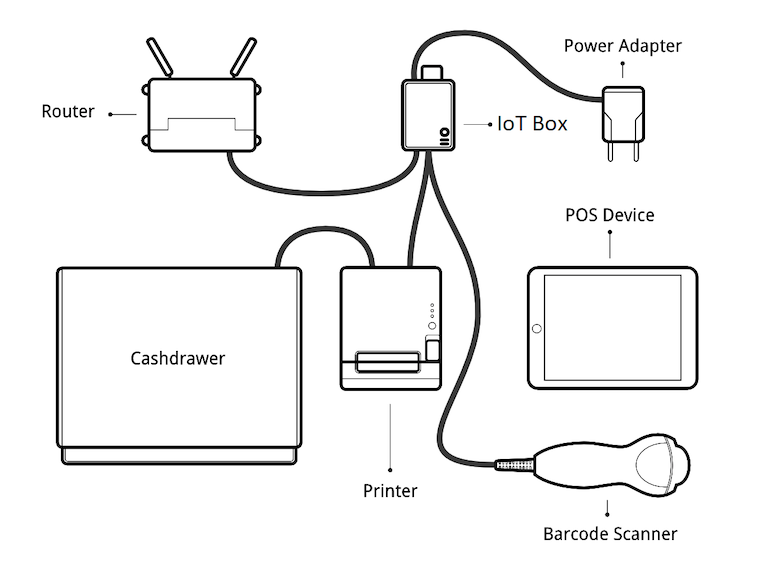
物联网系统连接
将 POS 与 物联网系统 连接:
确保在数据库中安装了销售点和物联网(IoT)应用程序。
设置 物联网盒子 或 Windows 虚拟物联网 。
将外围设备连接到物联网系统:
设备
指令
打印机
将支持的收据打印机连接到 USB(通用串行总线) 端口或网络,并打开电源。请参阅 订单打印 。
钱箱
应使用 RJ25 电缆将钱箱连接到打印机。
条形码扫描器
条形码扫描仪必须以 `ENTER`字符(关键码 28)结束条形码,这样条形码扫描仪才能兼容。这很可能是条形码扫描仪的默认配置。
比例
Connect the scale and power it on. Refer to 连接电子秤.
客户显示器
Connect a screen to the IoT box to display the PoS order. Refer to 连接屏幕.
支付终端
连接过程取决于终端。请参阅 :doc:` 支付终端文档</applications/sales/point_of_sale/payment_methods>`。
Access the POS settings and select your POS, or click the vertical ellipsis button (⋮) on a POS card and click Edit. Scroll down to the Connected Devices section, enable IoT Box, then select the devices to be used for the POS. Click Save.
小技巧
Click IoT Devices to access the list of 设备 for your POS and view their connection status. Click a card to access the device’s form.
设置示例