
墨西哥
模块
以下模块会自动安装墨西哥本地化版本:
名称 |
技术名称 |
描述 |
|---|---|---|
墨西哥 - 会计 |
|
The default fiscal localization package adds accounting characteristics for the Mexican localization, such as: the most common taxes and the chart of accounts – based on the SAT account grouping code. |
墨西哥电子数据交换 |
|
Includes all the technical and functional requirements to generate and validate electronics documents — based on the technical documentation published by the SAT. This allows you to send invoices (with or without addedums) and payment complements to the government. |
Odoo 墨西哥本地化报表 |
|
为墨西哥电子会计调整报表:包括会计科目表、试算平衡表和 DIOT。 |
墨西哥 - 第13个月试算平衡表 |
|
用于创建结账分录(也称为*第13个月凭证*)所必需。 |
Odoo 墨西哥 XML 凭证导出 |
|
允许导出用于强制性审计的日记账凭证 XML 文件。 |
以下模块是可选的。建议*仅当*满足业务的特定需求时才 安装 它们。
名称 |
技术名称 |
描述 |
|---|---|---|
墨西哥电子数据交换(高级功能) |
|
在发票上添加外贸补充信息(向国外销售产品的法律要求)。 |
墨西哥 - 电子货运指南 |
|
Lets you create a Carta Porte: A bill of lading that proves to the government you are sending goods between A & B with a signed electronic document. |
Odoo 墨西哥库存/清关本地化 |
|
允许在电子单据中管理与清关成本相关的报关号。 |
销售订单的 CFDI 4.0 字段 |
|
向 销售 模块添加额外字段,以符合墨西哥电子发票法规要求。 |
POS 墨西哥本地化 |
|
向 POS 模块添加额外字段,以符合墨西哥电子发票法规要求。 |
电商的墨西哥本地化 |
|
向 电商 模块添加额外字段,以符合墨西哥电子发票要求。 |
Employees - Mexico |
|
Adds extra fields to the Employees module to comply with local information for employees. |
Mexico - Payroll with Accounting |
|
Adds the required rules and parameters to manage local payroll calculation with the Payroll app. |
视频教程
关于墨西哥本地化的视频教程也已提供。本页面涵盖的基本工作流程和大多数主题均有视频格式,请查看以下内容:
本地化概述
Odoo 的墨西哥本地化模块允许根据 SAT 对 CFDI 4.0 版本 的规范签署电子发票,这是自 2022 年 1 月 1 日起的法律要求。这些模块还添加了相关的会计报告,包括 DIOT,支持外贸业务,并支持创建货运指南。
注解
为了在 Odoo 中电子签署任何文档,必须安装“电子签名”应用。
要求
在 Odoo 中配置墨西哥本地化模块之前,必须满足以下要求:
已在 SAT 注册并拥有有效的 RFC。
拥有有效的 `数字印章证书 <https://www.gob.mx/sat/acciones-y-programas/certificado-de-sello-digital>`_(CSD)。
选择一个 PAC。目前,Odoo 与以下 PACs 合作:Solución Factible <https://solucionfactible.com/contenido/productos/timbrado/general#dos>、Quadrum <https://cfdiquadrum.com.mx/odoo/> 和 SW Sapien - Smarter Web <https://info.sw.com.mx/sw-smarter-odoo>_。
公司
安装正确的模块后,下一步是验证公司是否配置了正确的数据。请前往 ,然后选择要配置的公司。
在打开的表单中输入完整的 地址,包括:邮政编码、州、国家/地区 和 |RFC|(税务编号)。
根据 CFDI 4.0 的要求,公司主要联系人的姓名**必须**与在 SAT 注册的商业名称完全一致,且不包含法律实体缩写。邮政编码 的要求也同样。
重要
从法律角度来看,墨西哥公司**必须**使用当地货币(MXN)。如需使用其他货币,请将 MXN 设为默认货币,并使用 价格表 来代替。
接下来,请前往 ,并滚动到 墨西哥电子发票 部分。在 税务管理服务局(SAT)`下,从下拉列表中选择适用于公司的 :guilabel:`税收制度,然后点击 保存。
小技巧
若要测试墨西哥本地化功能,请将公司配置为墨西哥境内的真实地址(包括所有字段)。添加 EKU9003173C9 作为 税务编号,并添加 ESCUELA KEMPER URGATE 作为 公司名称。对于 税收制度,请使用 法人实体通用法。
联系人
注解
Install the Contacts application to access contact records.
To create a contact that can be invoiced, go to . Then, enter the contact name, full Address including the ZIP code, State, Country, and RFC (Tax ID).
重要
As with your own company, all contacts must have their correct business name registered in the SAT. This also applies to the Fiscal Regime, which needs to be added in the Sales & Purchase tab.
警告
设置了 |RFC|(税务编号)但未配置 国家/地区,可能会导致发票信息不正确。
税
因素类型
Both the SAT Tax Type and Factor Type fields are pre-loaded in the default taxes. If new taxes are created, these fields must be set. To do so, go to , then fill both fields in the Advanced Options tab for all tax records, with the Tax Type set as Sales.
Odoo supports four groups of SAT Tax Types: IVA, ISR, IEPS, and Local.
小技巧
墨西哥管理两种不同的 0% 增值税以适应两种场景:
For 0% VAT, set the Factor Type as Tasa
For VAT Exempt, set the Factor Type as Exento
征税对象
One requirement of the CFDI 4.0 is that the resulting XML file handles the breakdown of taxes of the operation in accordance with the regulation. There are three different possible values that are added in the XML file:
01: Not subject to tax: This value is added automatically if the invoice line doesn’t contain any taxes.02: Subject to tax: This is the default configuration of any invoice line that contains taxes.03: Subject to tax and not forced to break down: This value can be triggered on demand for certain customers to replace the value02.
To use the 03 value for a contact, navigate to the contact’s Sales & Purchase tab, and
activate the No Tax Breakdown checkbox under the Fiscal Information section.
重要
:guilabel:`无税款明细`值**仅**适用于特定的财务制度和/或税种。在进行任何修改之前,请先咨询您的会计师,确认是否需要为您的业务使用这个功能。
其他税项配置
墨西哥本地化使用 现金制税金。登记付款时,Odoo 会执行将税金从 现金制过渡账户 转移到发票或账单行上设置的税金记录中 定义 标签页内配置的账户的操作。在此操作中,重新分类税金时,日记账分录会使用一个税基账户:( 899.01.99 基于现金流税基账户)。请勿删除此账户。
产品
To configure products, go to , then select a product to configure, or Create a new one. In the Accounting tab, in the UNSPSC Product Category field, select the category that represents the product. The process can be done manually, or through a bulk import.
注解
所有产品都需要关联一个 SAT 编码,以防止验证错误。
电子发票
PAC凭证
在通过 SAT 处理完您的 私钥(CSD) 后,您必须在开始从 Odoo 创建发票之前,直接向您选择的 认证服务提供商(PAC) 注册。
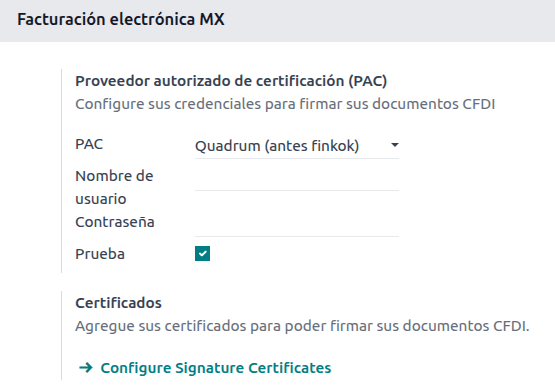
一旦您在任一提供商处创建了账户,请前往 ,并导航到 墨西哥电子发票`部分。在 :guilabel:`授权认证提供商(PAC)`部分,输入您的 |PAC| 名称及您的凭据(:guilabel:`PAC 用户名 和 PAC 密码)。
小技巧
若要在没有凭据的情况下测试电子发票功能,请勾选 墨西哥 PAC 测试环境 复选框,并选择 Solucion Factible 作为 PAC。在测试环境中,无需添加用户名或密码。
.cer 和 .key 证书
公司的 数字证书 必须在 证书 部分上传。要执行此操作,请前往 。
在 管理您的证书 下,点击 密钥`链接以访问 :guilabel:`密钥 列表视图。点击 创建,上传数字 密钥文件`(:file:.key 文件),为密钥添加一个 :guilabel:`名称,并输入 私钥密码。
从 中,选择 证书 以访问 证书 列表视图。点击 创建,上传数字 证书`(:file:.cer`文件),为证书添加一个 名称,并从下拉菜单中选择上一步创建的 私钥。
注解
证书 记录上的 证书密码 和 公钥 字段是可选的。
会计
电子发票
Odoo 中的发票流程基于 SAT 电子发票的附件 20 <http://omawww.sat.gob.mx/tramitesyservicios/Paginas/anexo_20.htm>`_ 版本 4.0。
客户开票
要从 Odoo 开具发票,必须使用 标准开票流程 创建客户发票。
当文件处于草稿模式时,可以对其进行更改(例如,可以添加客户可能需要的正确 付款方式 或 使用方法)。
After clicking on Confirm in the customer invoice, click the Send button to process the invoice with the government. Make sure that the CFDI checkbox is marked.
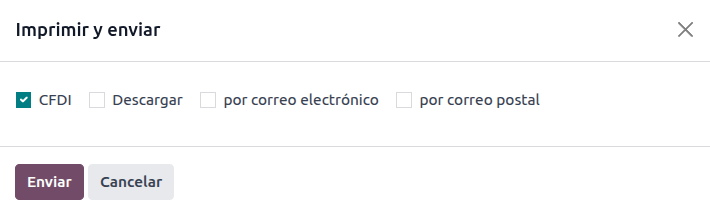
从政府收到已签署的文档后,财务流水号 字段将出现在文档上,XML 文件将同时出现在 CFDI 标签页和沟通栏的附件中。
如果在客户联系人记录中配置了电子邮件地址,勾选 通过电子邮件发送 和 :guilabel:`CFDI`复选框会将 XML 和 PDF 文件一起发送。
要在本地下载 PDF 文件,请点击 打印 按钮。
小技巧
点击 更新 SAT 状态 时,发票上的 SAT 状态 字段将确认 XML 文件是否在 SAT 中 已验证。
在测试环境中,将始终显示 未找到 的消息。
贷记单
发票属于单据类型 “I”(Ingreso),而贷记单属于单据类型 “E”(Egreso)。
对 信用证的标准流程 的唯一补充是,作为 SAT 的要求,信用证和发票之间必须有通过财务对开单的关系。
由于这一要求,字段 CFDI Origin 用 01| 添加了这一关系,后面是原始发票的财务对开页。
小技巧
要自动添加 CFDI Origin 字段,请使用发票上的 添加贷方票据 按钮,而不是手动创建。
付款
付款政策
墨西哥本地化的一项补充是 付款政策 字段。根据 SAT 文档 <https://www.sat.gob.mx/consultas/92764/comprobante-de-recepcion-de-pagos>_,付款有两种类型:
PUE (一次性付款)
PPD (分期或延期付款)
The difference lies in the Due Date or 付款条件和分期付款计划 of the invoice.
To configure PUE invoices, navigate to , and either select an invoice Due Date within the same month, or choose Payment terms that do not imply changing the due month (i.e., Immediate Payment, or 15 Days or 21 Days, as long as they fall within the current month).
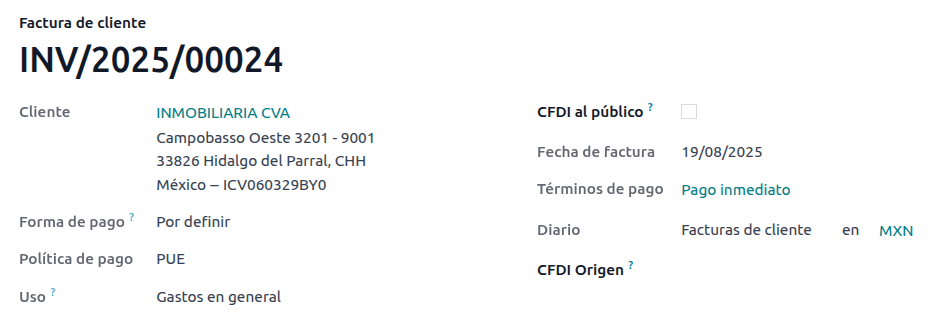
要配置 PPD 发票,请导航至 ,然后选择一张 到期日 在下个月第一天之后的发票。如果您的 付款期限 在下个月到期,这也适用。
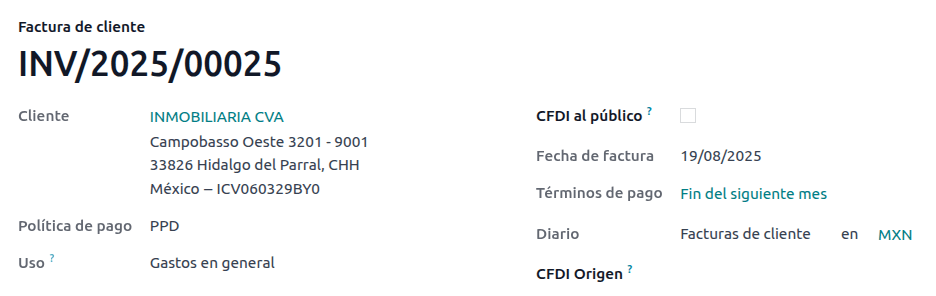
支付流
这两种情况下,Odoo 中的付款流程 是相同的。主要区别在于,根据法律规定,与 PPD 发票相关的付款需要以 “P”(付款)单据类型发送给政府。
如果付款与 PUE 发票相关,可以通过付款弹窗进行登记,并与相应的发票关联。要执行此操作,请前往 ,选择一张发票。然后,点击 付款 按钮打开付款弹窗,设置 付款方式`和其他字段,并点击 :guilabel:`创建付款。
尽管 PPD 发票的流程相同,但创建 电子单据 的补充要求意味着需要满足一些额外条件才能正确地将单据发送给 SAT。
从法律角度看,PPD 发票**必须**包含收到付款的具体 付款方式。因此,付款方式 字段不能设置为 待定义,因此选择该选项时该字段将变为不可见。
注解
如果需要银行账号,请在客户联系人记录的 会计 标签页中添加。
具体配置见 SAT <http://omawww.sat.gob.mx/tramitesyservicios/Paginas/anexo_20.htm>`_ 的附件 20。通常,银行账户 需要 10 或 18 位数字用于转账,16 位数字用于信用卡或借记卡。
如果一个已完全核销的付款与一张具有 财务流水号 的发票相关,则会显示 更新付款 按钮。点击 更新付款 按钮,将自动向政府发送**付款补充信息** XML 文件,并在发票和付款的 CFDI 标签页中显示该文件。
Similar to an invoice or credit note, the PDF and XML can be sent to the final customer. To do so, click the (gear) icon to open the actions drop-down menu and select Send receipt by email.
开票取消
可以取消发送到 SAT 的电子数据交换文件。根据 Reforma Fiscal 2022,自 2022 年 1 月 1 日起,有两项要求:
所有取消请求都需要提供*取消原因*。
发票创建 24 小时后,必须请求客户批准取消。如果 72 小时内未收到回复,取消将自动处理。
发票取消可以基于以下原因之一进行:
01 - 发票开具有误(有相关单据)
02 - 发票开具有误(无需替换)
03 - 业务未执行
04 - 与全局发票相关的记名业务
要发起取消,请前往 ,选择要取消的已过账发票,然后点击 请求取消。接着,根据取消原因,参考 取消原因 01 或 取消原因 02、03 和 04 部分。
小技巧
或者,也可以从 CFDI 标签页请求取消,点击行项目上的 取消。
注解
如果在锁定期间请求取消,CFDI 将被取消,但会计凭证不会。
如果客户拒绝取消,发票取消行项目将从 CFDI 标签中删除。
取消原因 01
在 :guilabel:请求 CFDI 取消 弹出窗口中,从 :guilabel:原因 字段选择 :guilabel:01 - 发票开具有误(有相关单据),然后点击 :guilabel:创建替换发票 以创建新的草稿发票。这张新的草稿发票将替换之前的发票以及相关的 CFDI。
确认草稿并发送发票。
返回到初始发票(即您最初请求取消的那张发票)。请注意,被替换为 字段会出现,并引用新的替换发票。
点击 请求取消。在 请求 CFDI 取消 弹出窗口中,原因 字段会自动选中 01 - 发票开具有误(有相关单据) 选项。
点击 确认。
随后将生成发票取消,并在 CFDI 标签页中显示原因行项目。

注解
当使用 01 - 发票开具有误(有相关单据) 作为取消原因时,财务流水号 字段中会出现 04| 前缀。这是 Odoo 用于完成取消操作的内部前缀,并不意味着 取消原因是 04 - 与全局发票相关的记名业务。
取消原因 02、03 和 04
在 请求 CFDI 取消 弹出窗口中,选择所需的取消 原因 并 确认 取消。
确认后,将生成发票取消,并在 :guilabel:`CFDI`标签页中显示原因行项目。
注解
如果 SAT 状态 变回**已验证**,可能是由于以下三个原因之一:
The invoice is labeled as No Cancelable in the SAT Website. due to the fact that it has a valid related document: Either another invoice linked with the CFDI Origin field or a Payment Complemement. If so, you need to cancel any other related document first.
取消请求仍在由 SAT 处理中。如果是这样,请等待几分钟再试。
最终客户需要在其 税务信箱 中拒绝或接受取消请求。这可能需要长达 72 小时,如果取消请求被拒绝,您将需要重复此过程。
对于取消原因**02**、03 和 04,创建替换发票 按钮将被 确认 按钮取代,该按钮会立即请求取消。
当前发票的 状态 和 :guilabel:`取消原因`均可在 :guilabel:`CFDI`标签页中找到。

付款取消
要取消 付款补充信息,请转到相关发票的 CFDI`标签页,然后点击付款补充信息行上的 :guilabel:`取消。
与发票类似,前往付款单并点击 更新 SAT 状态,以便将 SAT 状态 和 状态 更改为 已取消。
注解
Just like invoices, when creating a new payment complement, you can add the relation of the
original document, by adding a 04| plus the fiscal folio in the CFDI Origin field.
This action cancels the invoice and marks the Reason as 01 - Invoice
issued with errors (with related document).
开票特殊用例
多币种
墨西哥的 主货币 是 MXN。虽然这对所有墨西哥公司都是强制性的,但可以发送和接收不同货币的发票(和付款)。要启用 多币种 功能,请前往 ,然后在 自动汇率 部分将 服务 设置为 [MX] 墨西哥银行。接着,根据您希望更新汇率的频率设置 间隔 字段。
这样,文档的 XML 文件将具有正确的汇率和总金额(外币和墨西哥比索)。
强烈建议为每种货币使用独立的 银行账户。
注解
每天自动更新汇率的货币仅为:美元、欧元、英镑、日元和人民币。
折扣
根据法律,发送给政府的电子单据不能包含负数行,否则可能引发错误。因此,当使用 礼品卡 或 忠诚计划 时,后续的负数行在 XML 中将被转换为普通的 折扣。
要进行此设置,请前往 并创建一个名为 折扣 的产品,确保它设置了有效的 税金`(通常为 16% 的 :guilabel:`增值税)。
After this, create and sign the invoice via CFDI, and add the Discounts product at the bottom. In the XML
the discount should be subtracted from the first invoice line available, Odoo will try to subtract
from each line the total amount in order until all the discount has been applied.
小技巧
必须为与 礼品卡 或 忠诚计划 相关的每个产品变体创建一个`折扣`和 UNSPSC 产品类别。
首付
A common practice in Mexico is the usage of down payments. It’s usage primarily consists of cases where you receive a payment for a good or service where either the product or the price (or both) hasn’t been determinated at the moment.
The SAT allows two diferent ways to handle this process: both of them involve linking all invoices to each other with the CFDI Origin field.
注解
此流程必须安装 销售 应用。
其他资料
配置
首先,前往 以创建产品 Anticipo(预付款)并进行配置。产品类型 必须为 服务,并使用 UNSPSC 类别 84111506 开票服务。
然后,进入 ,将 Anticipo 产品添加为默认产品。
方法 A
此方法包括创建预付款发票、创建总金额发票,最后为预付款总额创建一张货项通知单。
首先,创建一个包含总金额的销售订单,并从中创建预付款(使用百分比或固定金额均可)。然后,通过 CFDI 签署该单据,并登记付款。
当客户需要最终发票时,再次从同一销售订单创建。在 创建发票 ` 弹出窗口中,选择 :guilabel:`常规发票。确保*Anticipo* 产品的那一行。
小技巧
在墨西哥本地化中使用预付款时,请确保产品的 开票政策`为 :guilabel:`订购数量。否则将创建客户贷项通知单。
Then, copy the Fiscal Folio from the down payment invoice, and paste it into the
CDFI Origin of the final invoice, adding the prefix 07| before the value and sign
the document via CFDI.
Finally, create a credit note for the first invoice. Copy the Fiscal Folio from the
final invoice, and paste it in the CFDI Origin of the credit note, adding the prefix
07|. Then, sign the document via CFDI.
至此,所有电子单据都已相互关联。最后一步是全额支付新发票。在新发票的底部,您可以在 未结清信用 部分找到货项通知单 - 将其添加为付款。最后,通过 付款 弹窗登记剩余金额。
在销售订单中,所有三张单据都应显示为“收款中”。
方法 B
满足 SAT 要求的另一种更简单的方法是只开具首付款发票,并为余款开具第二张发票。这种方法将负数行作为折扣处理。
为此,请遵循与 方法 A 相同的过程,直到创建最终发票。不要删除包含*Anticipo*的行,而是将其他产品的 描述`重命名为包含文本`基于预付款余款的 CFDI。别忘了在最终发票的 CFDI 来源 字段中添加预付款发票的 财务流水号,并在前面加上前缀 07|。
Finally, sign the final invoice via CFDI.
XML 阅读器
在某些情况下,例如当您在其他软件中或直接在 SAT 上创建发票时,您可能希望将发票上传到 Odoo。XML 阅读器允许您从 XML 文件中提取数据。要执行此操作,请前往 ,在列表视图中,点击 上传 按钮选择任意数量的 XML 文件,草稿发票将自动创建。您也可以将文件从电脑拖拽到视图中来完成此操作。
草稿发票将提取 :guilabel:`客户信息`(如果不存在,将创建新联系人)、:guilabel:`产品行`(仅当已存在同名产品时),并计算所有税金和墨西哥本地化特有的额外字段。导入信息将显示在沟通栏中。
警告
根据发票的创建来源,XML 文件中的值可能与 Odoo 计算的总金额不同。**务必**仔细检查以此方式上传的任何文档。
以此方式创建的 客户发票 将能够创建*付款补充信息*,并且可以随时取消。如果您使用 打印 按钮,PDF 文档将包含所有相应信息。
这同样适用于 供应商账单。
小技巧
To retrieve the Fiscal Folio, drag and drop XML files for already created draft invoices.
CFDI 公开
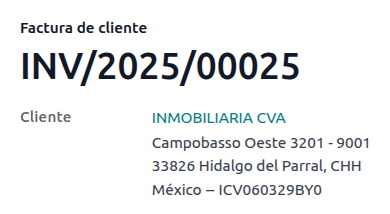
墨西哥政府要求所有销售的商品或服务都必须有发票支持。如果客户不需要发票或没有 RFC,则必须创建*向公众开具的 CFDI*,也称为”名义”发票。
A contact must be created and it must have a particular name. If the CFDI to Public checkbox in either a sales order or an invoice is checked, the final XML will override the data in the invoice contact and will add the following characteristics:
RFC:如果客户是本国客户,则为**XAXX010101000**;如果是外国客户,则为**XEXX010101000**
邮政编码:与公司的邮政编码相同
用途:S01 - 无财务影响
重要
If your contact Country is empty, the final invoice is considered as a CFDI to Public for national customers. A non-blocking warning will be displayed before signing the document.
如果最终客户不提供任何详细信息,请创建一个通用的 客户。名称不能是 PUBLICO EN GENERAL,否则会触发错误(例如,可以是`CLIENTE FINAL`)。
统一发票
如果在特定时间段结束时(根据您公司的法律需求和偏好,可能从每日到每两月不等),客户仍有未被标记为常规发票或个人*向公众开具 CFDI 发票*的销售业务,SAT 允许创建一张可包含所有业务的单一发票,称为*统一发票*。
注解
此流程必须安装 销售 应用。
其他资料
销售流程
First, it is necessary to create a special Journal created in with the purpose of keeping a separate sequence.
然后,确保所有需要签署的销售订单具有以下配置:
完成后,前往 ,选择所有相关的销售订单并按 创建发票。确保禁用 合并开票 复选框,然后点击 创建草稿发票。
Odoo 将重定向到发票列表。选择所有发票,在 操作 下拉菜单中选择 过账。再次选择所有已过账的发票,返回 操作 下拉菜单,选择 创建统一发票。
在向导中,选择专业会计师指定的 周期,然后按 创建。所有发票应在同一个 XML 文件下签署,并拥有相同的 财务流水号。
小技巧
点击 CFDI`标签页中的 :guilabel:`显示,可查看包含所有相关发票的列表。
点击:guilabel:
CFDI`标签页中的 :guilabel:`取消,可在 SAT 和 Odoo 中同时取消统一发票。
注解
以此方式创建的统一发票不会包含**PDF 文件**,因为其信息已存储在 Odoo 中,且无需向客户展示。
电子会计(报告)
在墨西哥,“电子会计<https://www.sat.gob.mx/aplicacion/42150/envia-tu-contabilidad-electronica>`_” 是指通过电子手段保存会计记录和条目,并每月通过 SAT 网站输入会计信息的义务。
它由三个主要 XML 文件组成:
当前正在使用的会计科目表的最新列表
月度试算平衡表,以及结账分录报告,也称为:第13个月试算平衡表
总分类账中日记账分录的导出(除非强制审计,否则为可选)
生成的 XML 文件符合 `Anexo Técnico de Contabilidad Electrónica 1.3 <https://www.gob.mx/cms/uploads/attachment/file/151135/Anexo24_05012015.pdf>`_的要求。
除此以外,还可以生成 DIOT:一份涉及增值税的供应商日记账分录报告,可以 TXT 文件格式导出。
注解
要使用这些报告,必须安装以下模块:
Odoo 墨西哥本地化报告 l10n_mx_reports
墨西哥 - 第13个月试算平衡表 l10n_mx_reports_closing
Odoo 墨西哥XML凭证导出 l10n_mx_xml_polizas
会计科目表 和 第 13个月试算平衡表 报告可在 中找到。*DIOT 报告可在 *menuselection:会计 --> 报告 --> 税务报告 中找到。
重要
您发送的报告的具体特点和义务可能会根据您的财政制度而发生变化。在向政府发送任何文件之前,请务必联系您的会计师。
科目表
墨西哥的 会计科目表 遵循基于 SAT 科目分组代码 <http://omawww.sat.gob.mx/fichas_tematicas/buzon_tributario/Documents/codigo_agrupador.pdf>_ 的特定模式。
可以创建任何科目,只要其符合 SAT 的编码分组模式:模式为 NNN.YY.ZZ 或 NNN.YY.ZZZ。
Example
例如,“102.01.99” 或 “401.01.001”。
在 中创建符合 SAT 编码分组模式的新科目时,正确的分组代码会出现在 标签 中,并且该科目会显示在*会计科目表* 报告中。
创建所有科目后,请确保添加了正确的 标签,因为这些标签标明了科目的性质。
注解
不建议使用任何以 0 结尾的章节模式(例如`100.01.01`、301.00.003 或 604.77.00)。这会在报告中触发错误。默认情况下,如果编号稍后会导致问题,Odoo 会将科目标记为黄色,这是为了防止报告提供不准确的数据。
一切设置完成后,请前往 ,点击 :guilabel:`SAT 会计科目表(XML) `按钮,生成包含所有科目的 XML 文件。该 XML 文件可准备上传至 SAT 网站。
试算表
只要添加了正确的 编码组,试算表就会报告账户的初始余额、贷方余额和总余额。
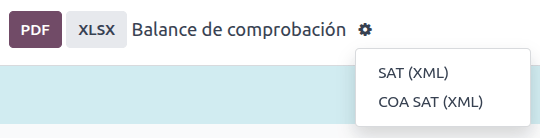
要生成试算平衡表的 XML 文件,请前往 ,选择日期,然后点击 (操作菜单),再选择 SAT (XML)。
注解
Odoo 不会生成 Balanza de Comprobación Complementaria。
第 13 个月
另一个附加报告是*第13个月*:一份结账资产负债表,显示了会计年度结束时所做的任何调整或变动。
要生成此 XML 文档,请前往 ,并创建一个新凭证。在此处,添加所有需要调整的金额,并平衡每个科目的借方和/或贷方。
完成后,进入 其他信息 标签页,勾选 第13个月结账 字段。如果需要,请前往 并选择日期 第13个月,在此处可以查看年度总金额以及日记账分录的所有增减项。要生成 XML 文件,请点击 (操作菜单),然后选择 SAT (XML)。
总账
根据法律,墨西哥的所有交易都必须以数字方式记录。由于 Odoo 会自动为所有发票和付款创建底层日记账分录,因此只需导出总账即可满足 SAT 的审计和/或退税要求。
小技巧
可以根据需要按期间或按日记账筛选报告。
要创建 XML,请前往 ,点击 (操作菜单),然后点击 XML (Polizas)。接着,从四种 导出 类型中选择:
税务审计
审计认证
退货
赔偿
对于税务审计或审计认证,添加由SAT提供的订单编号。对于退货或补偿,添加同样由SAT提供的流程编号。
注解
要查看此报告而不发送它,请使用 ABC6987654/99 作为订单编号,或使用 AB123451234512 作为流程编号。
DIOT报告
DIOT(Declaración Informativa de Operaciones con Terceros /第三方交易信息声明)是对SAT的额外义务,其中向SAT提供您供应商账单的可抵扣和不可抵扣付款、预扣税、进口税和增值税退税的当前状态。
注解
自 2025 年 7 月起,新的 2025 版本报告已可用。
Unlike other reports, the DIOT is uploaded to a software provided by the SAT that contains the A-29 form. In Odoo, you can download the records of your transactions as a TXT file that can be uploaded to the form, avoiding direct capture of this data.
交易文件包含在供应商账单中登记的付款总额,按相应类型的 IVA 细分。所有供应商都必须输入 VAT 和 国家/地区 字样。
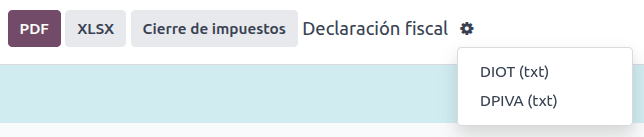
要将DIOT报告下载为 TXT 文件,请前往。选择所需月份,点击(操作菜单),然后选择DIOT (TXT)。
重要
需要在每个供应商的会计标签中填写操作类型字段,以防止验证错误。确保外国客户已设置其国家。
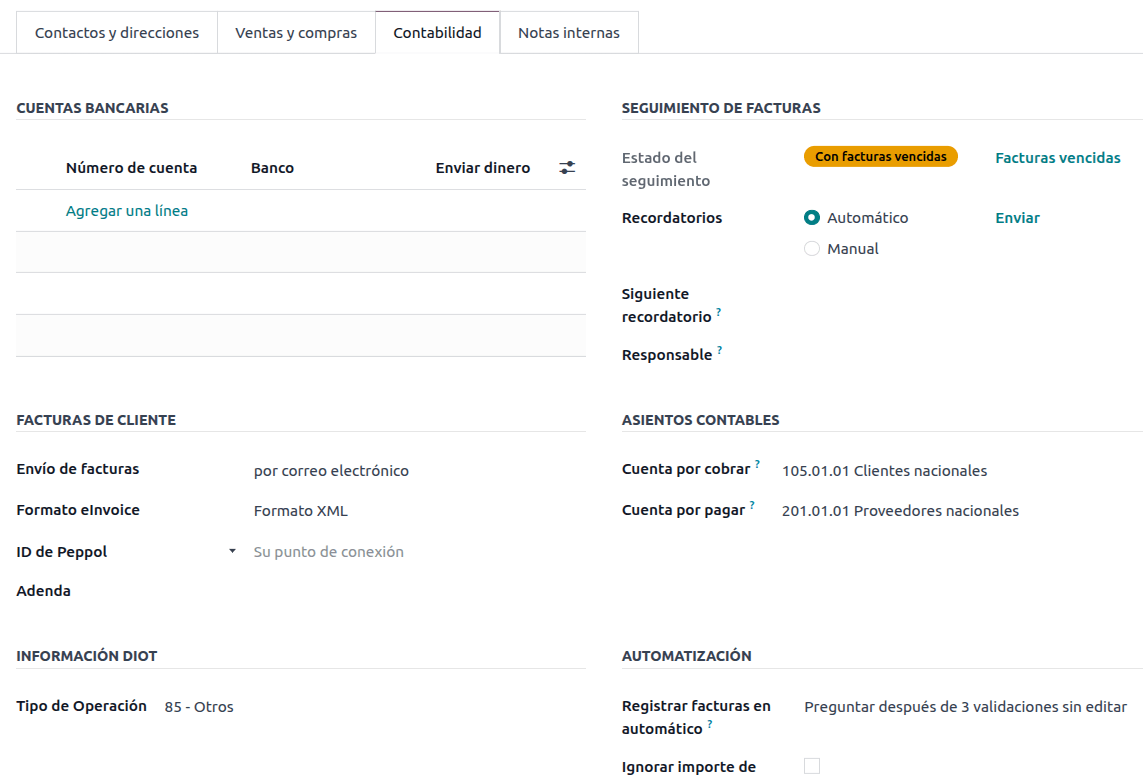
选择87 - Global Operations会导致最终的 TXT 文件将所有属于全球运营的供应商合并到一个通用 VAT 下:XAXX010101000。
外部贸易
外贸是对普通发票的补充,根据 SAT 法规,在 XML 和 PDF 中为外国客户的发票添加某些值,例如:
收件人和发件人的具体地址
增加一个 关税比例 标签,用于识别产品类型
正确的国际贸易术语(国际商业术语)
还有更多,例如原产地证明和特殊计量单位
除了扩展所售商品的描述之外,还可以正确识别出口商和进口商。
自 2018 年 1 月 1 日起,开展 A1 类出口业务的纳税人必须进行对外贸易。目前的 CFDI 为 4.0,而对外贸易目前为 1.1 版
注解
要使用此功能,必须安装EDI for Mexico (Advanced Features) l10n_mx_edi_extended 模块。
重要
安装前,请确保您的企业需要使用此功能。如有必要,在安装任何模块之前,请先咨询您的会计师。
配置
联系人
要配置您公司的对外贸易联系人,请导航至,移除默认的Customer Invoices过滤器,并选择您的Company名称。虽然 CFDI 4.0 要求在公司联系人记录中添加有效的ZIP代码,但对外贸易补充文件还要求City和State也必须有效。这三个字段必须与Official SAT Catalog for Carta Porte一致,否则会产生错误。
警告
在公司的联系人记录中添加City和State,而不是在公司记录本身中。
在联系人记录中,还可以填写可选字段Locality和Colony Code。这两个字段也必须与SAT中的数据一致。
要配置外国接收客户的联系人数据,请导航至 ,然后选择外国客户的联系人。为避免出错,联系人必须填写以下字段:
整个公司的 地址,包括有效的 ZIP 代码和国外的 国家/地区。
国外的RFC`(税务识别号),格式正确(例如:哥伦比亚 `123456789-1)
在Sales & Purchase选项卡中,激活Needs external trade?复选框。
重要
Do not enable the No Tax Breakdown option for External Trade customers. Selecting this option hides mandatory fields that are required for external trade contact configuration.
注解
在生成的 XML 和 PDF 文件中,VAT 会自动替换为国外交易的通用增值税:xexx010101000。
产品
所有涉及对外贸易的产品都有四个必需的附加字段,其中两个是对外贸易专用的。
产品的Reference必须在General Information选项卡中设置。
Inventory选项卡中产品的Weight必须大于
0。必须在Accounting选项卡中为对外贸易设置产品的正确Tariff Fraction。
Accounting选项卡中的UMT Aduana必须设置并与对外贸易的Tariff Fraction相对应。
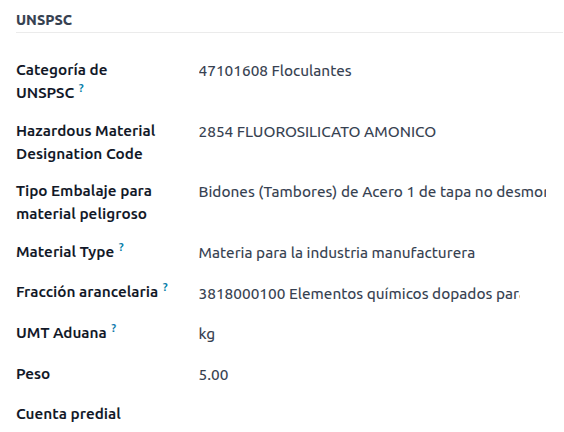
小技巧
如果Tariff Fraction的计量单位代码为
01,则正确的UMT Aduana为kg。如果Tariff Fraction的计量单位代码为
06,则正确的UMT Aduana为Units。
开具发票流程
在创建发票之前,重要的是要考虑到对外贸易发票需要将产品价格转换为外币,例如美元。因此,必须启用multicurrency,并在Currencies部分中激活外币。要运行的正确Service是[MX] Bank of Mexico。要转换产品价格,请以外币创建pricelist。
然后,在中设置正确的汇率后,在发票的Other Info选项卡中设置Incoterm和可选的Certificate Source字段。
最后,按照常规发票的流程确认发票,并点击发送按钮通过 CFDI 进行电子签名。
POS:
The Point of sale adaptation of the Mexican Localization enables the creation of invoices that comply with the SAT requirements directly in the POS session, with the added benefit of creating receipt tickets that allow self-invoicing in a special portal and creating global invoices.
POS 流程
Other than the standard Point of Sale configuration, the only requirement for the Mexican localization is the additional fact that each payment method needs to be configured with a correct Payment Way.
小技巧
By default Odoo creates preconfigured payment methods for cash, credit card, and debit card.
在POS上销售时,点击客户按钮以创建或选择客户。在此可以查看客户发票信息(例如RFC或税收制度),甚至可以直接在会话中修改它。
选择客户后,勾选发票复选框。这将打开一个菜单以选择用途并定义是否为公共发票。点击确认,选择付款方式,然后点击验证以完成订单。随后将下载 PDF,并可以将发票与收据一起通过邮件发送给最终客户。
小技巧
要从订单创建发票,请转到订单菜单,选择订单,点击加载订单,并勾选发票复选框。这将打开与用途和CFDI to Public相同的菜单。
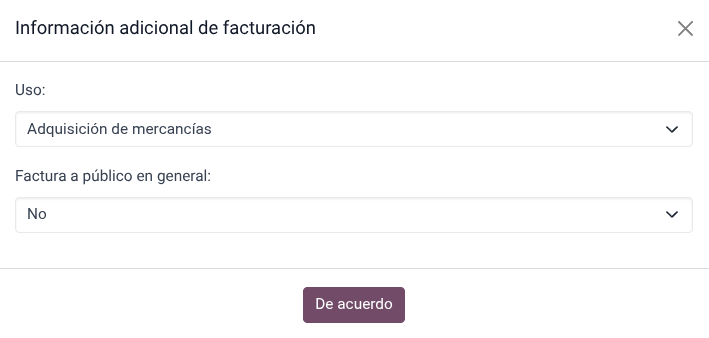
To sign a credit note automatically, tick the Invoice checkbox when processing a refund.
注解
退货产品的信用票据将包含关系类型03 - Devolución de mercancía sobre facturas o traslados previos。
重要
在墨西哥本地化中,POS 会话中不能混合正数和负数行项目。
If a SAT validation error occurs customer will get a Pro-Forma invoice instead.
自助开票门户
如果最终客户不确定是否要在销售的确切时刻生成发票,可以为他们提供使用二维码或 URL 创建收据的选项。为此,请按照以下步骤操作:
转到。
选择POS。
滚动到账单和收据部分。
启用自助开票。
将打印字段设置为二维码、URL或二维码 + URL。
扫描此二维码或访问该 URL 的客户将进入一个菜单,在输入收据上提供的五位数代码后,他们可以添加其财务信息,包括用途和税收制度。
其他资料
统一发票
As with regular sales orders, global invoices can also be created from a POS session.
为此,请确保不要在付款菜单中选择客户或发票选项,并转到。在那里,选择所有要开票的订单,点击操作并选择创建全局发票。
与销售订单一样,选择正确的周期性并按创建。
这将为每个选定的订单附加一个XML文件。可以通过转到CFDI标签页下载XML文件。如果需要,可以在同一标签页中取消发票。
If eventually any of the orders that are part of the global invoice need to be addressed to a customer, it is still possible to send an invoice by entering a new POS session, clicking the (drop-down menu), then click Orders. Change the All active orders filter to Paid, select the order, and click the Invoice button.
注解
全局发票与常规发票一样,只能按实际地址分组。这由POS发票日记帐上设置的地址确定,因此当尝试对两个地址开票时,会出现警告以提醒用户该错误。
电子商务
The eCommerce adaptation of the Mexican Localization provides and extra step to create invoices that comply with the SAT requirements on eCommerce by retrieving the customer data after the Checkout and even allowing for the signature of automatic invoices after the payment is processed, as well as sending customers the files via email and granting them access to retrieve their PDF & XML files from their own customer portal.
电子商务流程
在常规结账流程中,会出现一个新的开票信息步骤,可以选择是否申请发票。如果选择否,则创建公众CFDI。如果选择是,则需要RFC、财政制度和用途,以便在销售订单中获取所有信息,其状态将更改为待开票。
重要
确保为配送产品添加UNSPSC代码。
If you enable the Automatic Invoicing in , the electronic document will be signed automatically.
订阅
在处理订阅时,所有销售字段都用于创建定期发票。这些发票会自动签署并通过电子邮件发送,附带PDF和XML,无需其他手动操作。
库存
海关编号
*海关申报单*(Pedimento Aduanero)是一种财务文件,证明已向财政实体(SAT)支付了所有税款,包括商品的进出口。
According to the Annex 20 of CFDI 4.0, in documents where the invoiced goods come from a first-hand import operation, the Customs Number field, needs to be added to all lines of products involved with the operation.
重要
不要将这一特征与对外贸易相混淆。海关编号与进口货物直接相关,而对外贸易补充则与出口相关。如果需要此功能,请先咨询您的会计师,然后再做任何修改。
配置
In order to track the correct customs number for a specific invoice, Odoo uses landed costs. Go to , and in the Valuation section, make sure that Landed Costs is activated.
Begin by creating a service-type product called, Pedimento. In the Purchase tab,
activate Is a Landed Cost, and select a Default Split Method.
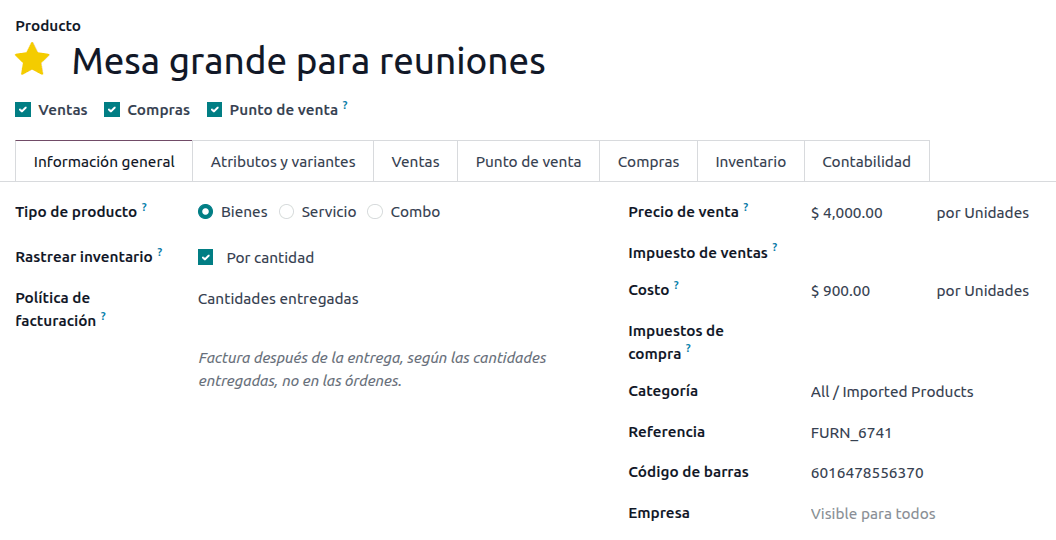
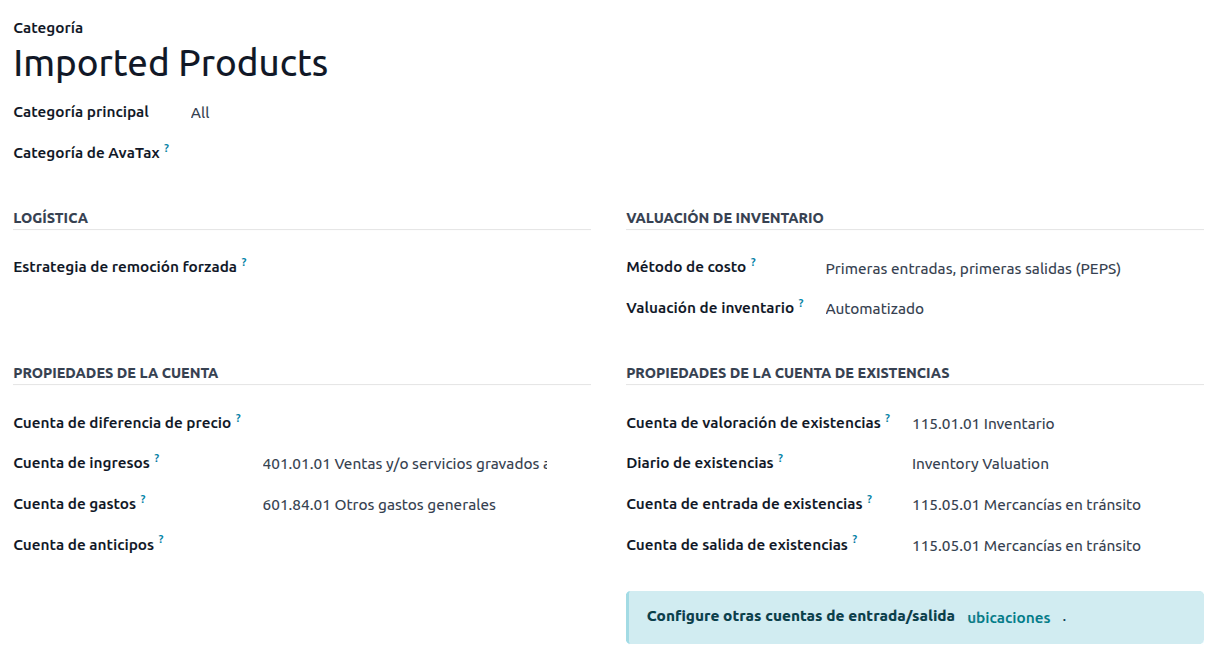
Then, configure the goods-type products that hold the customs numbers. To do so, create the products, and make sure the Product Category has the following configuration:
成本计算方法:选择 FIFO 或 AVCO
库存估值:自动
Stock Valuation Account: 115.01.01 Inventory
库存日记账: 库存估值
Stock Input Account: 115.05.01 Goods in transit
Stock Output Account: 115.05.01 Goods in transit
注解
Setting the Inventory Valuation to Automated requires first enabling the feature. Go to , and in the Stock Valuation section, enable Automatic Accounting.
采购和销售流程
配置产品后,遵循标准采购流程。
从创建采购订单。然后,确认订单以显示收货智能按钮。点击收货智能按钮并验证收货。
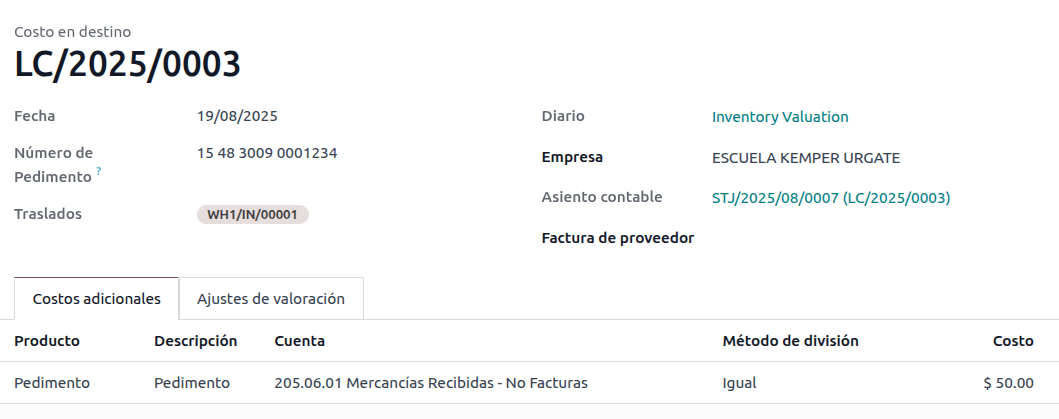
Go to , and create a new record. In the Transfer, add the receipt that was just validated, add the Customs number and in the Additional Costs tab, add the Pedimento product.
Optionally, it is possible to add a cost amount. After this, Validate the landed cost. Once Posted, all products related to that receipt have the customs number assigned.
警告
The Pedimento Number field is not editable once it is set, so be careful when associating the correct number with the transfer(s).
Next, create a sales order and confirm it. Click the Delivery smart button that appears, and Validate the delivery order.
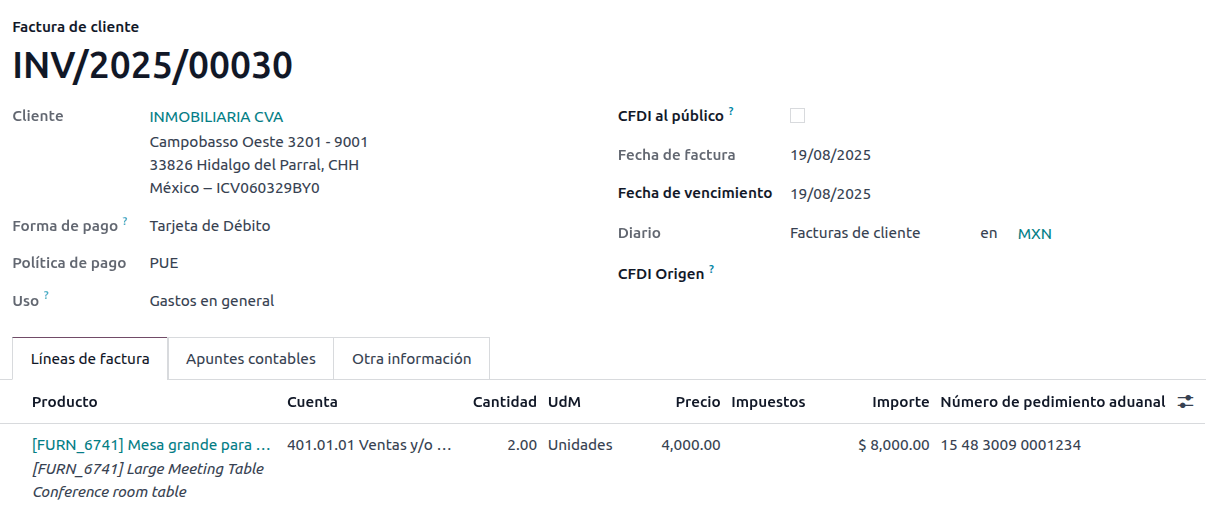
Finally, create an invoice from the sales order, and confirm it. The invoice line related to the product has a customs number on it. This number matches the customs number added in the landed cost record created earlier.
发货指南
Carta Porte 是提单:说明货物类型、数量和目的地的文件。
2024年7月17日,该CFDI的3.1版本对所有运输提供商、中介机构和货物所有者实施。Odoo能够生成文档类型”T”(Traslado),与其他文档不同,它在交货订单中创建,而非在发票或付款中创建。
Odoo 可以创建带(或不带)地面运输的 XML 和 PDF 文件,并可以处理被视为 危险品 的材料。
重要
Odoo 不支持 Carta Porte 类型文件 “I”(Ingreso)、空运或海运。如果需要此功能,请先咨询您的会计师,然后再做任何修改。
配置
Odoo管理两种不同类型的CFDI类型”T”。两者都可以从入库货运或交货订单创建。
当到目的地的距离
小于30公里<http://omawww.sat.gob.mx/cartaporte/Paginas/documentos/PreguntasFrecuentes_Autotransporte.pdf>`_时,使用:guilabel:`非联邦公路。当到目的地的距离超过30公里时,使用联邦运输。
Other than the standard requirements of regular invoicing (the RFC of the customer, the UNSPSC code, etc.), if you are using No Federal Highways, no external configuration is needed.
对于*联邦运输*,必须在联系人、车辆设置和产品中添加多项配置。这些配置随后会包含在XML和PDF文件中。
联系方式和车辆
与对外贸易功能类似,公司和最终客户的地址必须完整。邮政编码、城市和州必须与`Carta Porte官方SAT目录<http://omawww.sat.gob.mx/tramitesyservicios/Paginas/catalogos_emision_cfdi_complemento_ce.htm>`_一致。
小技巧
对于两个地址,字段 地点 都是可选的。
重要
交货指南使用的原始地址在中设置。虽然默认设置为公司地址,但您可以将其更改为正确的仓库地址。
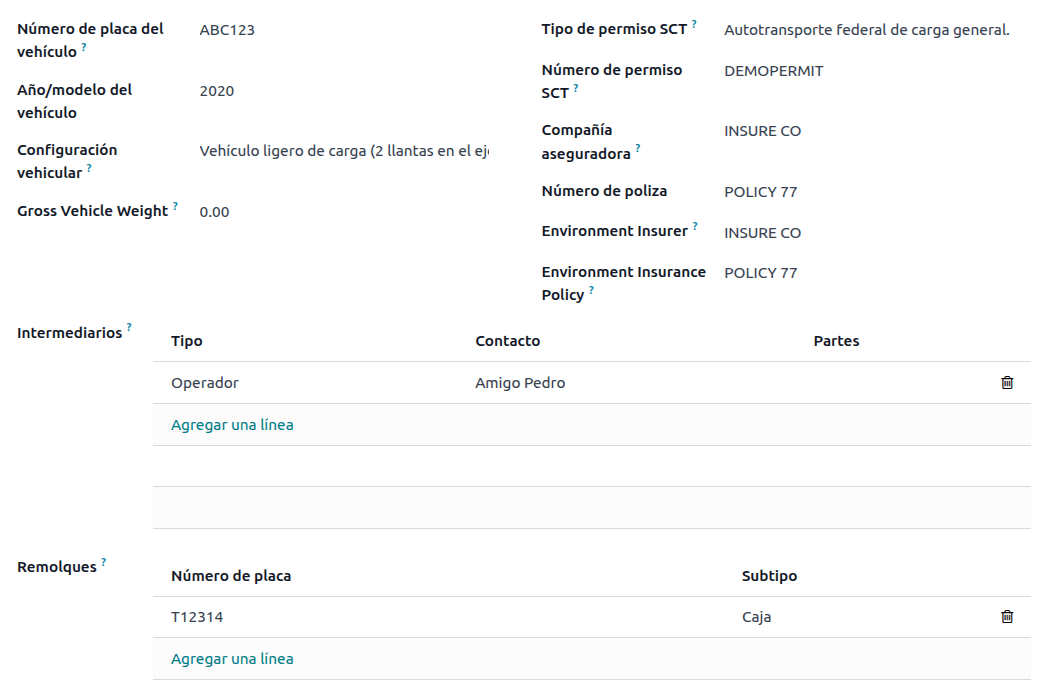
Another addition to this feature is the Vehicle Setups menu found in . This menu lets you add all the information related to the vehicle used for the delivery order.
所有字段都必须填写,以便创建正确的送货指南。
小技巧
The fields, Vehicle Plate Number and Number Plate, must contain between 5 and 7 characters.
In the Intermediaries section, add the operator of the vehicle. The only mandatory fields for this contact are the VAT and Operator Licence.
产品
与常规发票类似,所有产品都必须有 UNSPSC 类别。除此以外,还有两种额外配置,适用于交货指南中涉及的产品:
必须将 产品 设置为 可储存产品 才能创建库存变动。
In the Inventory tab, the field Weight must be more than
0.
警告
Creating a delivery guide of a product with the value 0 will trigger an error. As the
Weight has been already stored in the delivery order, it is needed to return the
products and create the delivery order (and delivery guide) again with the correct amounts.
销售和库存流动
To create a delivery guide, first, first create and confirm a sales order from . Click the Delivery smart button that is generated, and Validate the transfer.
状态设置为完成后,您可以编辑转移,并在附加信息选项卡中选择运输类型。
如果使用非联邦公路运输类型,请保存转移,然后点击生成交货指南。生成的XML可以在聊天记录中找到。
注解
Other than the UNSPSC on all products, delivery guides that use No Federal Highways do not require any special configuration to be sent to the government.
If using the Federal Transport Transport Type, the tab MX EDI
appears. There, enter a value in Distance to Destination (KM) greater than 0, and
select the Vehicle Setup used for this delivery.
Finally, add a Gross Vehicle Weight and click Generate Delivery Guide.
小技巧
Delivery Guides can also be created from Receipts, either from the Inventory app or by the standard flow of the Purchase app.
危险隐患
在 官方 SAT 目录 <http://omawww.sat.gob.mx/tramitesyservicios/Paginas/complemento_carta_porte.htm>`_中,:guilabel:`UNSPSC 类别`中的某些值被视为*危险危害*。在使用 :guilabel:`联邦运输 创建交货指南时,需要额外考虑这些类别。
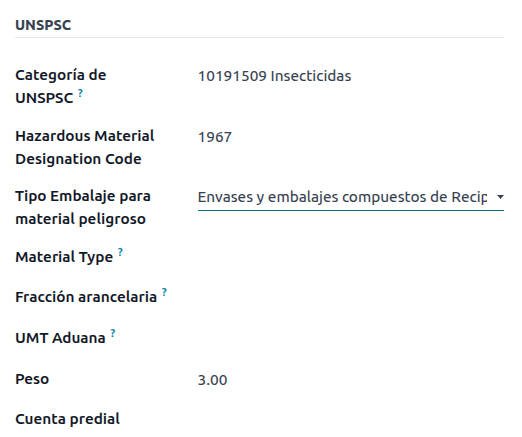
首先,从中选择产品。然后,在会计选项卡中,使用SAT目录中的正确代码填写危险材料指定代码和危险包装字段。
重要
存在这样的可能性:UNSPSC类别可能是或可能不是危险品(例如*01010101*)。如果不是危险品,请在危险材料指定代码字段中输入`0`。
In , complete the Environment Insurer and Environment Insurance Policy well. After this, continue with the regular process to create a delivery guide.
进出口
如果您的Carta Porte用于国际业务(出口),则需要考虑一些额外的字段。
首先,确保所有相关产品具有以下配置:
UNSPSC类别`不能为:guilabel:`01010101目录中不存在。
:guilabel:`关税分数`和:guilabel:`UMT Aduana`必须设置,与:ref:`对外贸易 <l10n/mx/external-trade>`流程类似。
:guilabel:`材料类型`必须设置。
然后,在从交付或收货创建:guilabel:`交付指南`时,填写以下字段:
海关制度
海关文件类型
海关文件识别号
Then, when creating a Delivery Guide for a receipt where the Customs Document Type is Pedimento, two new fields appear: Pedimento Number and Importer.
小技巧
The field Pedimento Number should follow the pattern xx xx xxxx xxxxxxx. For
example, 15 48 3009 0001235.