
管理用户账户
In Odoo’s Lunch application, users pay for products directly from their Lunch app account. For funds to appear in their account, a Lunch app manager must transfer funds into each user’s account.
重要
To add funds and manage user accounts, the user must have Administrator access rights set for the Lunch application. This is verified by navigating to Manage Users. Then, click on a user to view their various settings and access rights.
更多信息,请参阅 访问权限 文档。
**午餐**应用程序**不**以任何方式直接与任何与货币账户或计费相关的软件或产品连接。不能从用户的银行账户转账,也**不能**从用户的信用卡扣款。
Odoo 的**午餐**应用程序**只允许**午餐**应用程序管理器手动输入现金交换。午餐账户的补充方法由各公司自行决定。
Example
举例说明公司内部如何组织和转移资金:
现金交给 午餐 应用程序经理,然后由他更新用户的账户。
Money is automatically deducted from the user’s paychecks, then the Lunch app manager updates the account when paychecks are issued. This requires adding a salary attachment for the user’s payslip in the Payroll app.
公司可按设定价格出售 “午餐券”(例如,一张午餐券售价$5.00)。用户可以从**午餐管理**应用经理处购买,然后经理会更新用户的账户。
现金凭证
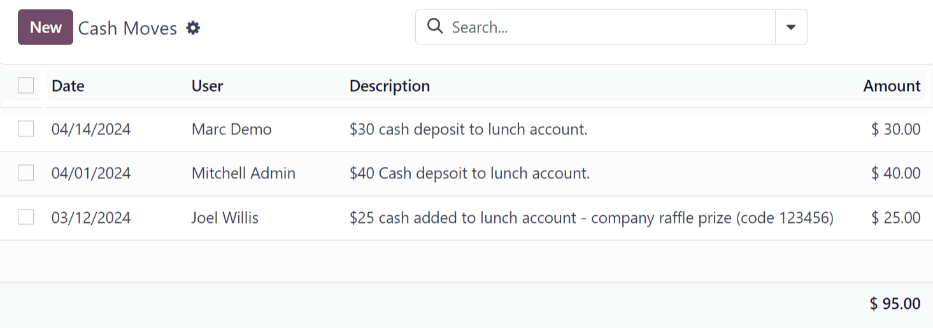
要向用户账户添加资金,必须单独记录每次现金转账。要查看所有现金移动记录或创建新的现金移动,请导航至 。这样就会显示 现金流动 仪表板。
在 现金移动 仪表板上,所有现金移动都以默认列表视图显示,显示每条记录的 日期、用户、描述 和 金额 。所有现金移动的总额显示在 金额 列的底部。
增加资金
要向午餐账户添加资金,请点击位于 现金移动 仪表板左上角的 新建 按钮。
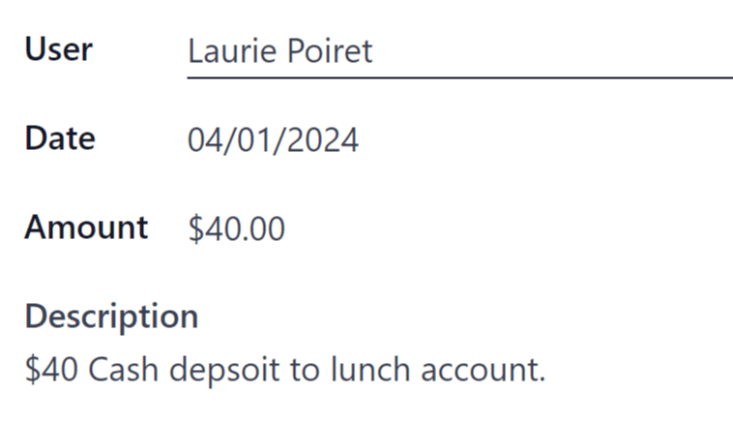
加载空白的 现金移动 表格。在表格中输入以下信息:
用户:从下拉菜单中选择将现金存入其账户的用户。如果用户不在数据库中,可在 用户 字段中输入用户名,然后点击 创建 “用户” 或 创建和编辑…,创建用户并编辑 创建用户 表单。
日期:使用弹出式日历,选择交易发生的日期。
金额:输入要添加到午餐账户的金额。
描述:输入交易的简要说明。
管理账户
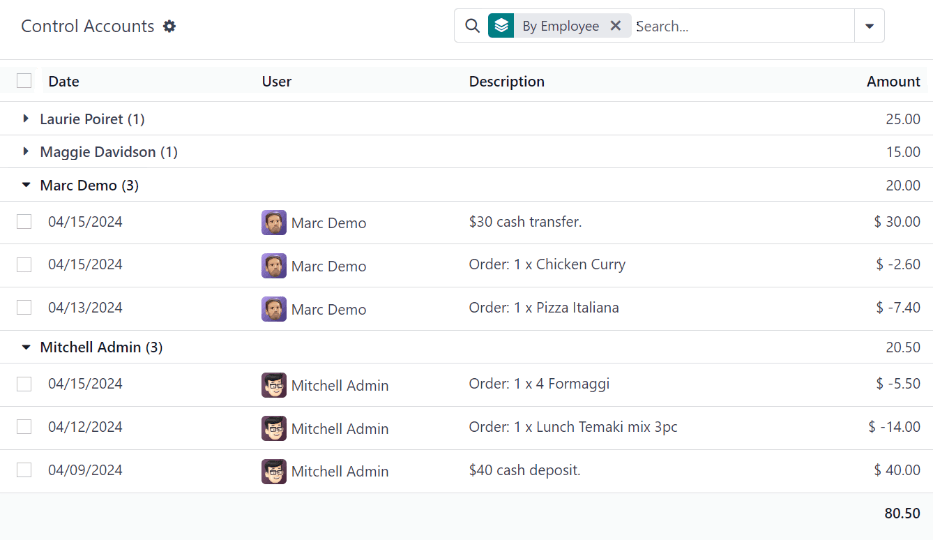
An overview of every transaction in the Lunch app, including all cash deposits and purchases, can be viewed on the main Control Accounts dashboard. To access this dashboard, navigate to
All transactions are grouped By Employee, and listed alphabetically by the user’s first name. At the end of the user’s name, a number appears. This indicates the number of individual records logged for that user.
The default view is to have all individual transactions hidden. To view all transactions for a user, click the (triangle) icon to the left of the desired name to expand that specific group.
Each record includes the Date, User, Description, and Amount.
重要
This list only displays the various transactions within the Lunch app, and does not allow modifications to be made to any records listed.
Cash moves can be modified, but only from the Cash Moves dashboard, not from the Control Accounts dashboard.
It is not possible to modify any product-related records.