
基本分包
In basic subcontracting, a company’s product is produced entirely by a subcontractor. The product is first purchased from the subcontractor, who acquires their own components, manufactures the final product, then delivers the final product to the contracting company’s warehouse.
The following documentation covers how to configure a subcontracted product and trigger the subcontracting process.
配置
To use subcontracting, contractors must first configure products with a vendor pricelist as well as a subcontracting-type BoM.
The pricelist allows the contracting company to purchase the product from the vendor (subcontractor) through a PO, while the BoM allows the product to be manufactured externally by the subcontractor.
設定產品供應商
要為基本分包設定產品供應商,請前往。然後,選擇一個產品或建立一個新產品。
On the product form, click the Purchase tab and add the product’s subcontractor as a vendor by clicking Add a line. Select the subcontractor in the Vendor drop-down menu.
Then, enter the price of the product in the Price field.
Finally, set a lead time for the product in the Delivery Lead Time field to specify the number of days for the subcontractor to produce and deliver the final product.
注解
Since contractors are only responsible for purchasing and receiving the final product, they do not need to additionally configure manufacturing lead times on a BoM. Instead, provide only a single Delivery Lead Time on the vendor pricelist that factors in both the subcontractor’s manufacturing and delivery time.
配置 BoM
After specifying the vendor, configure a subcontracting-type BoM for the product. Click the Bill of Materials smart button on the product form. Then, select the desired BoM or create a new one.
小技巧
或者,导航至 ,然后选择分包产品的 BoM 。
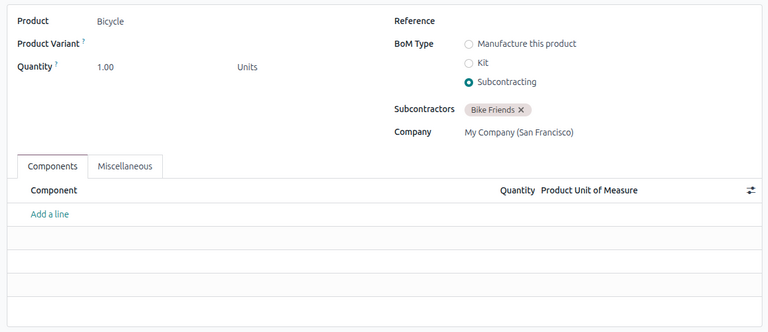
在物料清單類型欄位中,選擇分包。在結果顯示的分包商欄位中,新增一個或多個分包商。
Because the components and manufacturing are both handled by the subcontractor, there is no need to list any components in the Components tab of the BoM.
基本分包工作流程
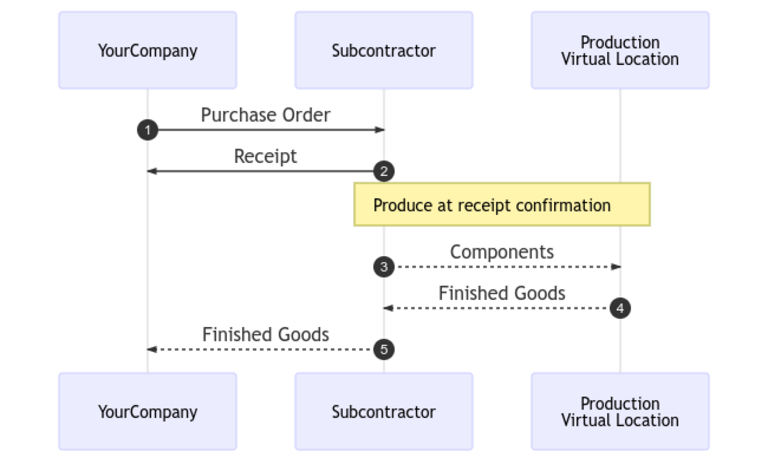
基本外包工作流程首先通过创建采购订单从外包商处采购产品(1)。
The contractor (YourCompany) then confirms the PO, which creates a receipt to transfer the final product (2). The subcontractor manufactures the product and delivers it back to the contractor when done.
Once the product has been produced and received, the contractor validates the receipt (5) to trigger inventory moves from the subcontractor to the company’s stock (3, 4).
创建并确认采购订单
要为外包产品创建PO,请导航至,然后点击新建。
开始填写PO,从供应商下拉菜单中选择一个外包商。在产品选项卡中,点击添加产品创建新的产品行。在产品字段中选择外包产品,并在数量字段中输入数量。
After adding the product, the Expected Arrival field is updated with the finished product’s expected delivery date, as configured earlier with the vendor’s Delivery Lead Time.
最后,点击确认订单以确认PO。系统会自动创建接收单,并在表单顶部显示接收智能按钮。
处理收据
After the order is confirmed, the subcontractor manufactures the product and delivers the finished good back to the contracting company.
To receive the finished product from the subcontractor, click the Receive Products button on the PO, or click the Receipt smart button at the top of the page. Then, click Validate to enter the incoming shipment into inventory.
注解
如果启用了多步库存流程,则必须验证其他转移才能将入库产品录入库存。
追踪库存移动
After validating a receipt, Odoo automatically generates inventory moves to track the movement of subcontracted products between locations. To view these inventory moves, navigate to .
To track inventory movement in subcontracting, Odoo sends any product components to a dedicated Subcontracting Location. A virtual location called Production then consumes the components and produces the finished good. Once produced, the good then moves back to the Subcontracting Location before finally entering the contractor’s stock when the receipt is validated.

注解
Because no components are sent in basic subcontracting, there is no movement from the Subcontracting Location to the Production location.