
批量付款
Batch payments act as an organizational tool that groups multiple individual customer or vendor payments into a single file. Rather than managing transactions one by one, you can consolidate them to generate a detailed deposit slip or a single electronic payment file. This significantly simplifies bank reconciliation: when a bulk sum appears on your bank statement, Odoo uses the batch reference to automatically match and reconcile all underlying payments in a single step.
For customer payments, the feature supports both physical payments, such as checks and cash, and electronic transfers. Group incoming cash or check payments into batches to print bank deposit slips to ensure your internal records mirror the lump-sum deposit on your bank statement. On the vendor side, batch payments streamline bulk electronic transfers. Instead of processing supplier invoices manually, select multiple bills and generate a single outgoing payment file to upload directly to your banking portal. Because these file formats are region-specific (e.g., SEPA in Europe, NACHA in the U.S., or the global ISO 20022 standard), consult your country’s fiscal localization documentation to verify supported formats.
其他资料
配置
Make sure batch payments are enabled by opening the Accounting app, going to , scrolling down to the Customer Payments section, and enabling Batch Payments.
注解
This enables both customer and vendor batch payments.
小技巧
According to your needs, check that the following apps are installed in the Apps app:
批次创建
To create customer or vendor batch payments and add existing payments to them, follow these steps:
确保所有要纳入批次的付款均已 登记。
Open the Accounting app and go to or according to the nature of the payment and click New.
Next, configure the batch payment:
Batch Type: select whether the money is being transferred to your account (Inbound) or to someone else’s account (Outbound).
Bank: the bank journal to use for this batch.
Payment Method: the payment method used for the invoices’ payments. Only payments matching the payment method selected will appear.
Date: the batch’s creation date.
Reference: the reference of the batch. Leave it empty to generate it automatically.
Add a line: click it to select the payments to include in the batch.
Once all desired payments are included, click Validate to finalize the batch.
Alternatively, you can select the relevant payments and create a batch payment directly from them:
确保所有要纳入批次的付款均已 登记。
Open the Accounting app and go to or and select all payments to include in the batch.
Click Create Batch, or (Actions), and select Create batch payment.
In the view form, review the selected payments. If any individual payments are missing, click Add a line, then select the missing payments to include in the batch.
If you’re using ISO 20022 as Payment Method, you can define the charge baring options in the Charge Bearer field.
Once all desired payments are included, click Validate to finalize the batch.
To view existing batch payments, go to or .
注解
All payments in a batch must use the same payment method.
Once validated, no additional payments can be added to a batch. You can delete the batch if necessary by clicking (Actions) and then (Delete).
小技巧
Click Print to download a list of the included payments.
To filter payments by payment method, click on the Payment Method column header during the batch payment creation step.
银行对账
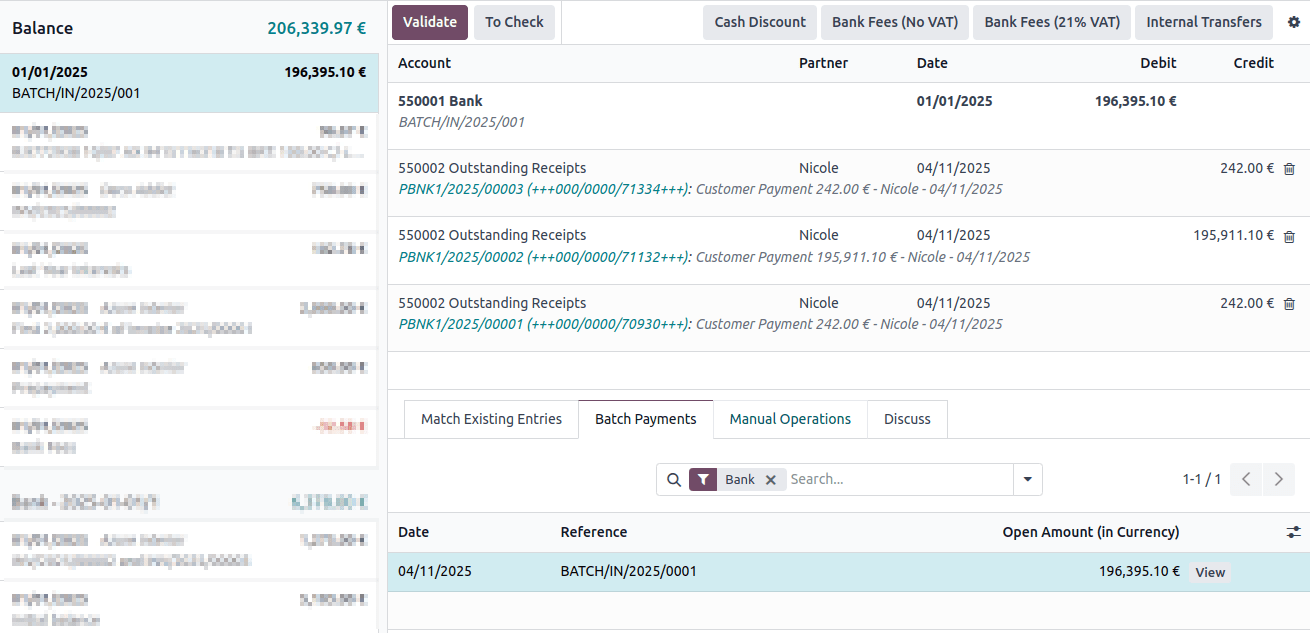
Once the bank transactions have been created in your database, you can reconcile them with the batch payment.
注解
If a specific payment could not be processed by the bank or is missing, remove the line corresponding to that payment by using the (Delete) button before validating the reconciliation of the batch payment.
Bank accounts
Odoo distinguishes between Banks (the financial institution issuing the account) and Bank Accounts (the specific account number and routing details).
You can store banking details for both your own company and your contacts. Odoo automatically uses this information when needed, such as when generating batch payment files.
To protect your business against phishing scams, Odoo configures all new bank accounts as “untrusted” by default, preventing outgoing wire transfers until you manually verify and trust the account.
其他资料
配置
注解
The Contacts app can be installed from the Apps dashboard.
To configure your banking information, open the Contacts app and go to Configuration. From here, you can manage Banks and Bank Accounts.
Create a bank
Go to and click New. Fill in the following fields:
Name: The name of the bank.
Bank Identifier Code: The bank’s SWIFT or BIC code.
Bank Address: Enter the Country. The Street, City, State, and Zip fields are optional.
Phone and Email: Optional contact details.
创建银行账户
注解
Prerequisite: A bank account must be linked to a specific bank record. Ensure you have created the required bank using the steps above before setting up a bank account.
Go to and click New. Enter the following details:
Account Number: The unique identification number for the bank account.
Bank: Select the associated bank from the drop-down menu.
ABA/Routing: The American Bankers Association routing number (if applicable).
Account Holder Name: The full name of the account holder.
Account Holder: Select the holder’s contact from the drop-down menu. If the contact does not exist yet, you can link it later by following the next steps.
Toggle Send Money to mark the account as Trusted. Marking the account as Trusted will enable you to send money to this account, so only do this when you are certain the information is correctly entered and was not provided by a phishing attack.
Link a bank account to a contact
If you need to link an existing bank account to a contact:
Open an app with contact access (such as Accounting or Contacts).
Select a contact and open the Accounting tab.
In the Bank Accounts section, click Add a line and provide the:
Account Number,
Bank,
Account Holder Name,
Account Holder,
Company and Currency (if applicable).
Toggle Send Money to mark the account as Trusted.
网络钓鱼攻击
**网络钓鱼攻击**是一种在线骗局,旨在通过发送欺诈性通信,诱骗个人或公司提供敏感信息或金钱。欺诈者假装成合法公司,并可能使用部分信息来使其请求可信。
网络钓鱼攻击有多种类型,其中包括**发票欺诈**。在这种情况下,欺诈者伪装成真正的供应商,跟进未付账单或发送新发票,但使用的付款信息与往常不同,联系方式也是伪造的。
为了保护自己免受此类网络钓鱼攻击,当您收到意外发票或付款请求时,请保持警惕。
重要
如有疑问,我们建议通过电话联系供应商。请务必通过自行搜索拨打官方电话号码,因为您收到的通信中所写的网址、电子邮件地址和电话号码可能是假的。