
加拿大
Odoo 加拿大本地化软件包为加拿大企业提供量身定制的功能和配置。
通过 Odoo 在线学习平台可观看一系列有关会计主题的视频。这些视频涵盖了如何从零开始、设置配置、完成常用工作流程,并深入介绍了一些特定的使用案例。
模块
The following modules are installed automatically with the Canadian localization:
名称 |
技术名称 |
描述 |
|---|---|---|
加拿大 - 会计 |
|
加拿大本地化的基础会计模块。 |
加拿大 - 会计报告 |
|
添加加拿大会计报告。 |
加拿大支票布局 |
|
可在预印支票纸上打印付款。支持三种最常见的支票格式,并可与来自 checkdepot.net 的链接支票配合使用。 |
注解
In some cases, such as when upgrading to a version with additional modules, it is possible that modules may not be installed automatically. Any missing modules can be manually installed.
本地化概述
The Canadian localization package ensures compliance with Canadian fiscal and accounting regulations. It includes tools for managing taxes, fiscal positions, reporting, and a predefined chart of accounts tailored to Canada’s standards.
The Canadian localization package provides the following key features to ensure compliance with local fiscal and accounting regulations:
Chart of accounts: a predefined structure tailored to Canadian accounting standards
Fiscal position: automated tax adjustments based on customer or supplier registration status
Taxes: pre-configured tax rates, including standard VAT, zero-rated, and exempt options
科目表
The chart of accounts (COA) for the Canadian localization, has accounts grouped into seven main categories, with corresponding numeric values that prefix individual journal entries:
应收账款:指企业已交付或使用商品或服务,但客户尚未支付的应收余额(或信用点)。AR 由标有(或以:guilabel:
1开头)的日记账编号表示。应付账款:企业欠付其债权人或供应商的短期债务,尚未支付。以:guilabel:
2标注(或以:guilabel:2开头)的日记账代码表示。权益:在清算的情况下,如果公司的所有资产都被清算,公司的所有债务都被清偿,公司股东将获得的返还金额。权益由标有(或以 3 或:guilabel:
9开头)的日记账代码表示。资产:资产负债表中列出的含有经济价值或有能力在未来产生现金流的项目,如一台机器、一份金融证券或一项专利。资产由标有(或以:guilabel:`1`开头)的日记账代码表示。
负债:指公司在业务运营过程中产生的财务债务或义务。负债由标有(或以:guilabel:`2`开头)的日记账代码表示。
收入:与*净收入*同义,是公司用销售收入支付所有相关费用后保留的利润。收入由标有(或以:guilabel:`4`或:guilabel:`6`开头)的日记账代码表示。
费用:公司为创收而产生的运营成本。费用由标有(或以:guilabel:`6`开头)的日记账代码表示。
小技巧
预定义账户包含在 Odoo 中,是与加拿大本地化软件包一起安装的 CoA 的一部分。下面列出的账户经过预先配置,可在 Odoo 中执行某些操作。建议 不要 删除这些账户;但是,如果需要更改,请重命名这些账户。
类型 |
账户名称 |
|---|---|
流动资产 |
银行暂记账户
未结收据
未付款项
流动性转移
库存估值
库存暂记(已收货)
库存暂记(已交货)
生产成本
|
收入 |
外汇收益
现金差额收益
现金折扣收益
|
费用 |
现金折扣损失
外汇损失
现金差额损失
|
本年盈余 |
Undistributed Profits/Losses |
应收 |
应收账款 |
应付 |
Account Payable |
其他资料
财政状况
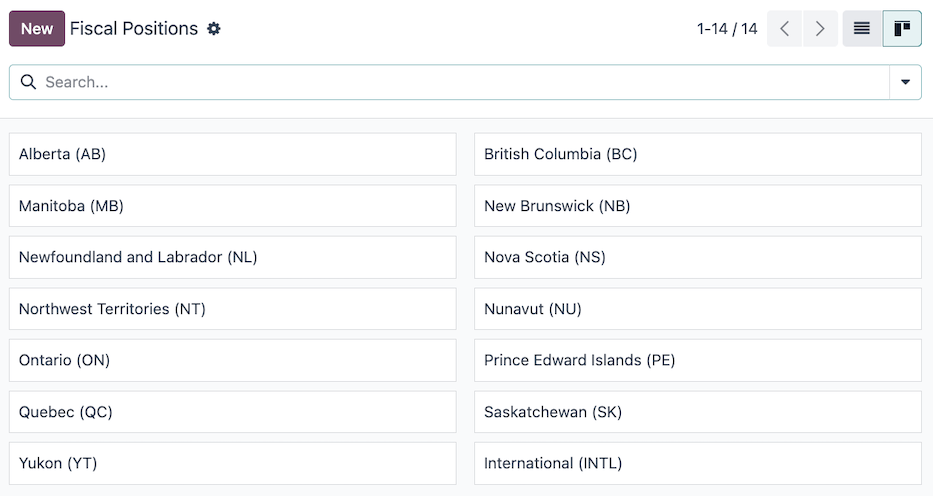
加拿大税率和应税项目因省和地区而异。安装 Odoo 会计 应用程序时,会自动创建默认的财务规则。要管理或配置其他财务规则,请导航至 。
默认情况下提供以下财务规则:
亚伯达省(AB)
不列颠哥伦比亚省(BC)
曼尼托巴省(MB)
新不伦瑞克省(NB)
纽芬兰和拉布拉多省(NL)
新斯科舍省(NS)
西北地区(NT)
努纳武特地区(NU)
安大略省(ON)
爱德华王子岛省(PE)
魁北克省(QC)
萨斯喀彻温省(SK)
育空地区(YT)
国际(INTL)
注解
在考虑适用何种税时,重要的是交货所在的省份。因此,交货由供应商负责,并在客户所在地进行核算。
Example
- 送货给来自外省的客户。
将客户记录中的税务规则设置为客户所在省份的税务规则。
- 当客户从外省前来提货时,其记录中不应设置任何税务规则。
不应在客户记录中设置财务规则。
- 国际供应商不收取任何税费,但关税由报关行代征。
将供应商记录中的财务规则设置为*国际*。
- 国际供应商收取省级税费。
将供应商记录中的财务规则设置为您所在地区的财务规则。
其他资料
税
在加拿大,各省和地区的税率和应税项目各不相同。安装 Odoo 会计 应用程序时,会自动创建默认的 销售 和 *采购*税。要管理现有税项或配置其他税项,请导航至 。
AvaTax
Avalara AvaTax 是一款基于云计算的税务计算和合规性软件,可与 Odoo 整合,适用于多种本地化环境,包括加拿大。将 AvaTax 与 Odoo 整合后,当数据库中的项目销售、采购和开票时,AvaTax 可提供实时和特定地区的税款计算。
重要
AvaTax 可与位于加拿大和/或美国的数据库/公司集成。有关更多信息,请参阅会计所在国家/地区文档。
报表
在 下拉菜单中,有许多 报告选择 可用于加拿大本地化:
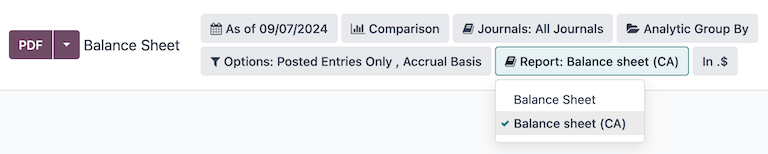
资产负债表: 公司在特定时间点的财务状况 “快照”,包含公司资产、负债和权益的概览。
请务必从 Report 筛选器中选择 选项。
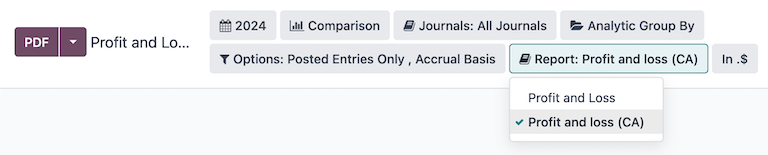
损益表:又称 利润表,提供公司在特定时期内的收入、支出和利润/亏损汇总。
请务必从 报告 筛选器中选择 选项。
现金流量表:显示公司在给定期间收到和支出的现金和现金等价物的数量。
执行摘要:一份概述报告,涵盖公司财务状况的关键绩效指标,例如收入、利润和债务。
税务报告:向税务机关提交的正式表格,报告收入、支出和其他相关税务信息。税务报告允许纳税人计算其纳税义务、安排纳税或要求退还多缴的税款。在 Odoo 中,可以每月、每两个月、每季度、每 4 个月、半年和每年制作税务报告。
其他资料
会计
现金折扣
Cash discounts can be configured from . Each payment term can be set up with a cash discount and reduced tax.
其他资料
开具支票
加拿大本地化允许用户为供应商付款打印支票。请确保 CA 本地化的 Canadian Checks Layout (l10n_ca_check_printing)模块 已安装。
要从 Odoo 启用支票打印,请导航至 并找到 供应商付款 部分。在此处,勾选 支票 复选框,以显示用于支票配置的多个字段。
从下拉菜单中选择支票布局:
打印支票(顶部)- 加拿大
打印支票(中部)- 加拿大
打印支票(底部)- 加拿大
接下来,选择是否启用多页支票存根复选框。
如有需要,可以设置支票顶部边距、支票左侧边距或支票右侧边距。
如果需要日期标签,请勾选打印日期标签复选框。
所有支票配置完成后,保存设置。
小技巧
某些支票格式可能需要第三方供应商提供的预印纸张。推荐使用checkdepot.net 提供的预印支票。
其他资料
EFT - electronic transfers
In Canada, Electronic Funds Transfer (EFT) refers to the digital transfer of funds between different bank accounts, largely replacing traditional paper-based transactions. EFT is the primary system used by businesses to automate payroll, pay suppliers, and collect recurring payments.
CPA005 file
CPA005 is a standardized file format used by Canadian banks to process batched financial transactions, primarily for EFT.
注解
Make sure to install the CPA005 Payments
(l10n_ca_payment_cpa005) module.
配置
The following configurations are required:
Make sure to fill in the necessary fields on the company record:
Country: Canada.
Short Name used in Canadian EFT: Enter a short version of the Company Name, limited to a maximum of 15 characters.
注解
Most banks require this value to be all uppercase letters.
Both the Company Name and the short name appear in the CPA005 file.
Set up the CPA005 information in the Bank journal:
注解
Make sure to have the appropriate access rights in the Accounting section to validate bank accounts.
Go to and access the relevant Bank journal.
In the Journal Entries tab, enter the bank Account Number and Bank details.
In the Outgoing Payments tab, make sure the Canadian EFT Payment Method is set. Then, complete the following fields in the Canadian EFT/CPA configuration section:
Destination Data Center: Enter the 5-digit ID provided by your bank.
Originator ID: Enter the 10-digit code provided by your bank.
Next File Creation Number (FCN): Enter a sequence between
1and9,999that will appear on the CPA005 file.
Make sure the Bank Account information is properly set up in the Accounting tab for the relevant vendor.
CPA005 EFT payments
注解
Make sure that batch payments are enabled.
To pay vendor bills using an EFT via the CPA005 file format, follow these steps:
When registering payments for vendor bills, select the Canadian EFT payment method.
Go to , access the relevant payments, and select the EFT/CPA transaction code for each payment.
In the Vendor Payments list view, select the relevant payments and click Create Batch.
Verify the information, such as the Date and File Creation Number, before validating the batch payment, as modifications can be more complex once validated.
Click Validate.
The generated CPA005 TXT file is available in the chatter for download and bank import.
重要
After importing the file into your banking system, payment processing may take up to 48 hours.